


Key points
- Publish fixed prices for jobs you quote everyone the same
- Use from prices and ranges for variable jobs
- Use an estimator or quote form for custom work
- Keep site, profile and phone prices identical
- Date your prices and review them quarterly
If people search for your service with "how much" or "cost" in front of it, you should publish at least a starting price, because the pages that show one answer the search and the pages that don't lose the click. When owners ask me "should I put prices on my website?", my answer is yes for fixed-scope jobs, a clear "from" price or range for jobs that vary, and a fast quote tool instead of a price for truly custom work.
The fear is always the same: competitors will undercut you, or customers will hold you to a number that doesn't fit their job. Both are manageable. Here's how I decide what goes online and how to word it.
Why hiding prices costs you searches
A lot of local searches are price questions: diagnostic fee, iPhone screen replacement, business card printing, a vehicle wrap. The person searching wants a number before they call. If your page says "contact us for a quote", the page doesn't answer what they asked, and they go back to the results for one that does.
Sign shops have described the cost of this plainly. In a Signs101 thread on flat pricing for vehicle wraps, shops discussed how opaque wrap quoting makes buyers leave before a price ever exists. The quote you'd have given never gets asked for.
Search is also getting more price-hungry. Google now lets searchers have its AI ring businesses for prices, and I cover what's known about Google's AI phone calls to local businesses separately. Either way, the shop whose prices are already visible is the easy one to include.
Should you put prices on your website? Which ones, and how
- List your ten most-asked price questions. Ask whoever answers the phone. These are the prices people want before they call, and they're the ones to publish first.
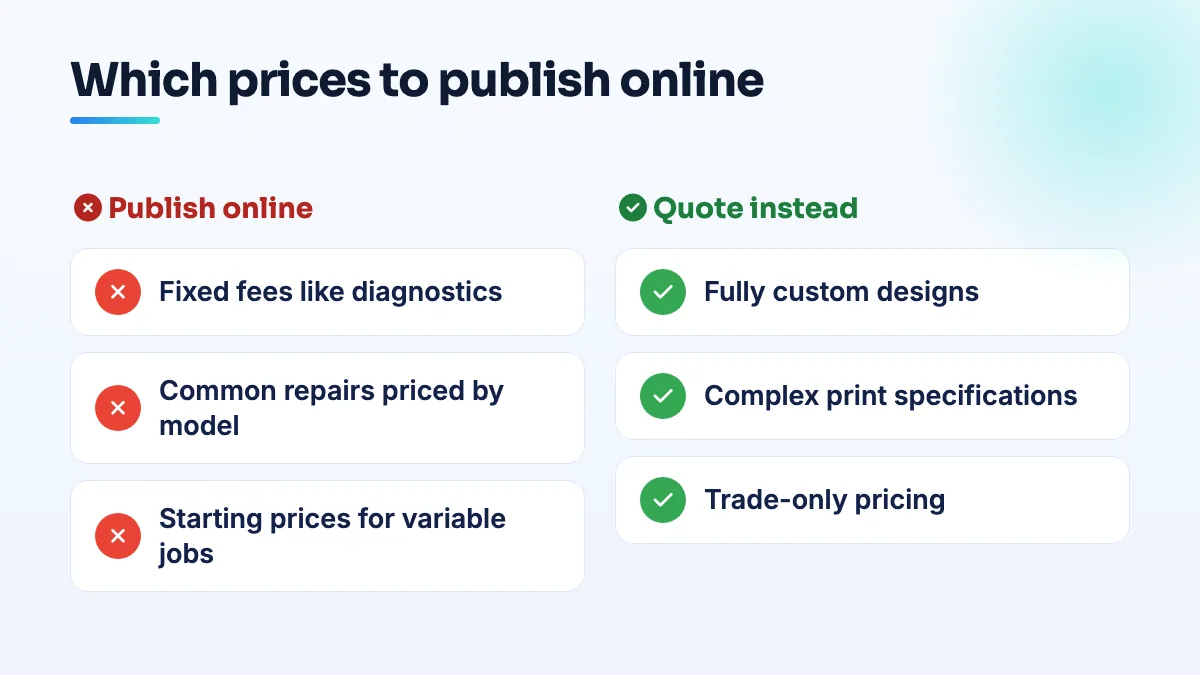
- Publish fixed-scope jobs as fixed prices. A diagnostic fee, an oil change, a screen replacement for a specific phone model, 500 standard business cards. If you'd quote the same number to everyone, put it on the page.
- Publish variable jobs as "from" prices with what changes them. "Brake pads from $X per axle; performance and European vehicles cost more." "Full wraps from $X for a small car; vans and trucks priced by size." The range sets expectations and filters out people who were never going to pay it.
- Publish custom work as a process, not a number. Explain what drives the price, show two or three past jobs with what they cost if the clients agree, and give a quote form that asks the right questions up front.
- Add a line that protects you. "Prices valid as of [month and year]. Final price confirmed after inspection." Update the date when you update the prices.
- Put the same prices on your Google Business Profile. Many owners don't know they can. A Help Community thread from a mobile store owner unaware that products and prices can be listed is typical. Keep the profile, the site and what you say on the phone identical.
When a quote tool beats a price list
Commercial printing is the clearest exception. In a Reddit discussion among commercial printers about publishing prices, shops described quoting as too complex to publish, and some build their own estimators instead of a price list. With stock, finishing and quantity all moving the number, I think that's the right call for a print shop. A calculator for your common products (cards, flyers, banners) gives the searcher a real number in seconds, and anything unusual goes to a quote form. The page still answers "how much", it just does the math for them.
Wraps sit in the middle. Full custom designs can't have a flat price, but a starting price by vehicle size can, and it keeps the buyer on the page long enough to ask. I go into that trade-off in detail in the post on vehicle wrap pricing.
What changes for repair shops and print shops
- Auto repair: publish the diagnostic fee and your labor rate, plus "from" prices for the common jobs. People are most nervous about the unknown, and a known diagnostic fee gets them through the door. It's where I start on any auto repair SEO site.
- Phone and computer repair: price by model. A table of screen, battery and charging-port prices for the models you see most matches exactly how people search, which is why it's the first page I build in computer repair SEO.
- Electronics repair: publish a bench or diagnostic fee and ranges by device type. Board-level work varies too much for fixed prices, but a range and a clear drop-off or mail-in process still answer the search.
- Printing: an estimator for standard products and a quote form for the rest. Keep trade-only pricing off the public site if you sell to other shops.
What I'd avoid
- Prices you won't honor. A low price to get the call, then a different number at the counter, earns you the reviews you'd expect.
- Out-of-date prices. Put a reminder in your calendar to check them every quarter.
- A price page nobody can find. Put the price on the service page itself, not buried in a PDF.
If your site can't show prices cleanly, that's usually a build problem, and it's something we fix when we design a small business website. Writing price pages that rank is part of our website copywriting.
People also ask
Which Google Business Profile categories require a visible address?
Some Google Business Profile categories won't run as a hidden-address service area. Local Search Forum practitioners have confirmed Mechanic and Swimming Pool Contractor, and owners in other categories report being told theirs needs a location customers can visit. If your primary category is one of them, you either show a real address customers can come to during your hours, or choose a different category that fits your work and allows a service area.
Read the full answer: Which Google Business Profile categories require a visible address? →
Why did Google change my business category or name without asking?
Google edits profiles on its own when its systems, or suggestions from the public, decide your details are wrong. It happens most to service-area businesses with hidden addresses: Joy Hawkins confirmed one wave of forced re-categorization hit only those listings. Put your category or name back with a single edit, then make your website, signs and other listings use the same words so the change doesn't return.
Read the full answer: Why did Google change my business category or name without asking? →
How can an independent repair shop compete with authorized repair chains on Google?
Don't fight chains on their terms. Chains like uBreakiFix have hundreds of stores and appear to keep ad exceptions independents don't get, but Google's local results lean heavily on distance. Win the map pack around your shop, the repairs the chain near you doesn't do, and price and device searches, with a complete profile, published prices, repair pages and reviews that name the repair.
Can phone and computer repair shops advertise on Google Ads?
Usually not. Google Ads restricts third-party phone repair and treats computer and electronics repair as third-party consumer technical support, so independent shops get rejected. Diamond Product Expert Rob Skelton's whole answer to one shop was "No. You cannot advertise." Shops were still being rejected in 2025. Stop resubmitting and move the budget to your Google Business Profile, repair pages, published prices and reviews.
Read the full answer: Can phone and computer repair shops advertise on Google Ads? →
Should a print shop build a web-to-print storefront?
Only if you already have repeat customers ordering fixed-spec products. A web-to-print storefront works best as a private portal where existing business clients reorder cards, forms and branded items at agreed prices. As a public shop it puts you up against online printers on price, adds a platform bill and brings file-prep disputes walk-in orders never had. Most commercial printers get more from strong product pages and a quote form that takes files.
Read the full answer: Should a print shop build a web-to-print storefront? →