

Repair customers search for exact things: "iPhone 13 screen repair", "do you fix Galaxy charging ports", "how much to replace a MacBook battery". The obvious answer is one page per device model, and that's where most repair websites go wrong. A hundred pages that differ only by the model name are thin, and Google treats that pattern as a problem, not an asset.
The repair website page structure I use works in layers instead: one hub per device family, one page per repair service within that family with every model's price in a table, and a separate model page only when there's something genuinely different to say. It answers the specific search without the duplicate pages.
Below is why the page-per-model approach backfires, the structure I'd build, the test I use before adding any model page, and what changes for electronics repair shops.
Why one page per phone model backfires
Google's own guidance on creating helpful, people-first content asks whether a site is producing lots of content mainly to attract search visits, and whether the content adds original information rather than rearranging what's already out there. Two hundred model pages with the same paragraph and a swapped model name fail both tests. Google's spam policies go further and treat many near-identical pages built to catch variations of a search as doorway pages.
The same thing is happening to city pages right now. Joy Hawkins opened a Local Search Forum thread asking whether the August 2026 spam update targeted service-area pages, and one member wrote that "most of my location pages fell out of the index." The reports were mixed, and nobody has proved the cause. But templated pages with one word swapped are the pattern, whether the word is a town or a phone.
There's a practical problem too. You can't keep 200 pages accurate. Prices change, parts go out of stock, new models launch every fall. A page that quotes last year's price does more harm than no page.
The repair website page structure by device model and service I recommend
Think of the site as three layers. Customers land on whichever layer matches their search and can always move up or down.
| Page type | What goes on it | Example |
|---|---|---|
| Device family hub | Every repair you do for that family, turnaround, warranty, links to each service page | iPhone repair |
| Repair service page | One repair for one family: a price table by model, parts options, how long it takes, warranty, your own photos, common questions | iPhone screen repair |
| Model page (only when earned) | One model where the parts, process or price really differ from the rest of the family | A model with a different screen type or a known recurring fault |
The service page does most of the work. Someone searching "iPhone 13 screen repair" finds a page about iPhone screen repair with an iPhone 13 row in the price table: the price, whether you use original or aftermarket screens, how long it takes and the warranty. That's the answer they wanted, on a page with enough substance to deserve ranking.
Build it step by step
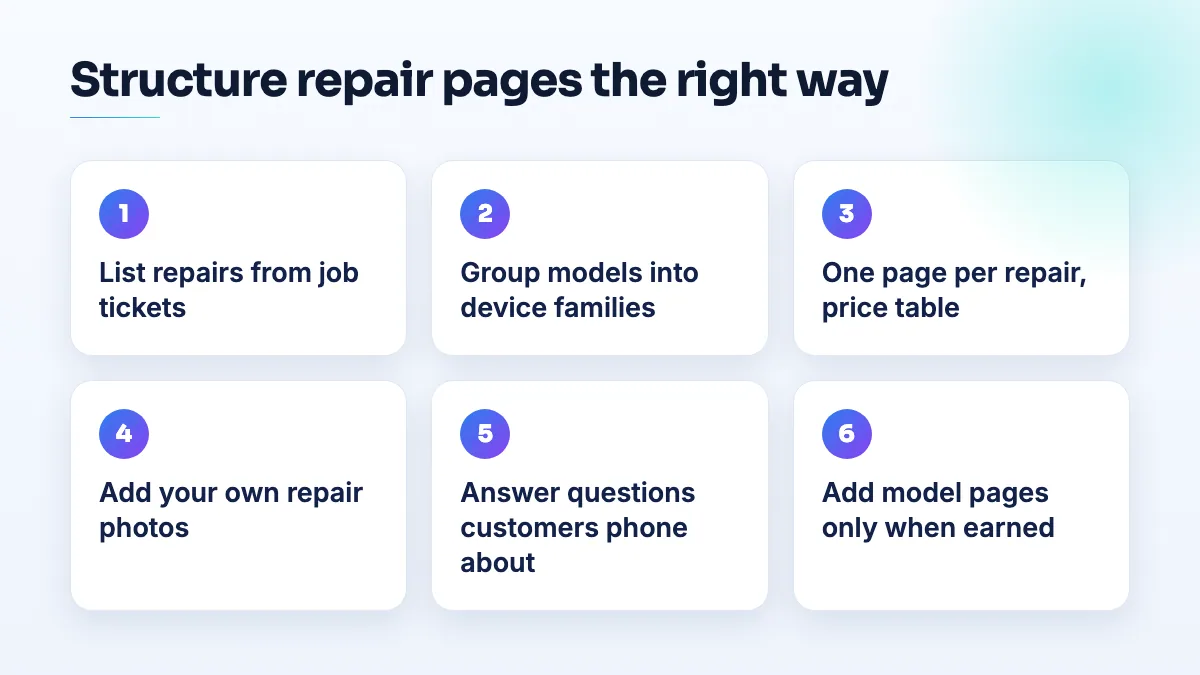
- List the repairs you actually do from your job tickets. Pull the last six to twelve months and count repairs by device and fault. That list, not a competitor's menu, decides which pages exist.
- Group the models into device families. iPhone, Galaxy, Pixel, iPad, MacBook, Windows laptops, consoles. Each family with steady work gets a hub page.
- Write one page per repair per family, with a price table. One row per model you fix, showing price, parts grade, turnaround and warranty. If you don't publish a price for a model, say "call for a quote" rather than leaving it out, so the model still appears.
- Add your own photos and explain how you do it. Photos of the actual repair on your bench, a short explanation of the process, what can go wrong and how you test the device afterwards. That's the first-hand detail a template can't copy.
- Answer the questions customers ask on the phone. Will I lose my data? Is Face ID affected? Do you need my passcode? Put the real answers on the service page.
- Add a model page only when it passes the test below. Link to it from that model's row in the price table, and link back up to the service page.
The test before you add a model page
I only add a separate model page when all of these are true:
- You've repaired that model and have your own photos of it.
- The parts, process or price genuinely differ from the rest of the family, enough to explain in your own words.
- Customers ask about it by name, on the phone or in person, often enough that you'd notice.
- You can keep it current. Someone will update the price when parts costs change.
If any of those is missing, the model stays as a row in the table. Most shops end up with a handful of model pages, not hundreds.
Prices, products and your Google profile
Price is often the actual search: "how much to fix" comes before "who fixes". I'd publish prices for your common repairs, and I explain the trade-offs of a price page for a local business in a separate answer.
Mirror the same structure on your Google Business Profile. List each repair as a service, and add products to your Google Business Profile for your most common repairs with prices. Plenty of owners don't know they can, as a Help Community thread from a mobile store owner asking about products shows, and products on the profile work like a repair catalog people see before they reach your site.
What's different for electronics repair shops
Phone shops can organize by model because there are only so many current phones. Electronics repair can't: TVs, amplifiers, consoles, drones and appliances come in thousands of models, and the customer often doesn't know theirs. Organize by device type and fault instead: "TV repair" as a hub, with pages for the faults you fix most, such as no power, no picture, or a broken HDMI port. Within each fault page, list the brands you regularly work on rather than every model.
Brand pages only make sense where you truly specialize, for example if you're the shop that fixes a particular console or a specific brand of audio gear. For board-level work, a page about the kind of repair you do, with photos of the board and the fault, is worth more than any list of model numbers.
What not to do
- Don't generate a page for every model automatically. That's the exact pattern Google's guidance warns about.
- Don't build a city by model matrix. "iPhone 14 screen repair" times twenty suburbs is two doorway problems at once.
- Don't create pages for models you've never repaired. You'll have no photos, no real process and no honest price.
- Don't split pages by color or storage size. The repair is the same, so the page should be too.
- Don't copy manufacturer specifications onto your pages. Customers want to know about the repair, not the device's camera.
- Don't lean on ads to fill the gap. If you've had screen repair ads rejected, you already know independent repair shops can't advertise these services on Google, which makes these pages even more important.
Getting it built
A repair site with this structure is less work to maintain and gives each page a real reason to rank. If you want help planning or writing it, our service page writing covers the service pages and price tables, and our website design team builds the structure so new models are a table row, not a new page. It's also a core part of our SEO for phone repair shops and electronics repair SEO work.
Written by Saifur Rifat, Founder & SEO Lead at SERP Squad.