


Key points
- One shop, stable range: add products on the profile
- Two or more stores: use Merchant Center
- Live stock needs Merchant Center and inventory data
- Pick one source per product, never both
- Repair shops list stock as products, repairs as services
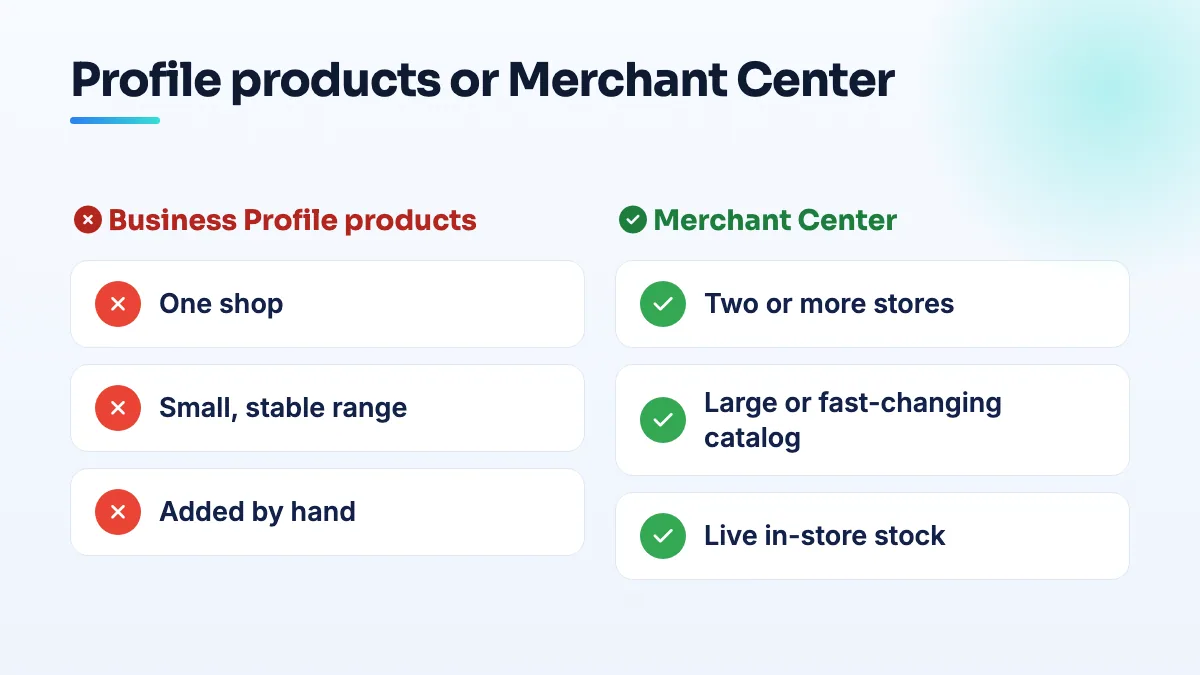
The choice between Google Business Profile products vs Merchant Center comes down to two things: how many stores you have and how fast your stock changes. One shop with a range that stays the same can add products straight to the profile in an afternoon. A second store, a big catalog, or a need to show what's on the shelf today all push you to Merchant Center.
What each option actually does
Business Profile products are a showcase. You add a photo, a name, a price or price range, a short description and a link, one product at a time, and they appear on your profile. There's no stock count and nothing to connect. It's the option most independent owners don't know exists: in a Help Community thread from a mobile phone store owner in Bangalore, the owner was asking whether products could be listed on the profile at all.
Merchant Center is a product feed. Your catalog comes in from your website, your point-of-sale system or a spreadsheet, and once it's linked to your profile it can power free local listings, which show shoppers what's in stock at your shop. Google's requirements for free local listings are a brick-and-mortar store in a supported country plus store, price and in-store inventory data. If your website can't carry that data, Google offers a hosted store page.
Google Business Profile products vs Merchant Center, by store count
| Your situation | What I'd use |
|---|---|
| One shop, up to a few dozen products, prices rarely change | Business Profile products |
| One shop with an online store already on Shopify or similar | Merchant Center, fed from the online store |
| One shop that wants to show live stock | Merchant Center with in-store inventory |
| Two or more shops | Merchant Center |
The multi-store line is the one people miss. In a Local Search Forum discussion on Merchant Center products vs GBP products, the point that came out was that once you're running several locations, linking Merchant Center becomes the route, not one option among two. Merchant Center Next covers chains under 50 locations, and larger chains need a local inventory feed. Adding the same products by hand to every profile also stops being realistic long before you get there.
How to set up the right one
- Count your stores and your products honestly. If it's one shop and a range you could type out in an afternoon, start with Business Profile products. Otherwise go to step 4.
- Add your best sellers to the profile first. Use your own photos, a real price, and a description that says what it is in the words customers use. Group them into categories so the profile reads like a shelf, not a pile.
- Keep them current. Put a monthly reminder in the calendar to remove anything you've stopped selling and fix prices that have moved. A product on your profile that you no longer stock is a wasted trip for a customer.
- If you need Merchant Center, link it with the profile's owner account. Merchant Center only finds profiles the signed-in account can manage. If it can't see yours, the fix for Merchant Center add store showing 0 stores is almost always about access.
- Don't run both for the same items. Pick one source for each product so prices can't disagree between two places.
What's different for phone and computer repair shops
Repair shops have more reason than most to use products, because they can't advertise the repairs themselves. Google Ads restricts third-party phone repair outright; a Google Ads Help Community thread on the phone repair ad restriction has 29 people marking the same question after a shop was told it can't advertise the service at all. Your profile isn't an ad, so it's where your stock has to do the selling.
My advice: list the things you sell as products, such as refurbished phones, laptops, cases, chargers and screen protectors, with the grade and warranty in the description. Put the repairs themselves, like screen and battery replacement, in the profile's services, where customers expect to see them. If you sell refurbished stock across several branches, that's a Merchant Center job, because the phone in the window at one shop isn't in the other.
What's different for boutiques and general retail
For a boutique, stock turns over by season and many pieces are one-offs, so hand-added products go stale quickly. I'd use Business Profile products for the lines you always carry and let the profile's photos show the new arrivals. Once you want shoppers to see which sizes are on the rail today, you need Merchant Center and in-store inventory, and I explain how that works in local product listings for a small shop.
General retail with a stable range, like a hardware, gift or garden shop, gets the most out of hand-added products, because the range doesn't move much. If products you add get stuck or vanish, read my notes on Google Business Profile products pending before you add them again.
We set these up as part of retail SEO, phone repair SEO and Google Business Profile optimization work.
People also ask
Can you remove reviews left under a business's previous owner?
Usually not. Google treats reviews as a record of customers' experiences at the business, so reviews describing a previous owner's staff, prices or policies normally stay after a sale, and flagging them one by one as off topic rarely works. Report only the reviews that break a specific policy. Answer the rest publicly with a short, dated note that ownership changed, and outnumber them with new reviews from current customers.
Read the full answer: Can you remove reviews left under a business's previous owner? →
Are local inventory ads worth it for a single-location store?
Only after free local listings are running cleanly and your stock data is accurate every day. Local inventory ads use the same store, price and in-store inventory feeds as the free listings, plus an ad budget, so they can't fix a broken setup. For one store with searchable, higher-margin products, a short test with a fixed budget will tell you whether they pay.
Read the full answer: Are local inventory ads worth it for a single-location store? →
How do you claim a Google listing that has no claim button?
Start from Business Profile Manager instead of the listing. Add a business, pick your existing listing from the suggestions, and Google will either let you verify it or route you to its ownership request, which emails the current owner. If neither appears, check every Google account you've used, then post the Maps link in the Help Community so a Product Expert can look.
Read the full answer: How do you claim a Google listing that has no claim button? →
Why are my customers' Google reviews not showing up?
Usually because Google is holding the review back, not because it was never written. A filtered review stays visible to the person who wrote it, so their screenshot doesn't prove it's public. New or empty accounts, sudden bursts of reviews and anything rewarded are the usual triggers. If nobody at all can leave a review, check your profile for a suspension, a verification request or a ratings restriction.
Read the full answer: Why are my customers' Google reviews not showing up? →
When does a department or second entrance get its own Google Business Profile?
Only when customers deal with it as its own place. A department that has its own entrance or counter, its own phone line, its own hours and a category different from the main business can have its own listing, named as the business plus the department. A second door, a delivery gate or an internal team can't, and listing them causes duplicate flags.