


Key points
- Customers must deal with the department directly
- It needs its own phone, hours and category
- Name it as business name plus department
- A second entrance is not a second business
- Add one department listing at a time
A department gets its own listing when customers deal with it as its own place: its own entrance or counter, its own phone, its own hours and a different category from the main business. Under the department Google Business Profile rules, an internal function, a second door to the same business or a delivery gate doesn't qualify, and creating listings for them is how you end up with duplicate flags.
Dealerships, retailers with units in airports or inside other stores, and trucking companies with a separate yard entrance all ask versions of this. The test is the same for all of them, so I'll give it once and then go through what's different for each.
What the department Google Business Profile rules say
Google's guidelines for representing your business allow public-facing departments to have their own listings when they operate as distinct entities. In practice that means the department's name has to be different from the main business and from the other departments, it normally has its own customer entrance or service point, and it fits a category of its own. A car dealership's service department and a store's pharmacy counter are the classic examples.
What the rules don't allow is a listing for every service, every door or every team. A body shop you run from the same bay and front desk as the service department is a service, not a department. A side entrance is still the same business.
How I decide whether a department gets a listing
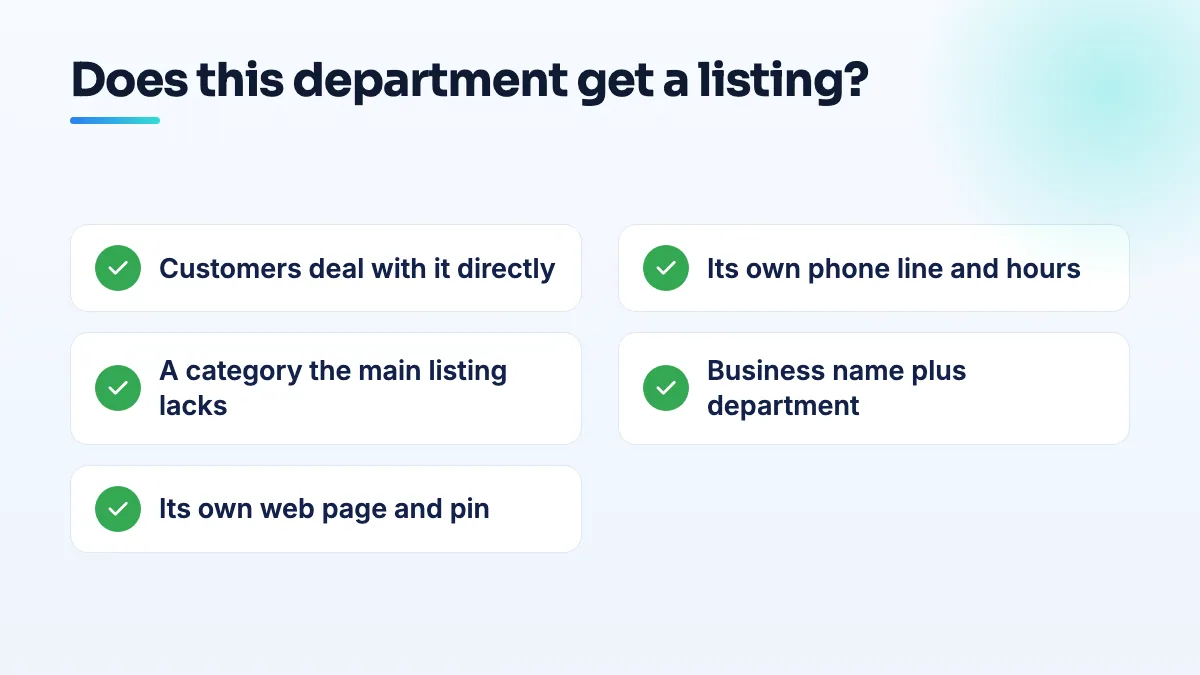
- Ask whether customers deal with it directly. They walk up to its own counter or entrance, call its own number, or book with it by name. If they always go through the main reception, stop here: it's not a department listing.
- Check it has its own phone line and hours. A line answered by that department, not the switchboard, and hours that really differ from the main business, such as a service department that opens at 7:00 while sales opens at 9:00.
- Pick a primary category the main listing doesn't use. If the only category that fits is the main business's category, Google will read the two listings as one business twice.
- Name it with the business name plus the department. "[Business] Service Center" or "[Business] Parts", exactly as your signage and website say. No town names or service lists added.
- Give it its own web page and pin. Link the listing to that department's page on your site, and place the pin on its entrance where it has one.
- Create one department at a time. Get each one verified and live before adding the next, and keep all of them in the same account as the main listing.
Dealerships and service departments
This is where most department listings go wrong. Owners on the Local Search Forum describe department listings being marked as duplicates of the main dealer profile, and others ask whether a separate service profile is a compliant setup or a guideline violation. My answer is that sales and service usually pass the test, because they have separate entrances, phones, hours and categories. Parts sometimes passes if it has its own counter and line. A finance office or a detailing bay almost never does.
The duplicate flags usually come from shared details: the same phone, the same homepage link, or overlapping categories. Fix those before asking for a review. The service department can also end up showing when people search the dealership's own name, which is a separate problem on Google's side. It's one of the first checks in any auto repair SEO audit we do for dealer groups.
Retail concessions and airport units
A retailer with units in several airports asked on the Local Search Forum how to list retail units in airports across the United States. Each airport unit is a separate location, not a department: it has its own address inside the terminal, its own staff and its own hours, so each gets its own listing under the same brand name.
A concession inside someone else's store is harder. If you have your own staff, your own till and your own counter that customers can find, a listing can work. If the host store's staff sell your products at their checkout, you're a product line in their store, and a listing at that address will struggle to verify. The retail store SEO work I'd do there is on the host's listing and your own website instead.
Trucking yards and second entrances
A transport business described in a Help Community thread about a site with a separate trucking entrance how its goods entrance is somewhere other than the main entrance, and there's no way to show that on one listing. That's the honest answer: a listing has one address and one pin. You can't add a second gate.
So put the pin on the entrance your customers use, whether that's the office or the gate drivers need. Then describe the other entrance in the business description, show it in photos and give written directions on your website. Only create a separate terminal listing if that terminal has its own staff, phone and hours that customers deal with directly. That comes up most in trucking SEO for companies with several yards.
If a department listing is flagged anyway
Don't create it again. Check it against the six steps, fix whatever it shares with the main listing, and post in the Help Community with photos of the department's entrance and signage, its phone number and its web page. If Google has already merged or duplicated the records, the order of work in my guide on how to merge Google Business Profiles safely applies. Hospitals face the same questions at a bigger scale, which I cover in the post on a hospital department Google Business Profile. And if you'd like a second opinion before you create anything, it's part of our Google Business Profile management.
People also ask
Which Google Business Profile categories require a visible address?
Some Google Business Profile categories won't run as a hidden-address service area. Local Search Forum practitioners have confirmed Mechanic and Swimming Pool Contractor, and owners in other categories report being told theirs needs a location customers can visit. If your primary category is one of them, you either show a real address customers can come to during your hours, or choose a different category that fits your work and allows a service area.
Read the full answer: Which Google Business Profile categories require a visible address? →
Why doesn't my business show up when people search its exact name?
Usually because Google either can't tie your profile to your business as a clear entity, or it has confused you with another business with a similar name and sometimes merged the two. Open your profile's share link on a signed-out phone: if it opens your profile, strengthen your name, phone and website signals; if it opens another business, it's a data problem to escalate with proof.
Read the full answer: Why doesn't my business show up when people search its exact name? →
Why does a dealership's service department show for the brand search?
It's a recurring Google-side problem: two listings carry the dealership's name, and Google sometimes picks the service department for the knowledge panel. You can't switch it off, but distinct names, categories, links and phone numbers on each listing, a stronger main listing and a well-documented report make it much less likely to happen and easier to get fixed.
Read the full answer: Why does a dealership's service department show for the brand search? →
Should you use Google Business Profile products or Merchant Center?
One shop with a small range that rarely changes can add products straight to its Google Business Profile, for free and without any feed. Use Merchant Center once you have a second store, a large catalog or an online store already, or when you want shoppers to see what's in stock today. Multi-location shops are effectively pushed to Merchant Center.
Read the full answer: Should you use Google Business Profile products or Merchant Center? →
Why did Google change my business category or name without asking?
Google edits profiles on its own when its systems, or suggestions from the public, decide your details are wrong. It happens most to service-area businesses with hidden addresses: Joy Hawkins confirmed one wave of forced re-categorization hit only those listings. Put your category or name back with a single edit, then make your website, signs and other listings use the same words so the change doesn't return.
Read the full answer: Why did Google change my business category or name without asking? →