

A second copy of your business is sitting on Google Maps, and it's either splitting your reviews, showing you as permanently closed, or ranking in places your real profile should. A duplicate Google Business Profile gets fixed by finding every copy, deciding which one survives, and then removing or merging the others in a set order and at a quiet time of year, because a merge done carelessly can cost you more than the duplicate did.
Roofers, flooring stores, HVAC companies, dentists, limo operators and movers all show up in the Google Business Profile Help Community with this problem. Some duplicates were created by Google, some by a former employee or agency, and a surprising number by the owner's own re-verification.
Here is how I handle them, including the cases where I'd leave a duplicate alone for a few months rather than touch it.
Why duplicate listings hurt more than they look
Most owners assume a duplicate with no reviews is harmless. It isn't. A flooring store in New York documented a case in a Help Community thread about a zero-review duplicate outranking the verified profile: an automatically generated copy with no reviews was beating the verified profile, which had 178 reviews, across the owner's grid scans. Google had two records for one business and was rewarding the wrong one in parts of town.
The other damage is what customers see. A roofer working as a service-area business described in a thread about a roofing duplicate showing permanently closed how one copy was shown to searchers as permanently closed, and the duplicates couldn't be merged. A homeowner who lands on that copy doesn't ring the other one. They ring your competitor.
Then there are reviews. Two profiles means two review counts, and neither looks as strong as the total. Which copy customers leave reviews on is out of your control while both exist.
Where duplicate listings come from
Knowing the source tells you how to fix it and how to stop it happening again.
- Google created it. Google builds listings on its own from directories, old websites and user edits. The flooring store's duplicate was one of these.
- Re-verification created it. An HVAC company in Texas described in a thread about re-verification creating a second HVAC listing how a routine re-verification quietly produced a second listing and every review disappeared from view. When Google asks you to verify again, you verify the profile you already have. You don't create one.
- A practitioner listing at the practice address. Dentists see this constantly. A Help Community thread about a dentist's name listed at the practice address is the typical case: a listing in the dentist's own name sitting on top of the practice. That may be a legitimate practitioner listing, not a duplicate, so check before you ask Google to remove it.
- Someone else made it. A former manager, an agency, a booking platform or a previous owner. These are often verified in an account you don't control, which changes the fix.
- A move or rebrand. The old listing at the old address or under the old name lives on next to the new one.
How to fix a duplicate Google Business Profile, step by step
Do these in order. Skipping to the merge request is where most of the horror stories in the forums start.
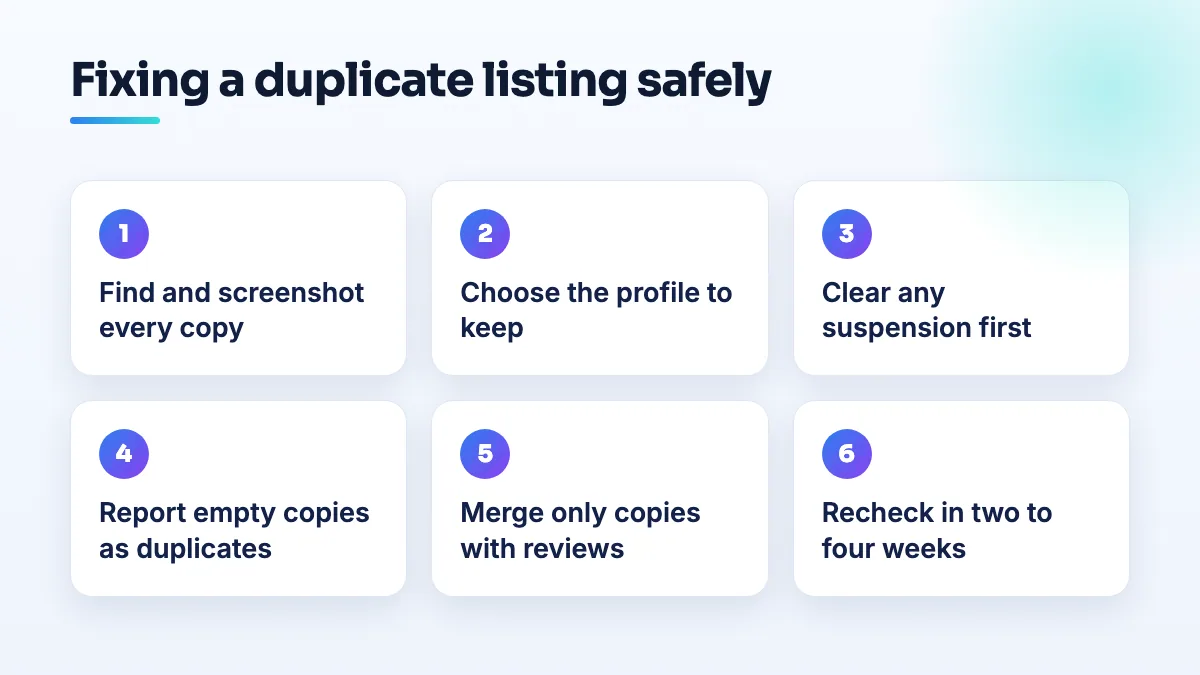
- Find every copy before you touch anything. Search Google Maps for your business name, your phone number, your old name and your street address, both logged in and in a private window. Save the Maps link of each copy and screenshot its name, address, category, review count and status, with the date. This is also your record of review counts if anything goes wrong later.
- Check which copies you already control. Open your Business Profile account and list every profile in it, including any in other Google accounts your business uses. A duplicate that's already in your account is the easiest one to deal with.
- Choose the survivor. Keep the verified profile at your real address with the most reviews, under your real business name. If the copy with more reviews is the one you don't control, don't create anything new. Get access to it first by requesting ownership from Google.
- Clear up any suspension first. If either copy is suspended, don't file a merge yet. A chauffeur business on a Local Search Forum thread on merging when one profile is suspended found the merge was blocked because one of the profiles was suspended. Get the suspension resolved, then merge.
- Remove the copies with nothing on them. For a duplicate with no reviews that you don't control, open it on Google Maps, suggest an edit and report it as a duplicate of your real profile (or as closed, if that's what it is). For a copy with no reviews inside your own account, remove it from the account after checking it isn't carrying anything you need.
- Ask for a merge only when the duplicate has reviews worth keeping. Contact Business Profile support from the profile you're keeping, give the Maps links of both copies, say which one to keep and ask for the reviews to be moved to it. Merges work best when the name and address match. A chiropractor who bought a clinic learned in a thread about merging reviews across two clinic addresses that reviews couldn't be combined across different addresses.
- Check again in two to four weeks. Search the name, phone and address again, compare review counts with your screenshots, and run the same grid scan you ran before. If the duplicate is back, add the new evidence to your existing support case or Help Community post instead of starting over.
When a merge request goes wrong
A merge is a change to Google's records, and like any change it can trigger a review of the whole profile. That's the part owners don't expect.
A moving company in a Help Community thread about a merge that killed a mover's peak season asked for a routine merge and lost its visibility for "movers near me" right in its busiest months. A flooring store in a thread about a flooring store stuck in a merge conflict had its profile disabled partway through a support case, with 71 reviews missing while it waited for what support called an engineering team to sort out the conflict between the two records.
Neither owner did anything wrong. They just picked a bad moment, or had a messy record behind the scenes. So my rules for merges are simple:
- Never merge in your peak season. For movers that's summer, for roofers it's the weeks after storm season starts, for HVAC it's the first heatwave and the first cold snap. A duplicate that's been there for a year can wait three more months.
- Don't combine a merge with other edits. No name change, no new category, no address change in the same month. If something breaks, you want to know what caused it.
- Keep your own record of reviews first. Screenshot the review count and your best reviews on both copies. If reviews go missing during the merge, you'll need to show support what was there.
- Make one request and wait. Filing the same merge through several channels creates several cases that can contradict each other.
What's different by industry
Roofing and other service-area businesses. With the address hidden, Google has less to match the two copies on, which is why the roofer's duplicates wouldn't merge. Make sure the phone number, website and business name are identical to the survivor, and focus on getting the closed copy removed rather than merged if it has no reviews. I check this early in any roofing SEO project because storm season is exactly when you can't afford a closed listing in the results.
Flooring stores with a showroom. A storefront has a fixed address, so Google tends to create duplicates from old directory data and past addresses. Before asking for anything, run a grid scan so you know which copy is ranking where. In flooring SEO work, that scan is what tells you whether the duplicate is actually taking calls.
HVAC. The risk is re-verification. When Google asks you to verify again, do it from the existing profile and don't create a new one if the process looks stuck. Wait, or post in the Help Community.
Dental. Separate a real duplicate of the practice from a dentist's own practitioner listing. A departed dentist's listing should be marked as moved, not merged into the practice, and a current dentist's listing is allowed to exist.
Limo and chauffeur services. Transport categories get extra scrutiny, and duplicates are one of the triggers for suspension. Sort out any suspension first, then deal with the duplicate.
Moving companies. Plan merges for winter. The peak-season case above is the clearest warning in the whole set, and SEO for moving companies depends on those summer months more than almost any other trade.
What not to do
- Don't create a new profile to replace a broken one. That makes three listings, not one, and the new one starts with no reviews.
- Don't claim a duplicate and rename it into something else. A listing that changes identity is exactly what Google's checks look for.
- Don't report your own duplicate as spam or fake. It's a duplicate. Report it as one.
- Don't delete the copy with the reviews. Even if it's the one with the wrong details, fix its details or merge it. Reviews on a removed listing are usually gone for good.
- Don't ignore the directories. If Yelp, Bing and old data suppliers still list the old name or address, Google can rebuild the duplicate from them. Directory citation cleanup is what stops it coming back.
Questions people ask
Will my reviews move to the profile I keep?
Usually, when the two copies share a name and address and support processes the merge. Across different addresses, owners report that Google won't combine them. The same applies after a sale; I cover that in the guide for a new owner taking over a Google Business Profile.
The duplicate is an old business at my address, not me. Is that the same fix?
No. That's a different business that needs to be marked closed or moved, not merged into yours. Follow the steps to remove an old business listing from your address instead.
How do I know which copy is ranking?
Search from different parts of your area, or use a geo-grid rank tracker. That's how the flooring store spotted its zero-review copy winning. Run it before and after the fix so you can see the result.
Where to start
Find every copy and take your screenshots today. Decide the survivor this week. Put the merge on your calendar for your quiet season. If you'd rather hand it over, duplicate cleanup is part of our Google Business Profile management, and we always start by making sure the profile we keep is clean before we ask Google to change anything.
Written by Saifur Rifat, Founder & SEO Lead at SERP Squad.