

You bought a business, and the Google listing with all its reviews still sits in the seller's account. Don't create a new profile. Transfer the Google Business Profile to the new owner, ideally as part of closing, and only change the name once the listing is in your hands.
New owners of barbershops, nail salons, flooring companies, chiropractic clinics and dental practices all post the same story in the Google Business Profile Help Community. Most of the damage comes from one move made in the first week: starting a fresh listing instead of taking over the old one.
Here's why that goes wrong, the transfer steps when the seller helps and when they don't, and how to rename without losing what you paid for.
Why a new profile after a purchase is the expensive mistake
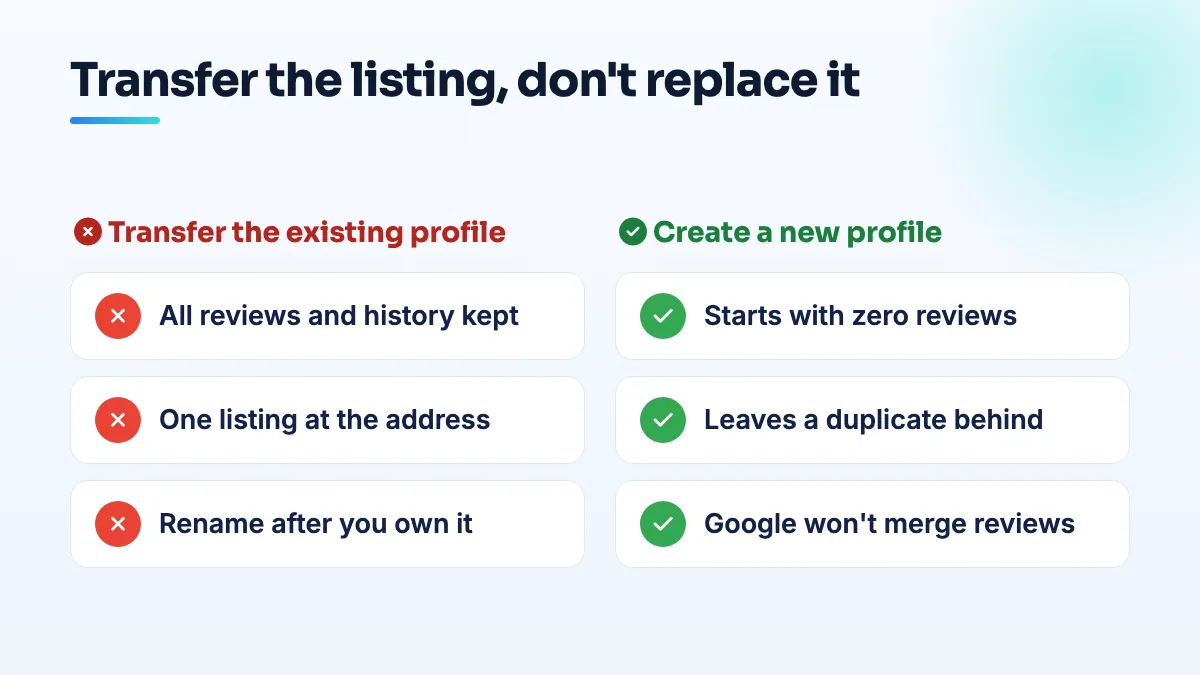
The reviews, photos and ranking history belong to the existing listing, not to the business name or the paperwork. When you start a new profile, you start from nothing, and the old one doesn't go away.
A barbershop buyer in a Help Community thread about two verified profiles at one address ended up with two verified listings for the same shop: the old one with 95 reviews and the new one with 3. Google wouldn't merge the reviews. A nail salon buyer in a thread from a new salon owner who wanted to start clean wanted to delete the old profile and begin again, which is the one move that throws the whole review history away for good.
Health practices get a sharper version. In a thread from a buyer of a chiropractic clinic, the reviews couldn't be merged across addresses once the clinic had moved. And in a thread about reviews vanishing after a dental practice acquisition, genuine patient reviews started disappearing after the sale, somewhere between 15 and 25 of them, with the count moving from 51 to 57 to 54 within days.
My advice is simple: the listing is an asset of the business, so treat it like the lease or the phone number. It changes hands. It doesn't get replaced.
How to transfer a Google Business Profile to the new owner
This is the order I'd follow when the seller is cooperating, which is most sales.
- Write the profile into the purchase agreement. The seller agrees to make your account an owner, transfer primary ownership to it at closing, and hand over every other login that touches the listing: the website domain, the booking platform, Facebook and Yelp. Buyers who skip this spend months chasing a seller who has moved on.
- Create a business Google account for the listing. Use an address on your business domain, not your personal Gmail, so the listing isn't tied to one person again.
- Have the seller add that account as an owner before closing. Then they transfer primary ownership to it. Don't let the seller remove themselves until you can see yourself as primary owner in your own dashboard.
- Check who else has access. Old staff, a booth renter, the seller's marketing agency. Remove anyone you don't recognize and add your own team as managers.
- Update only what has actually changed, and slowly. A new phone number or new hours are fine. Leave the name, address and primary category alone for now. Several edits at once on a listing that has just changed owners is exactly the kind of activity that triggers a review.
- Save a record of the reviews on day one. Screenshot the count and export or copy the reviews. If any disappear later, you'll know exactly what went and when.
When the seller won't or can't hand it over
Sellers retire, move abroad, or simply stop answering once they're paid. You can still get the listing through Google's ownership request process. Google's help page says the current owner is emailed and has 3 days to respond; the widely repeated "7 days" is out of date.
- Request ownership from your new business account. Search for the business on Google Maps, open the listing and follow the claim or request option. Use the name exactly as it currently appears on the listing.
- Have your proof ready. The bill of sale, the business registration or license transfer in your name, and a utility bill or lease at the address. If Google asks you to verify, the video should show the premises, the signage and you opening up with your own key.
- If the request is denied or ignored, follow the options on the request status. Keep screenshots with dates. If it stalls, post in the Help Community with the dates, the request status and your ownership documents so a Product Expert can see the facts at a glance.
One warning from the forum: a flooring company that was bought and renamed in a thread from an acquired flooring company that couldn't take ownership then struggled to get ownership of its own listing. Get the ownership first and rename second. A listing that already carries a new name, with a claim coming from a stranger's account, is harder for anyone to match to the business.
Changing the name after you take over
If you're keeping the old name, don't touch it. If you're rebranding, change the name on the profile only after the new name is on your signage, your website and your business registration, because Google checks the profile against all three. Expect a name change to trigger a review or re-verification, and make it on its own, not in the same session as an address or category change. I cover the full sequence in the guide to rebrand your Google Business Profile without losing it.
If you've already created a second profile
You're in the same spot as the barbershop buyer with 95 reviews on one listing and 3 on the other. Google won't combine them, so decide which one survives, and it should almost always be the one with the history.
- Get ownership of the old listing first, using the steps above.
- Move your current details onto it (phone, hours, website) one change at a time.
- Then deal with the new, near-empty profile. Remove it from your account or report it as a duplicate so customers don't see two versions of you. The details of which option to use are in my guide to fixing a duplicate Google Business Profile.
What happens to the old reviews, good and bad
They stay. Every five-star review the old owner earned comes with the listing, and so does every complaint about staff who have since left. Google reads reviews as a record of the place, so reviews that describe the previous owner rarely come down just because the business changed hands. My guide on whether you can remove reviews from the previous owner covers what's worth reporting and how to reply to the rest.
If reviews start vanishing after the sale, as they did for the dental practice, don't panic-request a flood of new ones to replace them. Keep your day-one record, note the dates of each drop and ask for reviews at the same steady pace the business always has.
What's different for salons, trades and health practices
Barbershops and nail salons usually come with booth renters and a booking platform already attached. Change the booking link on the profile to your own account, and make sure no renter has a listing sitting on your address. In barber shop SEO work this is the first thing I check after a sale.
Flooring companies and other trades are often bought for their name and reputation, then renamed or merged into the buyer's existing company. If you already own a flooring business with its own profile, you now have two listings to plan: keep both only if both locations are genuinely staffed and open to customers. That's a common conversation in flooring SEO after an acquisition.
Dental and chiropractic practices have practitioner listings as well as the practice listing. Agree with the selling dentist or chiropractor what happens to their personal listing before closing. If you're moving the practice, update the address on the existing profile rather than creating a new one at the new address, because reviews don't transfer between listings. I plan this before closing on every dental SEO takeover.
What not to do
- Don't delete the old profile to start clean. Deleted review history doesn't come back.
- Don't create a new listing at the same address "for now". It becomes the duplicate you'll spend months untangling.
- Don't rename the listing before you own it.
- Don't change name, address and category in one sitting.
- Don't ask customers to re-post old reviews on a new listing. It looks like review gating or manipulation, and it rarely works.
Get the transfer done before closing
The cleanest takeovers I see are the ones where the listing was on the closing checklist next to the keys. If you're mid-purchase or already stuck with two listings, sorting it out is part of our Google Business Profile management.
Written by Saifur Rifat, Founder & SEO Lead at SERP Squad.