


Key points
- Give each business its own suite number
- Separate signs, phone numbers and websites
- Same address plus same category invites suspension
- A new service is not a second business
- Edit and verify one profile at a time
Owners usually ask this after a suspension, when they find out another company has been listed at their street address all along. Two businesses at the same address on Google Business Profile is allowed, but only when Google can see they're separate: different suite numbers, their own signs, their own staff, phones and websites. Share the address, skip the suite number and pick the same category, and one listing starts to look like a duplicate or a fake.
Why two businesses at the same address get suspended
The clearest example I've read is a Help Community thread from a limo company suspended for months. The firm was licensed, had a staffed office, and was still suspended for "deceptive content." Product Expert Amy Toman looked it up and found another limo company listed at the same street address, with no suite number. Her explanation:
"Google doesn't usually approve of two businesses sharing an address, unless they have separate suite / office designations."
She added that it doesn't work when both use the same address, no office number and the same category. The owner hadn't done anything wrong at their own office. The problem was the other listing next to it. The thread was still unresolved months later.
From Google's side, two listings with one address and one category look like one business listed twice, or like the lead-generation listings that crowd transport and trades searches. Google's guidelines for shared and co-working spaces set the bar for telling them apart: clear signage, customers received there during business hours, and staff from that business on site.
How to set up two businesses at the same address on Google Business Profile
If both businesses are real and separate, this is the setup I use so neither trips a flag.
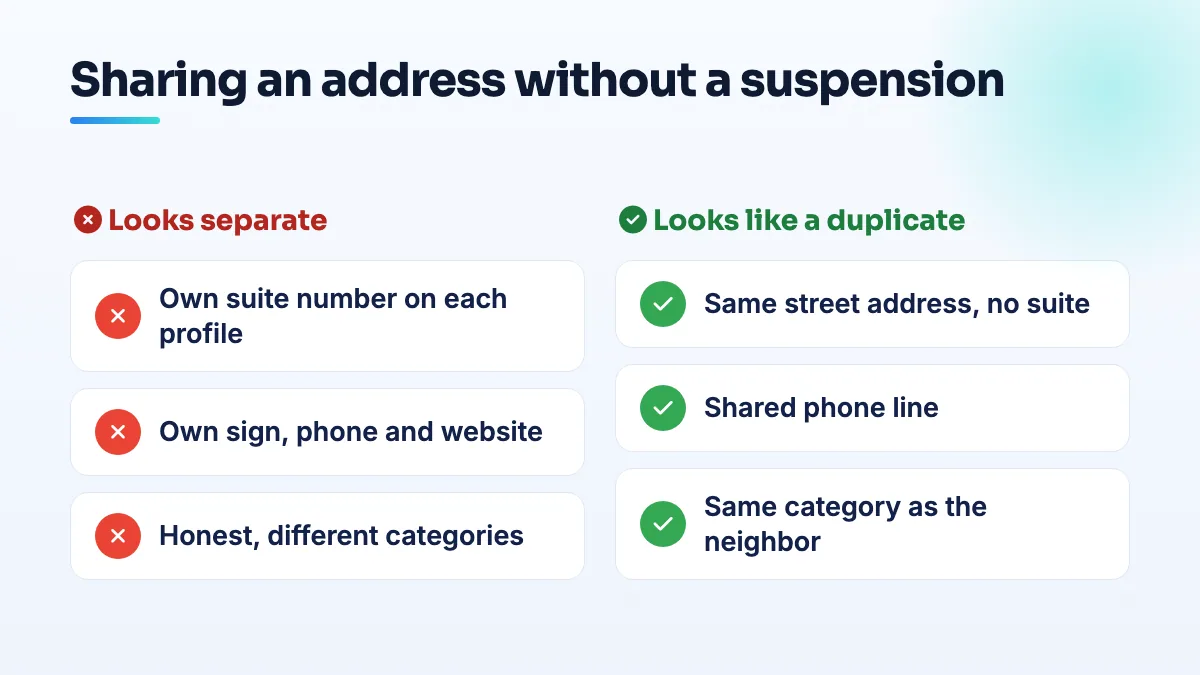
- Give each business its own suite or unit number. If the building doesn't have them, ask the landlord to assign one to each space and write it into each lease. Make sure mail addressed to the suite number actually arrives, because that's what utility bills and registration documents will show.
- Put the suite number on each profile, the same way everywhere. Second address line, identical on the website, directories and invoices. "Suite 2" on Google and "Unit B" on your website reads as two different places.
- Give each business its own permanent sign. On its own door or entrance, not a shared panel that could belong to either.
- Use separate phone numbers and websites. A shared phone line is one of the fastest ways for two listings to look like one business.
- Choose primary categories that honestly describe each business. If both really are in the same category, the suite numbers, signs and phones have to carry more of the weight, so get them all right before either profile goes live.
- Verify and edit one profile at a time. Don't change both listings on the same day. If one is under review, leave the other alone until it clears.
When the second business isn't really a second business
A lot of "second businesses" are a new service inside the first one. That's where I see the most risk.
- A new service in an existing clinic. In a Help Community thread about adding an occupational-health franchise inside a clinic, the owner asked how to list the new business at an address that already had a health listing, because it risked a duplicate flag. My rule of thumb: if the new brand has its own space, sign, staff and phone, it can have its own listing with its own suite. If your existing team delivers it in the same rooms, it's a service on your existing profile, not a new listing. For anyone doing chiropractor SEO, that usually means massage, decompression or rehab go on the chiropractic profile as services.
- Two businesses behind one door. A nail tech and a lash artist sharing one room, or a massage therapist inside a wellness collective, can't both have a separate suite. The Product Expert in a Help Community thread about a leased salon suite set the bar at a dedicated space with permanent signage. I go through the options for renters in the answer on a booth renter Google Business Profile.
- Two transport companies sharing a yard or dispatch office. Common in limo company SEO, and exactly the limo case above. Separate offices with numbers, separate signs and separate phones, or only one of you lists that address.
If you're already suspended because of a shared address
- Search your street address on Google Maps. List every business showing there, with categories and phone numbers. Screenshot it.
- If the other listing is actually your business listed twice, that's a duplicate, not a neighbor. Fix it with the steps in my guide to how you remove a duplicate Google Maps listing.
- If it's a genuine neighbor, sort out the suite number with your landlord before you appeal, so your evidence shows it: the lease with the suite, a utility bill addressed to it, and photos of your sign on your door.
- Post the facts in the Help Community. Say plainly that another business shares the address, give both suite numbers, and include your case ID. That's how the limo case got diagnosed in the first place.
If you'd rather have someone untangle it, it's routine work in our Google Business Profile management.
People also ask
Can a booth renter get their own Google Business Profile?
Usually not at the salon's address. Google only lets a business in a shared space list that address if it has its own dedicated space with permanent signage, where customers deal with its own staff during business hours. An open-floor chair doesn't pass that test. A private suite with your name on the door can, and a renter who also travels to clients can list as a service-area business with the home address hidden.
Read the full answer: Can a booth renter get their own Google Business Profile? →
Can you appeal a Google review decision more than once?
No. You get one appeal on each review Google decides not to remove, and once the appeal is denied, that decision is final for that review. Wait for the first decision before appealing, and only appeal with new evidence tied to a specific policy clause. After that, your options are a calm public reply, reporting new reviews from the same accounts, and outnumbering the review with genuine ones.
Read the full answer: Can you appeal a Google review decision more than once? →
Why are my customers' Google reviews not showing up?
Usually because Google is holding the review back, not because it was never written. A filtered review stays visible to the person who wrote it, so their screenshot doesn't prove it's public. New or empty accounts, sudden bursts of reviews and anything rewarded are the usual triggers. If nobody at all can leave a review, check your profile for a suspension, a verification request or a ratings restriction.
Read the full answer: Why are my customers' Google reviews not showing up? →
Can editing my Google Business Profile get it suspended?
Yes. Changes to your name, address, primary category, service area and even opening hours can send a profile back through Google's review, and real businesses have been suspended within minutes of making them. Photos, posts and review replies are rarely a problem. Before a risky edit, make sure your website and directories already show the change, make one planned change per session, and never edit while verification or an appeal is pending.
Read the full answer: Can editing my Google Business Profile get it suspended? →
Why did Google flag my massage business posts as sexually explicit?
Google's automated filters check the images and words in your posts, and on massage profiles they can misread ordinary treatment photos as adult content and switch off Posts. It's a machine decision about content, not a finding against your business. Remove bare-skin images and ambiguous wording, make the profile read as a licensed clinic, then ask support to review it and escalate in the Help Community.
Read the full answer: Why did Google flag my massage business posts as sexually explicit? →