

You joined a new brokerage, updated your Google profile the same afternoon, and a few days later it was suspended. When a realtor changed brokerage and Google suspended the profile, the cause is almost always the same: the name, website, address and photos all changed at once, and to Google that looks like a different business taking over yours.
This is the most common realtor complaint I found in the Google Business Profile Help Community, and it's avoidable. Change the outside world first, then change the profile one piece at a time, in the order below. If you're already suspended, skip to the section on appeals.
Why a realtor who changed brokerage gets suspended by Google
The post that sums it up is a Help Community thread from an agent suspended after switching brokerage: "My account was suspended due to change in brokerage. I am a Realtor and independent contractor." It's far from alone. Realtor profiles that get suspended again and again, even after passing verification, show up in more threads than any other real estate problem, such as a thread from a realtor repeatedly suspended after verifying.
Here's what Google sees when you move. A profile that has carried one brokerage's name, website and office for years suddenly shows a different company on every field, often within the same hour. That's the pattern of a hijacked or sold listing. Owners in other trades describe the same thing. A doctor who moved practices and updated the address, phone and website together was suspended for "deceptive practices" and had the appeal rejected. A computer repair owner who moved cities worked out the cause himself in a Help Community thread about a suspension after relocating: "an older listing that suddenly moves to a bigger city with mismatched paperwork looks like a hijacked listing."
Agents have two extra risks. Your license, your brokerage's roster and your agent page usually lag behind your move, so the paperwork Google can check still points to the old office. And many agent profiles carry the brokerage in the title, which means the name has to change too.
Set the profile up so a move changes almost nothing
The cleanest fix is structural, and it's worth doing even if you're not moving this year.
- Use your own name as the title. Google's practitioner guidelines list real estate agents as individual practitioners, and where several practitioners share an office, the title should include only the practitioner's name, not the organization. If your title is just your name, a brokerage change doesn't touch it.
- Use your home address, hidden, if you qualify. Agents travel to clients, so a service-area profile from home is allowed, and a hidden home address doesn't change when you switch brokerages. I compare the two options in the answer on the realtor Google Business Profile address.
- Keep your own mobile number on the profile. Not the brokerage switchboard. The same number before and after the move is one of the strongest signals that you're still you.
Before you give notice
- Check who owns your profile. Open the profile's people settings and confirm your own Google account is the primary owner. If the brokerage's marketing team, a former assistant or a real estate tech vendor holds it, fix that while everyone is still friendly. In a thread about a defunct real estate vendor listed as primary owner, an agent's profile was stuck with a company that no longer existed.
- Screenshot everything. The name, address, service area, categories, phone, website, hours, and your review count with the date. If you need to appeal later, this is your record of what the profile looked like before the move.
- Remove the old brokerage from anyone's access. If the old brokerage or its vendor is a manager on your profile, remove them after you've confirmed you're the primary owner, not before.
The order to change things after the move
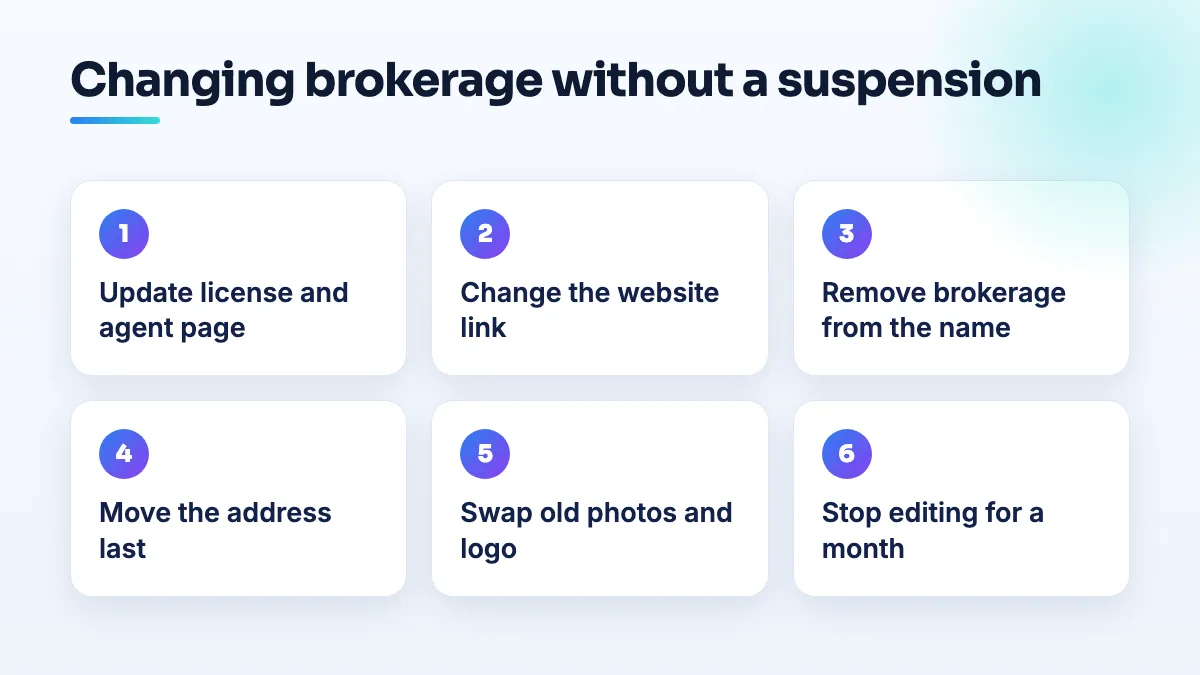
- Update the outside world first. Get your license record moved to the new brokerage with your state regulator, ask the new brokerage to publish your agent page, and update your portal profiles, email signature and your own website. Wait until those are live. When Google checks you, the rest of the internet should already agree with what you're about to tell it.
- Change the website link on the profile. Point it to your own site or your new agent page. Make one change, save it, and wait until it's showing publicly and nothing has been flagged. I'd leave at least a week before the next edit. That's my rule of thumb, not a Google number, but spacing edits out stops them reading as a takeover.
- Change the name only if the old brokerage is in it. Replace it with your own name alone. Don't swap one brokerage for another in the title, and don't add keywords while you're in there.
- Move the address last, and only if you have to. If you were listed at the old brokerage's office, you now need either your new office with your own suite number or your home address hidden. Make that its own edit and expect Google may ask you to verify again. Have your video plan ready before you save.
- Swap the photos and logo. Remove photos showing the old brokerage's sign, yard signs and branded headshots, and add new ones. If the old office's Street View image is stuck on your profile, as it was in a thread about old brokerage imagery stuck on a profile, read how to deal with old Street View on your profile.
- Leave everything else alone for a month. Categories, hours, service area and description can wait. Every extra edit is another chance for a review.
If Google suspended you anyway
- Don't create a new profile. A second listing for the same agent is a duplicate, and your reviews stay on the suspended one.
- Make your paperwork match before you appeal. Your license lookup should show the new brokerage, the brokerage's roster should list you, and your website should match the profile exactly. The computer repair owner's lesson applies directly: paperwork that still shows the old setup makes a real move look like a hijack.
- Appeal once, and answer the real question. Google wants to know whether this is the same agent, still working, now with a different brokerage. Send the license record, the new brokerage's page listing you, and a short note that you changed brokerage on a specific date. Proof of your home address doesn't answer that. My guide to a Google Business Profile suspended for unclear reasons covers the appeal itself.
- After reinstatement, stop editing. The repeated suspensions in the realtor threads often follow a fresh round of edits after the profile comes back. Let it settle before you change anything else.
- If the appeal is denied, post the facts in the Help Community. Say you're an independent agent, when you changed brokerage, what you edited and in what order, and what you sent with the appeal. Product Experts can't reinstate you, but they can spot what you missed and escalate a clear case.
What not to do
- Don't do all the edits the day you move. That's the exact pattern behind most of these suspensions.
- Don't delete the profile and start again. You lose every review, and the new one starts from zero trust.
- Don't let the new brokerage create a profile for you. You'll end up with two listings, and one of them owned by someone else.
- Don't put the brokerage in your title to please them. If your brokerage wants its name visible, put it on your website and in your photos, where it doesn't have to change on Google next time.
Getting it done without losing the listing
A brokerage change is one of the few profile edits you can plan weeks ahead, so plan it. If you want someone to handle the order and the evidence, that's part of our real estate agent SEO work and of our Google Business Profile management for individual agents.
Written by Saifur Rifat, Founder & SEO Lead at SERP Squad.