


Key points
- Hidden home address plus service area suits most agents
- Brokerage address listings are often flagged and filtered
- Only use the office if you're reachable there
- Title it with your own name, not the brokerage
- Never keep a home and an office profile
You're setting up your own listing and you don't know which address to give Google: your home, or the brokerage office you hang your license at. For a realtor Google Business Profile address there are two setups that work, and for most agents I'd pick the home address, hidden, with a service area, because profiles at the brokerage address are hard to verify and usually filtered out even when they pass.
Here's why, how to set up each one, and the one situation where the office is the better choice.
The two setups that work for a realtor Google Business Profile address
Agents ask this on the Local Search Forum all the time, and the answer in a Local Search Forum thread on which address and name an agent should use comes down to two models:
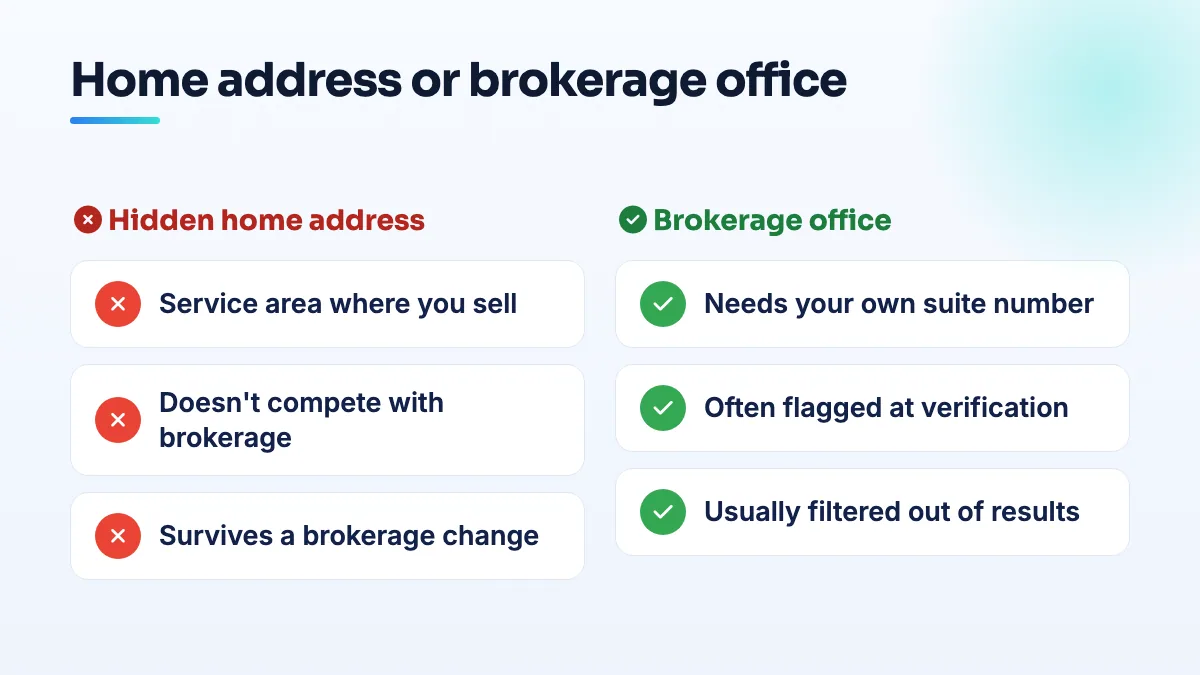
- Your home address, hidden, as a service-area business. Google lets a business onto Maps if customers visit it or if it travels to customers in person, according to Google's eligibility rules for Business Profiles. Agents meet buyers at showings and sellers at their homes, so this fits. If you use your home and leave the brokerage name out of the title, your profile shouldn't compete with the brokerage's own listing.
- The brokerage office with your own suite or office number. This only holds up if you really work from a specific office there. Google's guidelines for individual practitioners name real estate agents directly, and they say a practitioner shouldn't have a profile at a location where they can't be contacted directly during the stated hours.
Why the brokerage address usually loses
The problem with the office is everyone else already listed there. In a Local Search Forum thread on how people set up realtor profiles, practitioners described two walls. First, verification at the office address is extremely hard, because Google flags a new listing when many profiles already share that address and category. Second, if you do get through, you're very likely to be filtered anyway, which means your profile exists but doesn't show when people search.
That filter is the same one that hides all but one lawyer or advisor in a shared office. I explain it in the answer on realtor listings filtered at the same office. There's also a practical snag agents post about in the Google forum: the sign on the storefront carries the brokerage's name, not yours, and a verification video of someone else's sign doesn't prove much.
How to set up the home-address model
- Enter your home address, then hide it. Google needs it to know where you're based. Customers shouldn't see it, and you don't want strangers turning up at your door anyway.
- Set a service area you actually sell in. List the towns or ZIP codes where you really show homes and take listings. Product Experts have told mobile businesses to keep service areas within roughly a two-hour drive of their base, and a whole-state area on a solo agent looks made up.
- Use your own name as the title. Your name as clients know it, without the brokerage and without "Best Realtor in Town". A name stuffed with keywords is a suspension risk and competitors report it.
- Pick a category that describes you. I'd use real estate agent for an individual, and leave the agency-type category to the brokerage. A different primary category, phone number and website from the brokerage listing all make it less likely that one of you filters the other out.
- Give it your own phone number and page. Your mobile, not the office switchboard, and the page that's about you, whether that's your own site or your agent page on the brokerage site.
- If Google asks for a video, film it like a service-area business. The street around your home, your car, and proof you run the business, such as your key opening your home office and your license on screen. Don't film the brokerage lobby.
When the office address is the right choice
Use the office if you're the broker-owner, or if you have a dedicated office inside the building with your name on the door and clients come to see you there during set hours. In that case, include your suite or office number, keep your title to your own name when several agents share the address, and expect to work harder to stay visible next to the brokerage listing.
What I wouldn't do is use the brokerage's main address with no suite, or keep two profiles, one at home and one at the office. Two listings for the same agent is a duplicate, and you'll spend months untangling it.
Think about your next move now
The home model has one more advantage: when you switch brokerages, your address doesn't have to change. Agents at the office address have to move their whole profile, and that's a common trigger for suspensions. If that's coming, read how to update your brokerage on your Google Business Profile before you touch anything.
Getting the address right is the first thing I set up in real estate agent SEO, and it's part of our Google Business Profile management for agents who want the setup done once and done right.
People also ask
Can you use a coworking space or virtual office for Google Business Profile?
Only with your own dedicated office there. Google allows a coworking address only if the office has clear signage, receives customers during business hours, and is staffed during those hours by your own staff, not the operator's reception. A virtual office, mailbox, hot desk or day pass doesn't qualify, and profiles listed at them are regularly suspended.
Read the full answer: Can you use a coworking space or virtual office for Google Business Profile? →
Why does only one practitioner at our office show up on Google Maps?
Because Google's local filter usually shows only one of several listings that share an address and a category. It isn't a penalty, and the other listings still exist; they're hidden for that search. Agents, advisors, lawyers and instructors at one office trip it most. Different primary categories, direct phone numbers, genuine suite numbers and each listing's own reviews reduce it.
Read the full answer: Why does only one practitioner at our office show up on Google Maps? →
How should a doctor, lawyer or advisor name their Google Business Profile?
It depends on whether you're the only public-facing practitioner at that location. If you are, Google allows your brand followed by your name, as in its own example "Allstate: Joe Miller". If several practitioners share the office, the title should be only your name, without the firm's name. You can add a title or degree such as Dr., MD, JD, Esq. or CFA, and the name should match your license records.
Read the full answer: How should a doctor, lawyer or advisor name their Google Business Profile? →
Can a real estate agent licensed in several states have more than one Google profile?
Usually not. A Google profile needs a real place you serve clients from or travel from, and a license in another state isn't a location. Keep one profile where you live and work, set a service area that includes towns across the state line only if you really work there, and cover the other states on your website. A second profile only fits a real office you work from in that state.
Why does my profile get suspended again after passing video verification?
Because video verification only proves your business is real and operates where you say. It doesn't fix what triggered the suspension. If an eligibility problem is still on the profile, such as a visible home address on a service-area business, a service area far wider than you travel, a missing category, keywords in the name or details that don't match across the web, the next automated review finds it again.
Read the full answer: Why does my profile get suspended again after passing video verification? →