

Your old marketing agency, website vendor, ex-employee or former partner is still the primary owner of your listing, and they're slow, silent or refusing. To get your Google Business Profile back from an agency, use the two rules Google publishes: an ownership request gives the current owner 3 days to respond, and anyone acting for you must hand ownership back on request, with third parties given 7 business days to release control.
Owners in the forums often say the owner gets 7 days to answer a request. That mixes the two rules up. Below is what each one says, the order I'd use them in, and what to do when the owner is a company that no longer exists.
How agencies end up owning your profile
Usually nobody planned it. The agency created the listing under its own Google account to save time, or a vendor bundled it with a website package, or an employee set it up on a personal Gmail. It only becomes a problem when the relationship ends.
The threads all look alike. A construction firm in Arkansas posted in a Help Community thread about a marketing vendor holding its listing. A nail salon still has its former agency as owner in a thread about an old agency that still owns a salon profile. A real estate agent found the primary owner was a defunct tech vendor's account in a thread about a defunct vendor listed as primary owner. And a Local Search Forum thread about an SEO company holding a client's listing hostage shows how long it drags when nobody knows the rules.
The two Google rules that get it back
Rule one: the ownership request. If you can't get into the profile at all, you can ask Google for ownership. Google's help page on requesting ownership says the current owner "is then notified by email and has 3 days to respond." Three days, not seven.
Rule two: representatives must hand it over. Google's policy for authorized representatives says they "must always transfer Business Profile ownership to the business owner immediately upon request." Third parties have 7 business days to let the client regain exclusive control, and failing to do so can get the profile and the representative's Google Account suspended.
That second rule is the stronger one, because it puts the obligation on the agency, not on you. But notice the risk in it: a suspension can land on your profile too. So I use it to get a clean transfer, not as a threat I hope Google enforces.
Getting your Google Business Profile back from an agency, step by step
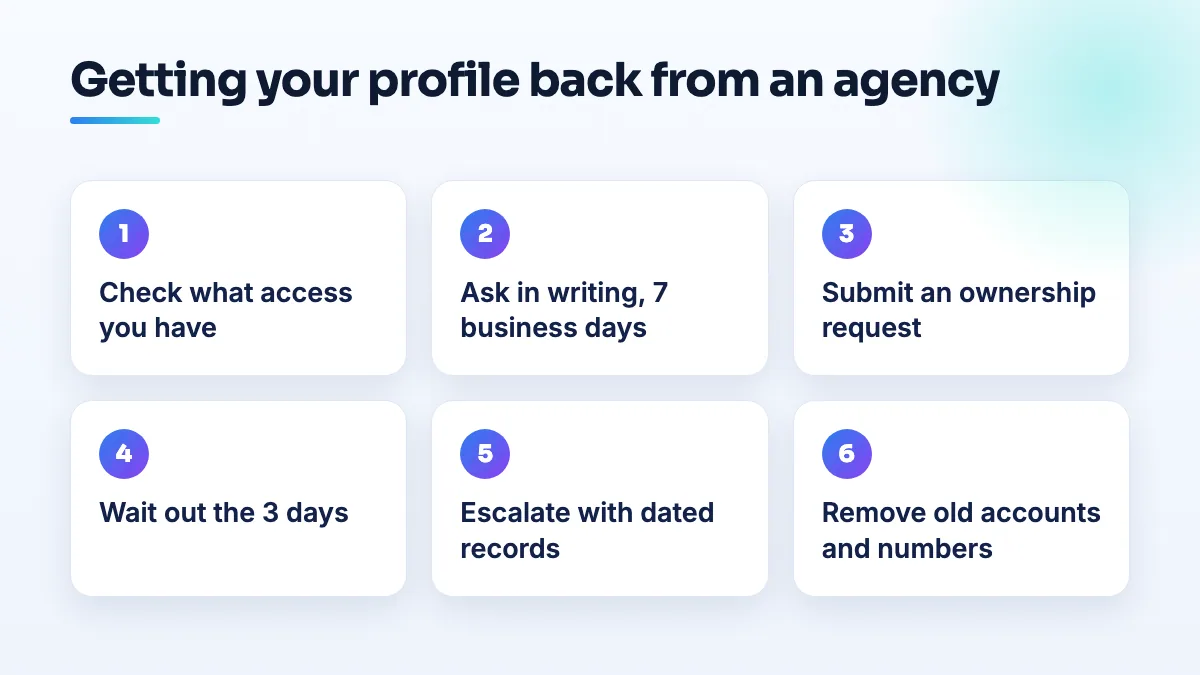
- Check what access you already have. Sign in with every Google account the business has used and look for the profile. If you're already a manager, you're halfway there: the owner only has to promote you.
- Create or pick the business's own Google account. Use an account the business controls, not a staff member's personal Gmail. This is the account that should end up as primary owner.
- Ask in writing first. Email the agency, name the account that should become primary owner, and ask for the transfer within 7 business days. Link Google's representative policy in the email. Keep it polite and keep a copy. Give them the chance to do it cleanly.
- If you have no access, submit an ownership request. Find your business on Google, start the claim, and request ownership. The request screen shows part of the current owner's email, which often tells you exactly who holds it.
- Put the 3-day deadline in your calendar. If the owner doesn't respond, go back through the link in Google's email about your request and follow the next step it offers you, which may be verifying the profile yourself.
- If they refuse, write once more and escalate. Point to the 7-business-day rule and the dates of your requests. Then post in the Help Community with the timeline, the request records and the owner's partial email. Product Experts can't transfer a profile, but they can escalate a clearly documented case.
- Clean up the moment you're primary owner. Remove the agency's accounts and anyone you don't recognize. Then check the phone number (it may be a tracking number the agency owns), the website link (it may point to a site the agency hosts), and any booking links. Change those one at a time, not all in one day.
When the owner is a dead company or a dead inbox
A vendor that shut down can't answer, and neither can an ex-employee's deleted Gmail. That's actually the simpler case. Submit the ownership request, let the 3 days run out, and follow Google's next step. Keep screenshots of the request and the dates, because if you end up in the Help Community, that timeline is what a Product Expert will ask for.
What I wouldn't do is create a fresh profile because the old one feels lost. It's a duplicate, your reviews stay on the old listing, and the two can end up competing or getting merged in ways you don't control.
When it's an ex-employee or a former partner
These get personal. A new owner in a Local Search Forum thread about a former employee posting offensive photos was dealing with someone using the listing against the business. A former partner holding the listing is often really a dispute about who owns the business.
- For an ex-employee, treat it like an agency: written request, then the ownership request. Screenshot anything harmful they post, and report it as well.
- For a former partner, get the business registration, the ownership documents and any separation agreement ready before you ask Google anything. If the business itself is in dispute, sort that out with your lawyer first. Google isn't going to decide it for you.
What's different by industry
- Law firms and financial advisors often have a firm listing plus one per practitioner. Each can have a different owner, so check every one, not just the main listing. It's one of the first checks in any law firm SEO engagement.
- Contractors are the most likely to have a profile bundled with a website package, so the vendor may also own the domain. Get both back together. It is a day-one question in my contractor SEO work.
- Nail salons and other shops that changed hands should recover the existing profile rather than start again, because the review history is worth more than a clean slate. That's usually the first job in nail salon SEO after a sale.
- Real estate agents often have profiles created by brokerage tech vendors. Check before you change brokerage.
- Driving schools and event planners tend to have the listing on an instructor's or planner's personal account. Move it to a business account while everyone is still on good terms.
What not to do
- Don't create a new profile. You lose the reviews and create a duplicate.
- Don't ask the agency for its password. You want ownership moved to your account, not a login you'll have to share.
- Don't edit everything once you're back in. Fix the phone and website first, one at a time, and leave the rest for a few weeks.
- Don't let it happen again. Before you hire the next agency, run a Google Business Profile ownership audit and add them as a manager on your account, never as owner. And check they aren't carrying risk into your profile. An agency's restricted Google account can take your listing down with it.
Get it back, then keep it
If a clear email and the ownership request haven't worked, or you'd rather someone else handle the requests and the clean-up, it's part of our Google Business Profile management, and the profile always stays in your name.
Written by Saifur Rifat, Founder & SEO Lead at SERP Squad.