


Key points
- Search signed out, by name, then in Maps
- The share link test separates merges from weak signals
- Never create a second profile to get around it
- Escalate merges with registration proof and screenshots
- Match name, phone and address everywhere online
A customer types your exact company name into Google and gets nothing, or gets a different company. When your business is not showing up when searching its own name, it's rarely a ranking problem in the usual sense: Google either can't tie your profile to your business as one clear entity, or it has confused you with another business and, in the worst cases, merged the two.
Those two causes have different fixes, so the first job is working out which one you have. Here's how I tell them apart and what I do about each.
Why your business is not showing up when searching its name
I went through the Help Community threads where owners report this, and they fall into three patterns.
The profile is live but Google won't show it for its own name. In a Help Community thread from a Tampa tow company invisible for its own brand name, Gold Product Expert Tony Gricar called it an SEO issue and said "Google does put greater scrutiny on towing companies." He also said there is no support available for ranking issues. Nobody at Google will switch it on for you. You have to make the signals clearer.
Google thinks you're someone else. A small transport company described in a Help Community thread about a transport firm shown as an alias of a competitor searched its exact legal name and got a former competitor that is no longer licensed in the city. Every time they sent customers their profile link, the customers saw a business marked as non-existent and were handed to the competitor. The owners' own read was that the two profiles had been merged on the backend because both were service-area businesses with hidden addresses. A plumbing company in a thread about a plumber auto-merged with a same-name firm in another state hit the same thing.
Google can't tell you apart from an older business with a similar name. A Vancouver contractor's dashboard said verified, but the listing never published. The Product Expert's diagnosis was that with no website, directory or registry footprint, Google couldn't distinguish him from an older business with the same name. A car dealer who took over another dealer's lot found Google had carried the old business's search terms over to his profile, sending him customers looking for a service he doesn't offer.
How to tell which problem you have
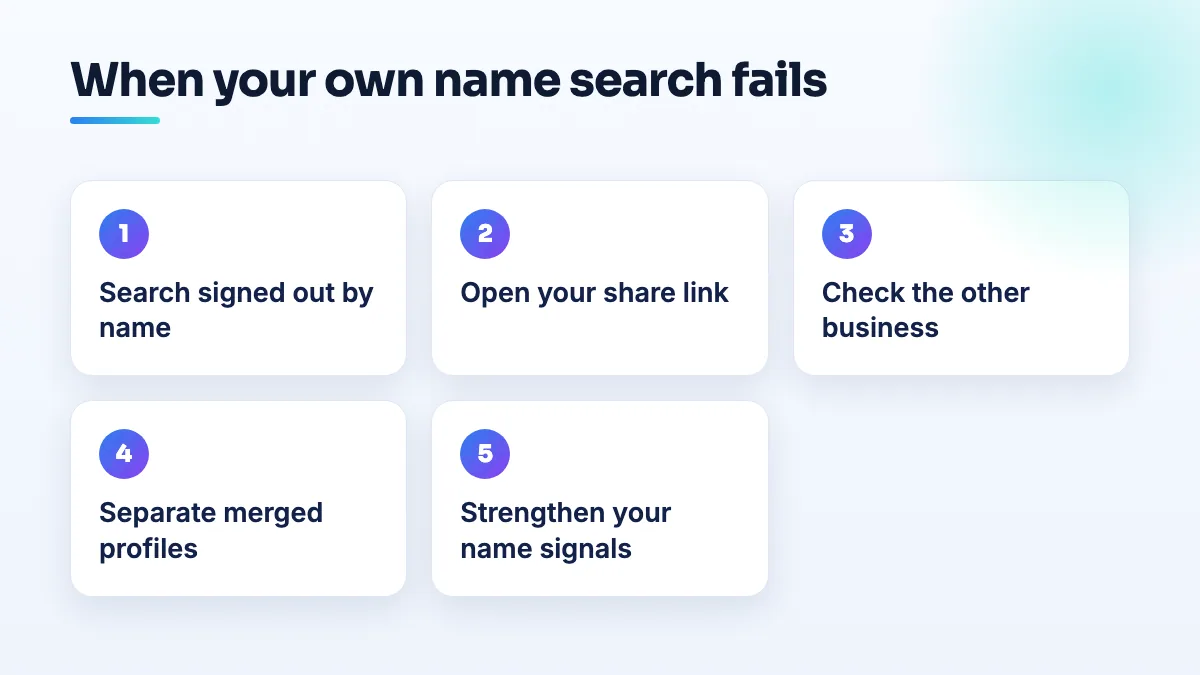
- Search the way a customer does. Open a private browser window, search your exact name, then your name plus your town, then search the name in Google Maps. Screenshot each result with the date.
- Check what your own account says. If the profile shows as verified but reads "only visible to you" or has no public link, that's a publishing problem, not a name problem. I cover that case separately in verified Google Business Profile not showing publicly.
- Open your share link on a phone that isn't signed in. If it opens your profile, Google knows you exist and the issue is how strongly your name is tied to it. If it opens another business, a closed listing or an error, you have a data problem: a merge or a mix-up.
- Look up the business Google shows instead. Note its name, phone, address, whether it's marked closed, and whether it's even in your state. That list is your evidence for the next step.
If Google has merged you with another business
- Stop editing and don't create a new profile. A second profile competes with the first, and edits during a data problem give Google another reason to review you.
- Deal with the other listing. If the business Google shows you as is closed, use the suggest-an-edit option on its Maps listing to mark it permanently closed, and report it if it's fake. A dead competitor's listing sitting live is part of what lets Google confuse the two.
- Collect proof that you are a separate company. Your registration with the legal name, your license or permit, your website showing the same name and phone as the profile, and the screenshots from your share link test.
- Ask support to separate the profiles, then post in the Help Community. Give both profile links, the dates, the screenshots and any case ID. Product Experts can escalate a clear data error. They can't do anything for a ranking complaint, so describe it as a merge, with evidence, not as "I'm not ranking".
If Google just doesn't recognize your name
This is the weak footprint case, and it's fixable with ordinary work. Put the exact profile name, phone and service area on your home page and contact page. Make sure your state registration, license records and the main directories all use the same name, phone and address. Old numbers and past addresses floating around are exactly what makes two businesses look like one, which is why citation cleanup is usually the first thing I do here. Then link the profile to the website and keep asking every customer for a review.
What's different for towing, transport and plumbing
Towing gets extra scrutiny, by a Product Expert's own account, so I batch fixes and avoid a string of small profile edits. In tow company SEO I treat every edit as something that may be reviewed.
Transport and moving firms that run with hidden addresses give Google very little to tell them apart: a name, a phone and a website. That's why the transport owners suspected their merge happened. If you're in transportation SEO territory, make sure no other company shares your phone number, website or a near-identical name.
Plumbers get the surname problem. Common names repeat across states, so put your town and license number on the website so Google has something to separate you with. If all of this is more than you want to take on, it's part of our Google Business Profile management, and if your listing is missing from Maps altogether rather than just for its name, start with business not showing on Google Maps.
People also ask
Does your service area affect where you rank on Google Maps?
Not in the way most owners expect. Adding towns to your service area doesn't make you rank in the map pack there. Map rankings are anchored to the address you verified with, even when it's hidden, and the service area mainly tells customers where you work. To reach nearby towns, use real town pages, reviews from customers there, ads, or a genuinely staffed second location.
Read the full answer: Does your service area affect where you rank on Google Maps? →
Can editing my Google Business Profile get it suspended?
Yes. Changes to your name, address, primary category, service area and even opening hours can send a profile back through Google's review, and real businesses have been suspended within minutes of making them. Photos, posts and review replies are rarely a problem. Before a risky edit, make sure your website and directories already show the change, make one planned change per session, and never edit while verification or an appeal is pending.
Read the full answer: Can editing my Google Business Profile get it suspended? →
Will Google remove a review from someone who was never a customer?
Usually not, if they dealt with your business at all. Google doesn't require reviewers to be customers, only to have interacted with you, so reviews from refused clients, couriers and towed drivers normally stay. Google does remove reviews with no real interaction, reviews about something other than your business, and reviews from someone with a personal conflict of interest. For the rest, a calm reply is your best tool.
Read the full answer: Will Google remove a review from someone who was never a customer? →
Will Google support help if my business stops ranking?
No. Google Business Profile support won't investigate why a live profile dropped in the rankings, and Product Experts say so directly. Support does act on profile problems: suspensions, verification, ownership, rejected edits and reviews or listings that break the rules. Check first whether your profile is live and findable by name; if it is, the drop is yours to diagnose.
Read the full answer: Will Google support help if my business stops ranking? →
Can you appeal a Google review decision more than once?
No. You get one appeal on each review Google decides not to remove, and once the appeal is denied, that decision is final for that review. Wait for the first decision before appealing, and only appeal with new evidence tied to a specific policy clause. After that, your options are a calm public reply, reporting new reviews from the same accounts, and outnumbering the review with genuine ones.
Read the full answer: Can you appeal a Google review decision more than once? →