

You run your business from home, Google tells you to hide the address, and once you do, the profile seems to sink. If customers never come to your house, you still have to hide your home address on Google Business Profile, because a visible home address is one of the most common reasons home-based businesses get suspended. What you can do is set the profile up so the hidden address costs you as little as possible.
The exception is the business customers do visit at home: a therapist seeing clients in a home office, an in-home daycare. For them, hiding the address is often the wrong setup altogether, and I'll cover what to do instead.
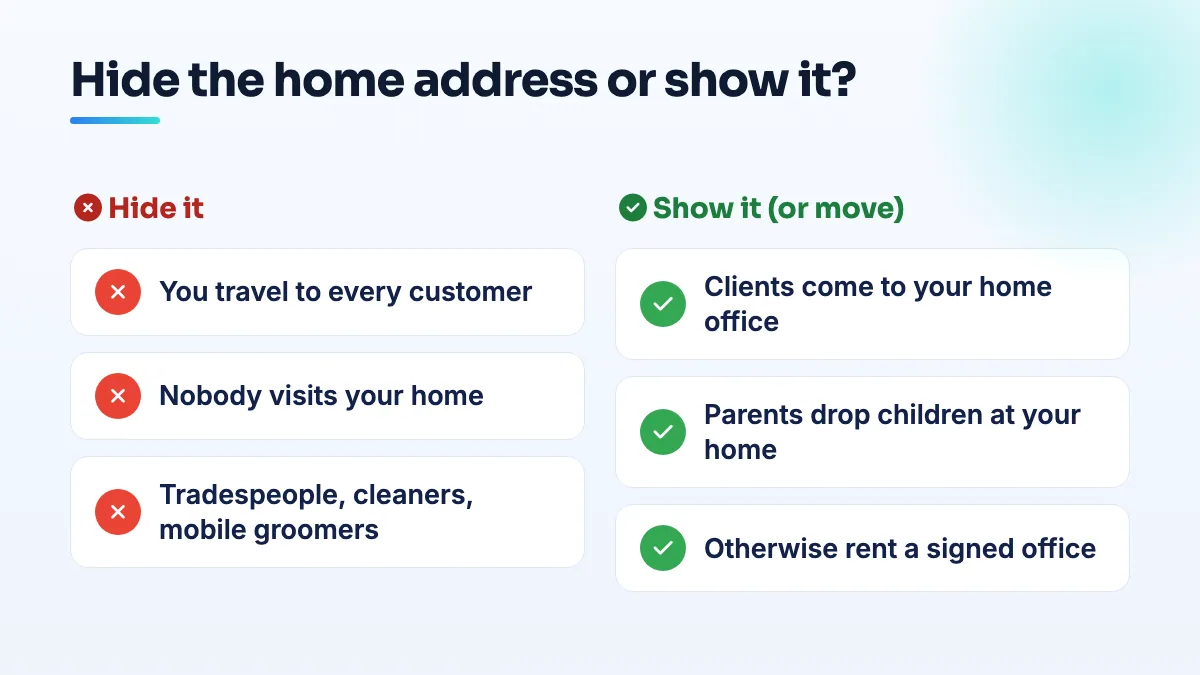
The rule: when to hide your home address on Google Business Profile
Google's eligibility rules give two ways to qualify: a location customers can visit, or staff who travel to customers in person. A plumber, handyman or remodeler working from home is the second kind. So is a photographer who shoots at venues and clients' homes and only edits at home, a setup owners ask about in a Help Community thread from a photographer who shoots on location. You still enter your home address so Google knows where you're based, but it shouldn't be shown publicly, and you add the areas you serve instead.
Leaving it visible is risky. A handyman business in a Help Community thread about a service-area business suspended over a residential address was suspended for deceptive content after having previously listed a residential address. It's one of the settings I see again and again in home-based suspensions, along with an oversized service area and a keyword-stuffed name.
Sometimes Google won't let you hide it. A plumber in a Help Community thread from a plumber who couldn't hide his address couldn't do what the policy tells him to. When that happens, check the primary category first. Practitioners on the Local Search Forum keep a list of categories that require a business address, and a category on that list won't run as a hidden-address business. The category is one of the first things I check in any plumbing SEO setup.
Why a hidden address can cost you visibility
The ranking drop owners describe is real for some businesses. In a Local Search Forum discussion on whether service-area businesses are at a disadvantage, one practitioner described "close to a dozen cases that had everything much better than the competition and would not even show anywhere until we displayed the address."
A home-based groomer who hides the door number for safety described in a Help Community thread from a home groomer invisible in local search being verified but invisible, with the support ticket closed by an automated template. Therapists on Reddit describe the same thing: a therapists' Reddit discussion on hiding a home address covers how switching to a service-area profile killed their local visibility.
Here's how I weigh it. For a business that travels to customers, showing the address isn't an option you have; it breaks the rules and risks the whole profile. So the question isn't whether to hide it, but how to make up the ground. Hiding doesn't change where Google thinks you are, because it still ranks you from the hidden address. What you lose is some of the trust signals a visible address carries.
How to set up a home-based profile properly
- Answer one question honestly: do customers come to your home? If never, carry on. If yes, skip to the therapist and daycare sections below, because this setup isn't yours.
- Enter your real home address and switch off showing it. Don't use a PO box, a virtual office or a friend's shop. A Product Expert community guide on business addresses is clear that virtual offices and remote mailboxes aren't eligible.
- Set service areas where you actually drive. Towns or ZIP codes you really work in, not the whole state. I explain the limits in the guide to set service areas on Google Business Profile.
- Pick a primary category that allows a service area. Match it to most of your work. If the hide option disappears after you pick it, the category is forcing an address.
- Keep the home address off your website too. Show the town or region you're based in and the areas you serve. A website that publishes the address your profile hides is an inconsistency you don't need.
- Verify as a service-area business. If Google asks for a video, film the street outside, your vehicle and tools, and your key opening a door you control. You don't need a sign.
How to win back the visibility you lose
None of these depend on showing an address, and together they do more than most owners expect:
- Reviews that mention real jobs. Ask every customer the week the job finishes. When they describe the work and the neighborhood in their own words, that tells Google and readers where you work. Don't script it.
- Photos of real jobs in the towns you serve. Before-and-after shots from actual addresses you've worked at, uploaded regularly.
- Service pages that prove local work. A page for each main service with photos and details of real local jobs does more than thirty near-identical town pages. Some contractors have reported town pages falling out of Google's index this year.
- Local mentions. Your chamber of commerce, trade association, suppliers and local sponsorships, with your name and phone matching the profile.
If you're wondering whether you can show up in towns you don't live in at all, my answer on how to rank in a city without an office goes through it. This groundwork is most of what our local SEO services do for home-based businesses.
Therapists who see clients at home
A therapist with a consulting room at home has a location clients visit. By Google's own eligibility rule, that's a business with an address customers come to, not a service-area business. Hiding the address and calling it a service area describes a business that travels to clients, which you don't. That mismatch is part of why therapists report both lost visibility and awkward verifications.
You have three honest options:
- Show the address. The profile then matches how you work, and you get the visibility a visible address brings. Only you can judge whether that's safe for your practice.
- Rent a room in a professional building and list that instead. Google's guidelines on shared offices ask for your own signage, clients received there during your stated hours, and your own staff. A room with your name on the door can qualify.
- Stay off the map and rely on directories and your website. If you only see clients online, you aren't eligible anyway, because online-only businesses are excluded.
If you genuinely do home visits, such as a mobile physiotherapist, the service-area setup fits and everything above applies. Setting this up correctly is the starting point in our SEO for therapists work.
In-home daycares
An in-home daycare has the same issue with more at stake. Parents bring children to your home every day, so it's a location customers visit. Publishing that address on Google is a serious privacy decision, and plenty of providers decide not to.
Parents who've posted about their search describe checking three places: Google Maps, the state licensing directory and local Facebook parent groups, according to a working parents' Reddit thread on how they found childcare. Other parents say home daycares are close to invisible on Google compared with centers.
So my advice splits two ways. If you're comfortable listing the address, create a normal profile with it shown, set accurate hours, and use photos of your space without children's faces. If you're not, don't create a hidden-address profile that pretends you travel to families. Put your effort into the state licensing directory, parent groups and a simple website with your license number and the neighborhood you're in. That's the approach we take in daycare SEO for home providers.
What not to do
- Don't leave a home address visible if customers never come there. It's the fastest route to a Google Business Profile deceptive content suspension for home-based businesses.
- Don't rent a virtual office or mailbox to have an address to show. It isn't eligible, and it's the setup spam listings use.
- Don't hide an address clients do visit and call yourself a service-area business. It doesn't describe how you work.
- Don't stretch the service area to make up for the hidden address. It doesn't change where you rank.
The trade-off is worth taking
A hidden address costs some businesses some visibility. A suspension costs all of it. Set the address up to match how you really work, then put your effort into reviews, photos and pages that prove where you work. If you want it checked before you change anything, that's what our Google Business Profile management starts with.
Written by Saifur Rifat, Founder & SEO Lead at SERP Squad.