

Most service area mistakes come from treating the setting as a ranking tool. It isn't. If you want to know how to set a service area on Google Business Profile properly, the rule is simple: list up to 20 towns or ZIP codes you really travel to, keep them within about two hours of your base, hide your address if customers don't come to you, and then leave the setting alone.
Get it wrong in one direction and you take calls from 50 miles away or from other states. Get it wrong in the other and you hand Google a reason to call the profile deceptive. This hits every business that goes to the customer: mobile massage therapists, photographers, driving instructors, mobile mechanics, handymen, limo operators and transport companies.
Below is what Google allows, the steps I follow when I set service areas for a client, what changes for each kind of business, and what to do when the calls still come from the wrong places.
What Google allows in a service area
Three limits come up again and again in the Help Community and on the Local Search Forum.
- Twenty areas at most. A horse transport company in a Local Search Forum thread about a transporter covering the US and Canada had to cap its service areas at 20 city and state combinations. It ended up splitting into separate US and Canadian profiles and rebuilding reviews from zero on the Canadian one.
- About two hours from your base. The forum admin in that same thread said a service area shouldn't stretch more than two hours from the verifying address. A Google Product Expert gave mobile massage therapists the same guidance in a Help Community thread about outcall massage verification: stay within roughly a two-hour drive.
- A hidden address if customers don't visit. Google's eligibility rule for Business Profiles covers two kinds of business: one customers visit, and one that travels to customers in person. If you're the second kind, your address stays in the profile for verification and ranking but doesn't show publicly.
One thing the service area doesn't do is make you rank in those towns. The same admin said it has "zero impact on where you rank". Ranking comes from the verified address, which is why I wrote a separate answer on the question does service area affect Google ranking. Keep that in mind and the rest of the decisions get easier.
Why a service area that's too wide backfires
It brings calls you can't take. A mobile mechanic in a Local Search Forum thread about calls from too far away was losing hours to callers 50+ miles out. A Chicago handyman in a Help Community thread about calls only from other states went almost two months getting calls from other states and nothing local.
It looks like a lead generator. A New Zealand tow operator listed the three settings behind his suspension: a country-wide service area, a visible home address, and a missing category. A Florida lawn care company that was suspended for deceptive content had already cut its service area from a whole county to three towns while trying to get reinstated. When Google's reviewers see a one-van business claiming a state, the profile starts to look like the fake listings they're paid to remove.
If that's already happened to you, start with what deceptive content on Google Business Profile actually means before you change anything else.
How to set a service area on Google Business Profile, step by step
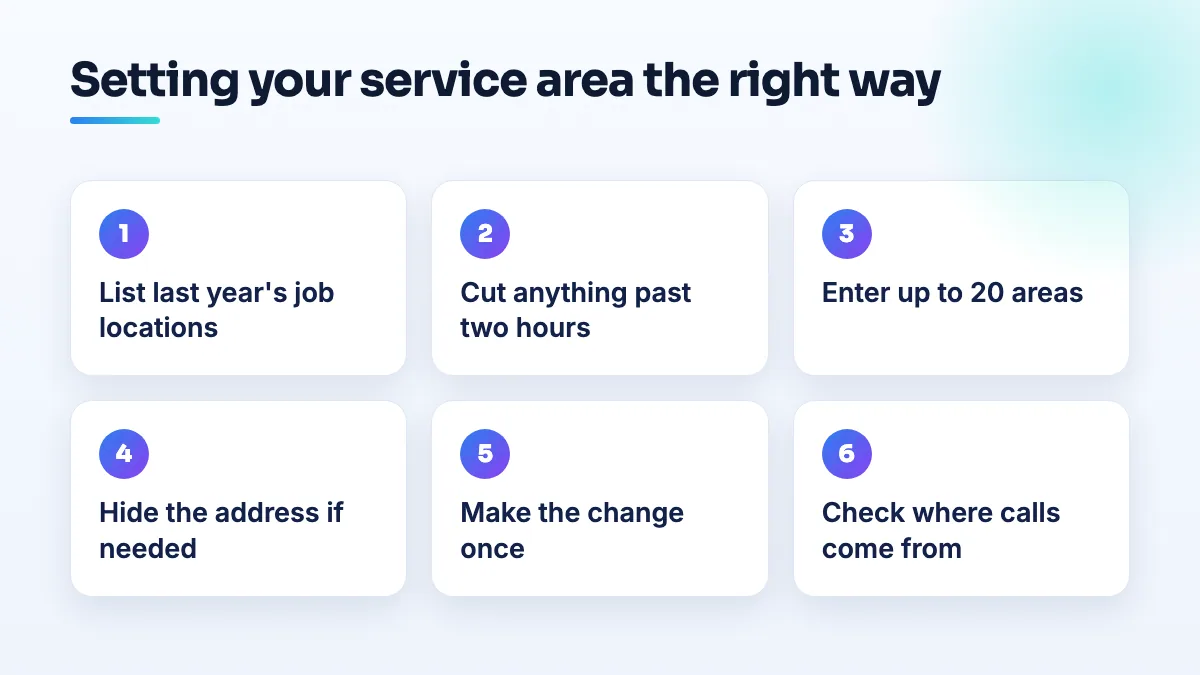
These are the steps I follow. Do the thinking on paper first and make the edit once.
- List where your paid jobs came from last year. Pull the addresses from your invoices or booking system and write down the town or ZIP code for each. This is your real service area, not the one you hope for.
- Draw the two-hour line. From your verified base, cut anything more than about two hours' drive away. For most mobile businesses the real line is much tighter, so be honest about how far you'll go for a normal job.
- Pick the right unit. Use towns or ZIP codes that customers recognize. In a dense metro, ZIP codes or neighborhoods keep you precise. In rural areas, towns or counties you really cover make more sense. Don't list whole states unless you genuinely serve all of them in person.
- Enter no more than 20. If you have more than 20 real areas, choose the ones with the most jobs and the highest value work. You don't need every village. Customers nearby will still find you.
- Hide the address if customers don't come to you. Keep it in the profile, switched off from public view. I explain the setting and its side effects in the guide to hide your home address on Google Business Profile. Check your category first, though. On the Local Search Forum, members documented that some categories, Mechanic among them, force a visible address.
- Make your website say the same thing. A service area page listing the same towns, with real jobs from them, tells customers and Google the same story as the profile.
- Make the change in one edit, then leave it. Owners in the Help Community describe suspensions that followed an address or service area edit. Batch everything into one session and don't tinker afterwards.
- Check the calls for a month. Note where every enquiry comes from. If a town produces nothing but calls you turn down, take it out at the next planned review.
What changes for your kind of business
The rules are the same for everyone. What counts as a realistic area isn't.
Mobile massage therapists
Stick to the two-hour guidance the Product Expert gave, and in practice keep it tighter: a 90-minute session isn't worth a four-hour round trip. If you also see clients at a studio, that's a visitable location with its own rules. One owner in the Help Community couldn't switch an established practice to mobile-only without putting their review history at risk, so plan that change carefully rather than flipping it. It's one of the first things I look at in massage SEO projects.
Photographers
Photographers travel to venues, sometimes far. List the area around your base where you shoot most, not every destination wedding you've done. A home-based wedding photographer's long Help Community thread ended with a Product Expert telling them to hide the home address and set realistic service areas. Destination work belongs on your website and portfolio, not in the service area.
Driving schools
List the neighborhoods and towns where you actually pick learners up, plus the area around the test center you use. A school in a Help Community thread about a driving school stuck in verification was already set up as a service-area business with the home address hidden and service areas set, and verification still hinged on filming the area around that hidden address. The settings have to match the video.
Mobile mechanics and auto repair
Check your category before anything else. If Mechanic forces a visible address, customers will turn up at it, so choose a base you're happy for them to find. Then keep the area tight: the 50-mile calls in that forum thread came from ranking too wide, and each one cost the mechanic time on the phone. I plan mechanic SEO around the base address for exactly that reason.
Handymen
Handymen feel the address rule hardest, because the business is often a home and a van. List the towns you'd happily drive to for a two-hour job, not a full day. If the calls come from out of state, as they did for the Chicago handyman, look for an address or category problem before you blame the service area.
Limo, chauffeur and transport companies
Airport runs and long-distance trips make these businesses want huge service areas. Don't. The question comes up in a Local Search Forum thread about ranking a limo service with no local address, and the answer is the same as for everyone else: the map pack follows where you're based. List your home metro and the airports and towns next to it, and reach the rest through pages and ads. The horse transporter was told the same thing: the Business Profile model doesn't fit a continental service, so organic search and ads have to carry the long distance work. It's how I'd approach limo company SEO for any fleet that travels.
If the calls still come from too far away
- Check which address Google has. Open the address in your profile settings, hidden or not. If it's wrong or out of date, that's the likelier cause of distant calls, not the service area.
- Check your category. Google has been known to recategorize hidden-address listings on its own. A wrong category can put you in front of the wrong searches.
- Look at the searches in your Performance report. If they're for a town far from you, that tells you what Google thinks your business is near.
- Post in the Help Community with the facts. Say where you're based, what your area is, where the calls come from, and when it started. A Product Expert can tell you whether it's a data problem or a ranking one.
- Filter the calls in the meantime. Put your towns in the first line of your description and on your website so callers can see where you work before they ring.
What not to do
- Don't list towns to rank in them. It doesn't work, and a stretched area is one of the settings that turns up again and again in suspension threads.
- Don't rent a virtual office in a bigger city to extend your reach. A virtual office or remote mailbox isn't eligible, and it's the classic pattern of fake listings.
- Don't edit the area every few weeks. Every edit can send the profile back for review.
- Don't create a second profile for the far side of your area. Unless there's a real, staffed location there, it's a duplicate, and duplicates get suspended.
Setting it once and building from there
A tight, honest service area is the base everything else sits on. When I set up a profile for a mobile business, this is one of the first settings I fix in our Google Business Profile management, and the reach into further towns comes from pages, reviews and ads built on top of it.
Written by Saifur Rifat, Founder & SEO Lead at SERP Squad.