

Your update was rejected, or every post you try now fails, or the option to post has disappeared altogether. When Google Business Profile posts are rejected, the cause is almost always one of three things: something written inside the image, content an automated filter misreads, or a restriction on the profile itself rather than the post. Each has a different fix, and the fix for one does nothing for the others.
This hits businesses you wouldn't expect: a fleet operator whose trucks carry its web address, a dog trainer, a massage clinic. Below is how I work out which cause it is, the fix for each, and what's different for fleets, pet businesses and spas.
Why Google Business Profile posts get rejected
Text inside the image
The most surprising case I found is a company with more than 90 locations whose posts were restricted because the photos showed its web address painted on the side of its service trucks. It's documented in a Local Search Forum thread about posts restricted for a URL on truck livery. Nothing about the posts was misleading. My read is that the filter saw a web address in the picture and treated it like a link it couldn't check.
The same logic catches photos of flyers, banners, storefront signs with a phone number, coupons, and graphics made in a design app with a price and a web address on top. My rule is simple: if there's readable text in the image that isn't your business name, expect it to be looked at.
Content a filter misreads
Automated review looks at what's in the image, not just the text. A Help Community thread from a massage business whose posts were classified as sexually explicit shows how far this can go: ordinary treatment content, Posts switched off for the whole profile, and two support cases with no reply. Skin, bodies, animals mid-procedure and before-and-after shots are the kinds of image I'd treat with care.
A restriction on the profile, not the post
If every post fails, including a plain text update, the post isn't the problem. A Help Community thread from a dog training business with posting disabled is the pattern: posting switched off, and the profile not appearing in search either. Those two symptoms together point at the profile's status. Rewriting posts won't help until the profile is sorted.
Things I keep out of post text
Google doesn't explain every rejection, so this last group is my own practice rather than a published list. I never type a phone number or a raw web address into the body of a post. The post already has a button for calling or visiting your site, so use that. I also avoid all-caps shouting, strings of hashtags and the same wording copied across dozens of posts. None of it helps the post, and all of it looks like spam to a filter.
How to fix a rejected or restricted post
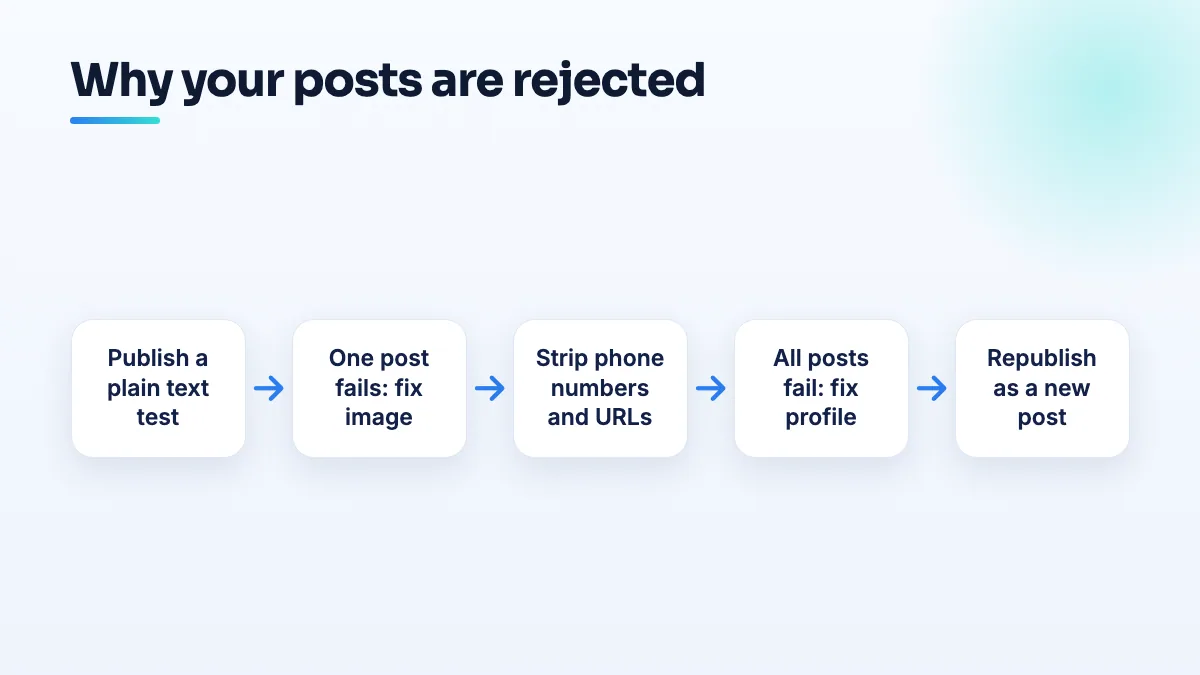
- Work out whether it's one post or all of them. Write a plain two-sentence update with no image and try to publish it. If it goes live, your problem is the content of specific posts. If it fails too, or the option is missing, skip to the profile steps below.
- Find the rejected posts and look at the images first. Open each one and look for readable text: a URL on a vehicle, a phone number on a sign, a price on a graphic. Also look for anything a machine might misread, such as bare skin or animals being handled.
- Replace or crop the image. Pick a photo where the livery is out of frame or unreadable, crop the web address off, or use a shot of the work itself. Don't try to blur a URL badly; a half-readable address still looks like a URL.
- Strip the text back. Take phone numbers, URLs and pricing claims you can't back up out of the body. Put the link in the button instead.
- Publish it as a new post. I delete the rejected one and post the corrected version fresh, so there's no confusion about which version was reviewed.
- Check again a day later. Posts can go live and then get pulled. If the new version is rejected too, change one thing at a time so you learn what the filter is reacting to.
When posting is disabled for the whole profile
- Check the profile's public status. Search your business name in a private browser window and in Google Maps. If you're missing there too, the profile is limited, unverified or not published, and posting is a side effect.
- Look for a notice in your account. Screenshot anything about a suspension, a restriction or a verification request, with the date.
- Fix the profile issue first. Complete verification if it's asked for, or deal with the suspension. I wouldn't write a single new post until the profile is public.
- Ask support to re-enable posting. Say what happened, what you've removed, and give the case ID back if they reply. If nothing moves, post the facts in the Help Community so a Product Expert can look at the profile and escalate it.
While posting is off, the rest of the profile still works. Keep adding photos, replying to reviews and keeping hours current. Posts are useful, but they aren't what decides whether you rank.
What's different for fleets, pet businesses and spas
Fleets and service trucks
A branded truck is great marketing on the road and a liability in a post. If your livery carries your web address, choose photos that show the crew, the job or the equipment, with the side of the truck out of frame or at an angle where the lettering can't be read. For a multi-location fleet, give every location manager the same rule, because the 90-location case shows how one photo habit repeats across a whole network. In our transportation SEO work I give fleets a short photo brief for exactly this reason.
Dog trainers, groomers and pet sitters
In the pet care threads I read, the problem sat at profile level, not in the images. Many pet businesses are home-based service-area businesses, and a profile that isn't fully verified or published often loses posting along with everything else. If posting is disabled and customers can't find you either, treat it as a profile problem first. It's one of the first checks I run in pet business SEO.
Massage and spa
Here it's the image filter. Show your reception, a made-up treatment room, therapists in uniform and your licenses, and keep bare-skin shots and bedroom-style lighting off the profile. I explain the full recovery in the answer to why Google flagged massage photos as sexually explicit, and the wording side matters just as much in massage SEO generally.
What not to do
- Don't resubmit the same post again and again. If it was rejected once, it'll be rejected again, and repeated rejections are a bad look.
- Don't create a second profile to get posting back. A duplicate is a suspension risk and splits your reviews.
- Don't change your name or category to get around a post filter. Those edits can send the whole profile for review.
- Don't panic about frequency. A gap in posting while you fix this won't sink you. If you're wondering about how often to post on Google Business Profile once it's working, steady and useful beats frequent and repetitive.
Getting posts working again
In the cases I found, the cause was a photo, a filter or the profile status, and each is quick to fix once you know which. If you want the posts, photos and profile checked together, that's part of our Google Business Profile management.
Written by Saifur Rifat, Founder & SEO Lead at SERP Squad.