


Key points
- Reports of dropped city pages are anecdotal and inconsistent
- Name-swapped city pages match Google's doorway description
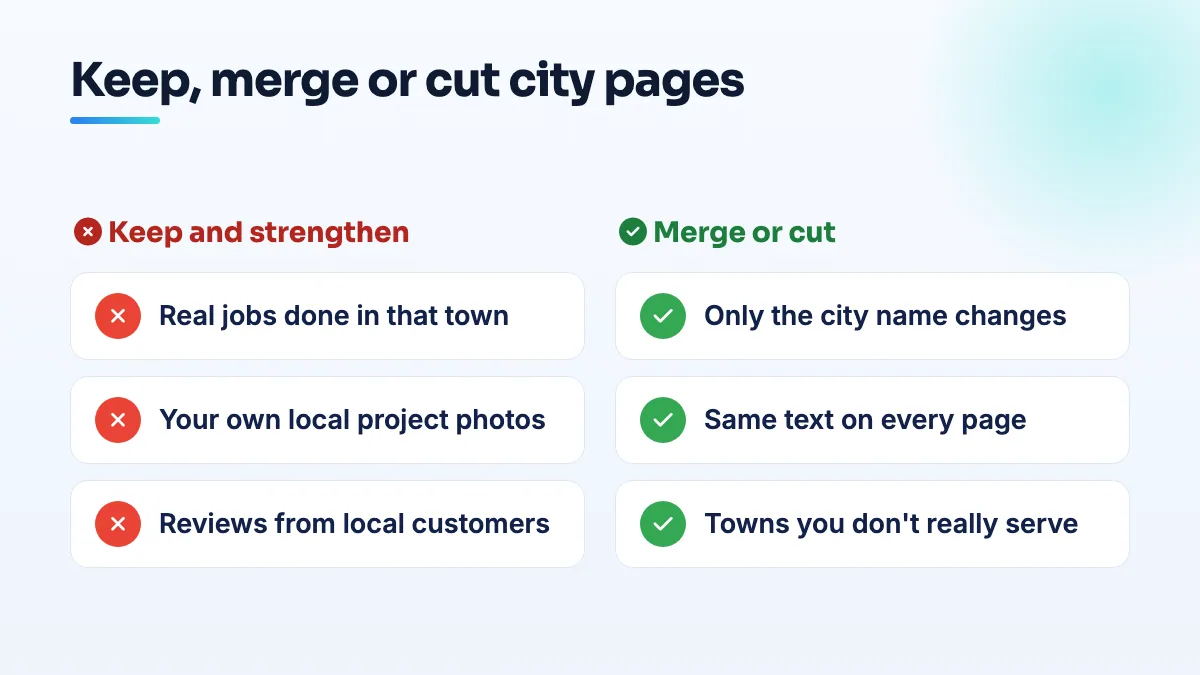
- Keep pages with real local jobs, photos and reviews
- Merge thin pages and redirect them with a 301
- Never build pages for towns you don't serve
Owners and SEOs are reporting city landing pages dropping out of Google's index, and the question going round is whether the service area pages spam update in August 2026 finished off location pages for good. My answer: pages that say something true and specific about each town are still safe, and pages that only swap the city name were never safe. The update didn't create that line. It may just be enforcing it harder.
Below is what's actually been reported, how I'd judge your own pages against Google's doorway rule, and exactly what to keep, merge or cut.
What owners have reported since the August 2026 spam update
Joy Hawkins opened a Local Search Forum thread asking whether Google is targeting service area pages on September 3, 2026. One member replied that most of their location pages had fallen out of the index and that it was starting to look like the end for location pages.
Two details matter before anyone deletes anything. First, the reports are anecdotal and inconsistent: some sites lost pages, some didn't, and nobody has shown a clean pattern. Second, that member said the pages started dropping around June, well before the August rollout. So some of what's being blamed on the update was already happening. I'd treat the update as a reason to audit, not as proof that city pages are dead. If you want the timeline of the rollout itself, I covered it in my notes on the August 2026 spam update.
Why the spam update hits some service area pages and not others
Google's spam policies describe doorway pages as pages built to rank for many similar searches, such as the same service with a different town name, that funnel people to the same place or offer nearly identical content. That describes the standard contractor package almost word for word: forty pages titled "Roofing in [Town]", each with the same four paragraphs, the town name dropped in six times, and a stock photo.
Google's guidance on helpful, people-first content asks whether a page exists mainly to attract search visits or to help the person who lands on it. A city page passes when a homeowner in that town learns something they couldn't get from your main service page. It fails when the only thing that changes is the name.
In my audits, the pages that drop out of the index first are almost always the thin ones Google was already ignoring. They rarely brought calls. Losing them hurts less than people fear.
How to audit your city pages
- List every city or service-area URL on the site. Pull them from your sitemap or your CMS into a spreadsheet, one row per page.
- Check which ones Google has indexed and which bring visits. In Search Console, look up each URL's indexing status and its clicks over the last 12 months. Mark any page that isn't indexed or has had no clicks.
- Run the swap test. Cover the town name and read the page. If it could describe any town you serve, it's a doorway page, whatever the rankings say today.
- Write down what's true only for that town. Real jobs you've done there, your own photos from those jobs, reviews from customers who live there, local permit or code details, and how you actually serve it (drive time, which crew, which days). Three or more real items means the page has a reason to exist.
- Keep, merge or cut. Strengthen pages that pass step 4 with that local detail. Fold the rest into one service-area page that lists the towns you cover, and redirect each old URL to it with a 301 so any links it earned still count. Delete outright any page for a town you don't really serve.
- Link from one hub. Your service-area page should link to each surviving city page, and each city page back to the main service page, so nothing sits orphaned.
Someone in a forum discussion on adding new cities to an existing page or new URLs asked the same question most owners ask when they expand. My rule: extend the existing page until you have enough real local material to fill a new one. A new URL with nothing new on it is how the thin pages above get made.
What's different for contractors and limo companies
General contractors, remodelers and roofers are the businesses most often sold forty identical city pages, so they carry the most risk. The fix is also easiest for them, because every finished job is local proof: a kitchen in one suburb, a re-roof after a storm in another. That's the material I build contractor SEO city pages from.
Limo and car service companies have the opposite problem. The service really is the same in every town, so city pages go thin fast. For them I'd rather build fewer, stronger pages around the places people travel to and from, such as the airport, the venues and the stations, than a page per suburb. Remember that pages don't make you a local business in the map pack either; I explain why in the answer on whether you can rank in a city without an office.
What I would not do
- Don't delete every city page in a panic. Pages with real local content and real traffic are doing their job.
- Don't rewrite thin pages with a spinner or a template. Different wording on the same empty page is still the same empty page.
- Don't add pages for towns you want to win but don't serve. That's the clearest doorway pattern there is.
If you'd rather have the pages judged by someone else first, it's part of every SEO audit we run, and rewriting the keepers is the kind of service page writing we do every week.
People also ask
Is Houzz Pro worth it for remodelers?
Only if the contract and the lead numbers both hold up. Remodelers reviewing Houzz Pro describe a plan sold as monthly but invoiced around $4,000 a year up front, about two leads a month that were mostly low quality, and a 30% price rise at renewal they couldn't opt out of. Get the billing, renewal and notice terms in writing and work out how many signed jobs you need before you pay.
Read the full answer: Is Houzz Pro worth it for remodelers? →
Does a contractor license help you pass Google Business Profile verification?
Not much on its own. Google doesn't verify you because you're licensed; it checks that your records, profile and video all point to the same business at the same address. A license lookup or corporate filing showing a different address, or a mailbox, can make verification fail. Align every record first, then show the license in your video as supporting proof.
Does a commercial contractor need search visibility if work comes from bid boards?
Yes, but not for the reason most agencies sell. On a hard low-bid public job, price decides. Before that, someone has to invite you, prequalify you or put you on a bidders list, and they check your name online first. A site with real project pages, clear credentials and a correct Google profile is what gets you onto the lists where the bid is decided.
How do independent HVAC companies compete with private-equity-owned brands?
Compete on what an acquisition can't carry over: an owner customers can name, fast answers, and proof of recent local work. Private-equity roll-ups often keep the old local name, reviews and map position, so they look like the same neighborhood company. You won't out-spend them on ads or shared leads. You can win the map pack in your core towns, earn steady reviews that mention your team, and make independent ownership visible wherever customers check.
Read the full answer: How do independent HVAC companies compete with private-equity-owned brands? →
Does your service area affect where you rank on Google Maps?
Not in the way most owners expect. Adding towns to your service area doesn't make you rank in the map pack there. Map rankings are anchored to the address you verified with, even when it's hidden, and the service area mainly tells customers where you work. To reach nearby towns, use real town pages, reviews from customers there, ads, or a genuinely staffed second location.
Read the full answer: Does your service area affect where you rank on Google Maps? →