

A business that closed or moved out years ago is still sitting on your address in Google Maps, taking your calls, showing its reviews next to yours or even lending you its search reputation. To remove an old business listing from your address, you get it marked as closed or moved with evidence Google can check, clean up the directories still feeding it, and make sure your own profile isn't carrying its history.
This hits anyone who moves into a space that had a life before them: flooring showrooms, appliance repair shops, nail salons, garages and car lots. The fix is mostly patience and paperwork, but the order you do it in decides whether it takes a week or a year.
Why the previous business is still on Google Maps
Google doesn't delete a place because the business left. The listing stays until someone tells Google it's closed and Google believes them. Directories, old websites and data suppliers keep repeating the old name at your address, so to Google the old business can look alive long after the sign came down.
Three cases from the Google Business Profile Help Community show how far it goes:
- A dead national chain on a local store's building. A carpet and tile store in Pennsylvania found a defunct Sears Appliance Repair listing sitting on its own building, and its suggested edits on Maps were rejected. The owner laid it out in a Help Community thread about a closed Sears listing on a flooring store.
- A car lot that inherited the last dealer's identity. A used car dealer took over a lot from a "Buy Here Pay Here" dealer, and Google blended the old business's keywords into the new one, so it ranked for finance searches it didn't offer. In a thread from a car lot ranking for the previous tenant's keywords, the owner said it was "routing high-friction, incorrect traffic to my lot".
- A new salon showing another salon's reviews. In a thread from a newly opened salon with the previous business's reviews, reviews from the business that used to be there were appearing on the new salon's profile.
The first case is a separate listing that won't die. The second and third are worse: the old business's history has leaked into yours. The fixes are different, so work out which one you have.
First, check which problem you have
Search your exact address on Google Maps, then search the old business's name. Screenshot everything with the date.
- Two separate listings at your address (yours and theirs): you need the old one marked closed or moved.
- One listing, yours, with their reviews, photos or keywords on it: your profile was built on top of the old one, or Google merged them. That needs a different conversation with Google.
- Their listing, and no listing for you at all: don't claim theirs and rename it. Create and verify your own, then get theirs closed.
How to remove an old business listing from your address
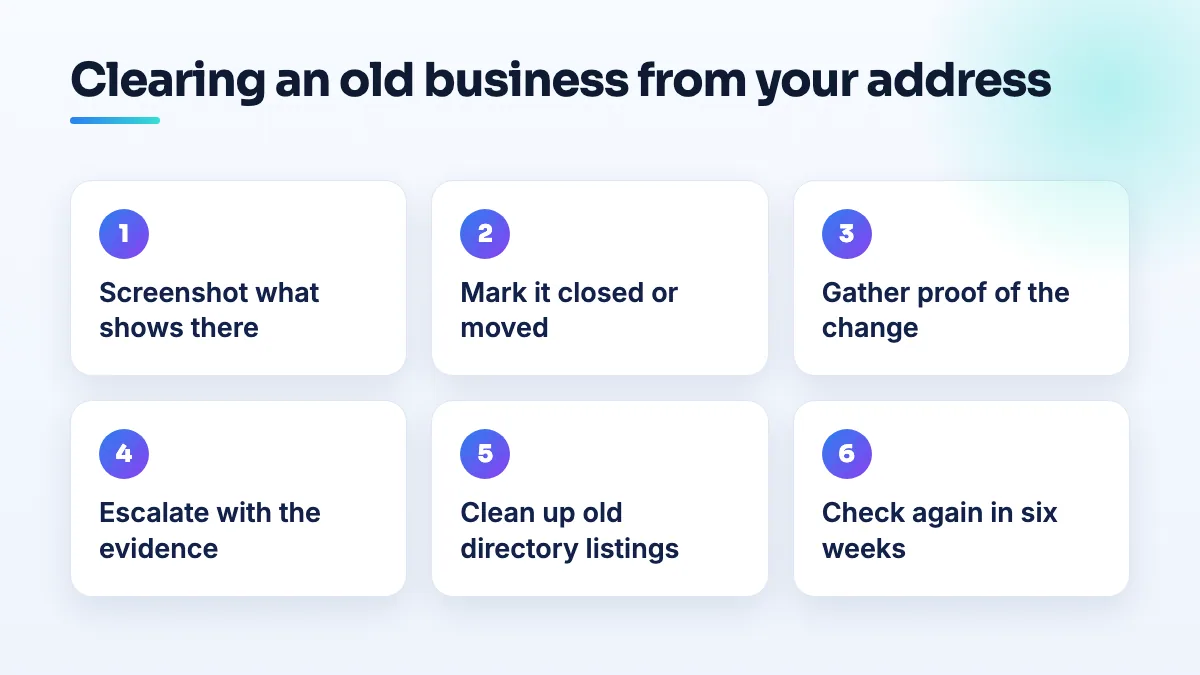
- Suggest the right edit on the old listing. Open it on Google Maps and suggest an edit. If the business closed, mark it permanently closed. If it moved and you know where, mark it as moved. Don't report it as spam or fake: it was real, it just isn't there any more, and a wrong report is easier to reject.
- Gather proof you can point to. A photo of your storefront showing your own sign where theirs used to be, your lease start date, and a screenshot showing their phone number is disconnected or answers somewhere else. If the old company has a website or social page that announced the closure or move, save it.
- If the edit is rejected, try the business behind the listing. If the old business still exists somewhere (a chain, a franchise or an owner who moved), ask them to close or move the listing from their own account. It takes them two minutes. National brands often manage listings centrally, so ask for whoever handles their store locations.
- Escalate with the evidence in one place. Post in the Help Community with the old listing's link, your address, your own listing's link, the dates your edits were rejected and the photos. A Product Expert can see in a minute that the place has changed hands and escalate it. That's the route the flooring store took after its Maps edits failed.
- Clean up the directories feeding the old record. Yelp, Yellow Pages, Apple Maps, Bing and the data suppliers behind them may still list the old business at your address. Mark it closed wherever you can, and make sure your own name, address and phone are identical everywhere. I cover this as part of citation cleanup, because Google keeps trusting a record that dozens of other sites still repeat.
- Check again in four to six weeks. Search the address and the old name. If it's still there, add the new screenshots to your Help Community post rather than starting a new one.
When the old business's history is on your listing
This is the car lot and the salon. The steps above won't help on their own, because the old business isn't a separate listing any more; part of it is inside yours.
- Find out how it happened. Did you claim the old listing when you moved in and rename it? If so, you're holding their reviews and history, and Google will see a different business living on someone else's record. If you created your own listing, Google may have merged the two on its own.
- Make your own identity unmistakable. Your primary category, your business description and your website should say exactly what you do and nothing the old business did. If you're a used car dealer who doesn't offer in-house financing, nothing on your profile or site should suggest it, including an old category left over from them.
- Ask Google to separate the records. Post in the Help Community with dates: when the old business left, when you opened, when their reviews or keywords appeared on your profile. Ask for the old business to be shown as permanently closed as its own place.
- Answer inherited reviews in public. A short reply saying the review is about the business that used to operate at this address, and when you opened, tells customers what they need to know while you wait.
If Google has ended up with two copies of the same place, or merged the wrong two, the options for untangling them are in my guide on how to remove a duplicate Google Maps listing.
What's different for showrooms, repair shops, salons and car lots
Flooring showrooms and other big retail units tend to inherit national chain listings, because big stores are often in buildings a chain once used. Chain listings were usually managed in bulk by a head office, so a suggested edit from a stranger carries little weight. Evidence and escalation matter more here. It's one of the first things I check in flooring SEO when a store has moved.
Appliance repair is where dead national service brands linger longest. The Sears case was an appliance repair listing, so anyone searching for that brand's repair service can be sent to a building where it no longer exists. If you repair appliances yourself, that confusion lands on you: say plainly on your profile and website who you are and that the old company isn't at this address.
Nail salons turn over units often, and a new salon in an old salon's space is exactly how the previous business's reviews end up on the wrong profile. Create your own listing; never claim theirs. That's standard in every nail salon SEO setup I do.
Garages and car lots carry the heaviest keyword baggage, because the old business's services (finance, a brand's service department, towing) are exactly what customers search for. Clear anything on your profile and site that suggests you offer them. I go through this in any auto repair SEO project after a move.
What not to do
- Don't claim the old listing and rename it to your business. You'll carry their reviews, and Google can treat it as a takeover of someone else's record.
- Don't report a genuinely closed business as fake or spam. Report it as closed or moved, which is the truth.
- Don't mass-report the same listing from staff and friends' accounts. Coordinated edits look like manipulation and get ignored.
- Don't change your own address or name to "get away" from the old listing. Edits to those fields can trigger a fresh review of your profile.
Where to start
Take the dated screenshots today, suggest the closed or moved edit, and start on the directories while you wait. If the old business has leaked into your own listing, that's a longer fix, and it's part of our Google Business Profile management.
Written by Saifur Rifat, Founder & SEO Lead at SERP Squad.