

The reviews you lose fastest aren't the ones a bad job costs you. They're the ones that vanish in a day when you move address, re-verify, get reinstated or have two listings merged. To protect Google reviews through those changes, you back up the full review history first, fix everything that could make the change look suspicious, and make one change at a time at a quiet point in your year.
I went through the Google Business Profile Help Community looking for owners who'd lost reviews, and the ones who lost the most weren't businesses with bad service. They were a plumber, a roofer, an appliance repair company, an electrician, a massage practice and a mover, all hit by an administrative event. Most of them had no copy of what they lost.
Below is why it happens, the backup I'd make before touching anything, the order I make changes in, and what to do if the reviews go anyway.
How reviews get lost after verification, reinstatement or a move
The numbers in the threads are hard to read if you've spent years collecting reviews:
- A plumbing and heating company lost about 15 genuine reviews during reinstatement, in a Help Community thread about reviews lost during reinstatement.
- A roofing company watched about 84 legitimate reviews vanish the moment its profile was verified, in a thread from a roofer whose reviews disappeared on verification.
- An appliance repair business lost 12 years and more than 290 reviews in a single day, and had to post about it three times, in a thread about 290 reviews gone overnight.
- A restaurant owner described 802 reviews and a 4.8 rating collected since 2017 vanishing the moment the address was updated. The mechanics are the same for a contractor who moves yard.
- A moving company lost more than 1,000 reviews overnight, right after reporting a set of fake 1-stars. Weeks later only 133 had come back, according to a Help Community thread from a mover that lost 1,000 reviews.
Here's how I explain it to clients. Reviews belong to the listing, and the listing is Google's record of a place. When you change the address, re-verify, get suspended and reinstated, or merge two listings, Google re-checks that record. While it does, reviews can be held back, re-filtered or left attached to a record that's no longer the one customers see. Sometimes they return. Often a chunk doesn't.
Two other cases show how it strands reviews rather than deleting them. An electrician moved from an old listing to a newly verified service-area profile and found the reviews stuck on the legacy one, in a thread about reviews stranded on a legacy profile. A massage therapist wanted to go mobile-only and couldn't, and wrote in a thread about switching a practice to mobile-only: "I need to keep my history of reviews!" Google also won't merge reviews from two listings on request: a barbershop left with two verified profiles at one address, one holding 95 reviews and the other 3, couldn't get them combined.
How to back up your Google reviews first
A backup won't make Google put reviews back. What it gives you is proof of what existed, for a support case, and your own record of what customers said, which nobody can take off your website. Do this before any change, and then every few months anyway.
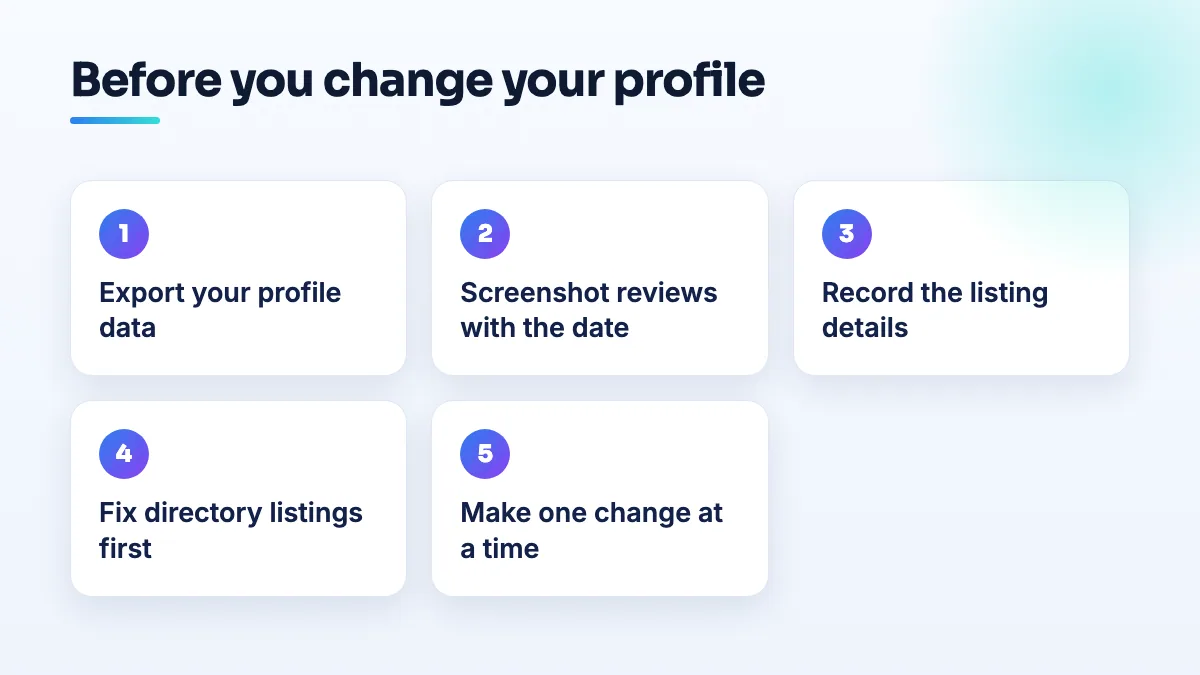
- Export your profile data. Use Google Takeout while signed in to the account that owns the profile and export your Business Profile data, which includes your reviews. Store the file somewhere that isn't the same Google account.
- Screenshot the reviews page with the count and rating. Scroll your reviews in date order and capture them, with today's date visible somewhere on the screen. Support staff respond better to a dated screenshot showing "290 reviews, 4.9" than to a description.
- Record the listing's identity. Save the Maps link to your profile, the exact business name, address, phone and primary category as they stand today. If the listing splits or a duplicate appears, this shows which one is the original.
- Keep your own customer records next to it. A spreadsheet of jobs by date lets you show that the reviewers were real customers if Google's review of the case asks.
- Put the best reviews on your website. Copy them as testimonials with the customer's first name and the month, and link to your profile. If the Google copies go, the words customers wrote are still working for you.
Protect Google reviews by planning the change
Most review losses I've seen follow a change that made Google look at the listing again. You can't always avoid that, but you can make sure the listing passes when it's looked at.
- Fix your details everywhere else first. A mover in Huntington Beach was suspended, reinstated and suspended again within 48 hours, losing reviews in between, and the cause turned out to be different business details on Yellow Pages, Groupon, the website and the BBB. Update your directory listings and website to the new details before or at the same moment as the profile.
- Match your paperwork to the new address. If you're moving, your registration, license and utility bills should show the new address before you edit the profile. If Google asks for proof, you want it to agree.
- Make one change, then wait. Address, then name, then category, never all in one sitting. Let each one settle and check your review count before the next.
- Pick your quiet season. A roofer shouldn't move address in hail season and a mover shouldn't do it in summer. If a change triggers verification or a suspension, you want it to land when the phone matters least.
- Edit the listing you have. Never delete it and start again. A new listing starts with zero reviews, and a deleted one can take its reviews with it. The full sequence for moves is in my guide on how to change your business address on Google Business Profile.
- Back up before you report spam in bulk. I can't tell you the mover's report of fake reviews caused its loss. I can tell you I'd take a fresh backup before filing any large report.
What's different by trade
- Plumbers and electricians often run on old listings created years ago by someone else. Before any change, check whether an older listing still exists and holds reviews. That's the electrician's stranded-reviews problem, and it's easier to deal with before you verify a new profile.
- Roofers and remodelers tend to re-verify or get reinstated after a suspension. Owners in the remodeling world report being reinstated with every review gone. Back up before you appeal, not after the decision comes back.
- Appliance repair and moving companies collect reviews at high volume, so a loss is in the hundreds. Monthly exports matter more for you than for anyone.
- Massage therapists and spas changing from a treatment room to mobile-only are changing the kind of business on the listing. Ask in the Help Community how your specific switch will be treated before you make it, and keep the old address visible until you know.
If the reviews go anyway
- Don't make any more edits. Every new change restarts the checking. Leave the listing alone while you work on the reviews.
- Contact Business Profile support with the backup. Give the date the reviews dropped, the count before and after, the change you made that day, and the screenshots. Ask a specific question: were the reviews removed for policy reasons, or lost in the change?
- Post the same facts in the Help Community. Include the before and after counts. A Product Expert can escalate a case with clear evidence, and the appliance repair owner who posted three times shows that the vague posts don't get picked up.
- Keep collecting new reviews meanwhile. Ask every customer from this week on. If the old reviews return, you've lost nothing. If they don't, you're rebuilding already.
If the reviews went missing after a reinstatement specifically, read my notes on reviews lost after reinstatement. For reviews that drop without any change on your side, the causes are different, and I cover them in why Google deleted my reviews.
What not to do
- Don't ask old customers to post their review again. The same text from the same account in a burst looks like manipulation and can bring more filtering.
- Don't create a second listing to hold the new address. Two listings for one business is a duplicate, and Google won't combine their reviews for you.
- Don't hand your login to anyone offering to restore reviews. Nobody outside Google can put them back.
- Don't skip the backup because the change looks small. The roofer lost 84 reviews to a verification, the step most owners think of as routine.
Plan the change with someone who's done it
I'd rather spend an hour planning a move than a month trying to get reviews back. Sequencing changes is part of our Google Business Profile management, and it's part of every relocation we handle in SEO for plumbers, roofing SEO and SEO for moving companies. If you're planning a move and want the directory side done at the same time, that's in our local SEO services.
Written by Saifur Rifat, Founder & SEO Lead at SERP Squad.