


Key points
- It has happened before and is on Google's side
- Name the service listing as dealer plus Service
- Separate categories, links and phone numbers
- Build reviews on the main sales listing
- Never delete or merge the service listing
Someone searches your dealership's name and Google shows the service department's panel, with service hours and a service phone number, instead of the main dealership. A dealership service department showing for the brand search is a recurring problem on Google's side, not something you caused, but you can make it much less likely by keeping the two listings clearly separate and making the main listing the obvious match for your name.
I take it seriously because it costs sales: a buyer who searches your name to find the showroom sees a panel for the service lane and rings the wrong desk, or sees closed hours and gives up.
Why the service department is showing for the dealership brand search
A thread on the Local Search Forum shows how familiar this is. When a dealer reported that a car dealership's service department profile was showing for the brand search, Joy Hawkins replied: "Not again! Last time it got a lot of attention from Danny Sullivan on Twitter." In other words, it has happened before, widely enough to draw attention from Google's search liaison, and it came back.
Here's how I read the mechanics. Google has two listings that both carry your dealership's name, and it has to pick one for the knowledge panel. Most of the time it picks the main dealership. When the signals between the two are close, or when the service listing has more reviews and more activity than the sales listing, which is common because service customers visit far more often than buyers, the choice can flip.
Dealer groups can make it worse without meaning to. Dealers on the same forum also report car dealership duplicates that Google will not merge. If the main dealership is split across two copies, its reviews and activity are split too, and that makes the single service listing look like the stronger match for your name.
What to do about it
- Confirm it and record it. Search your dealership's exact name on a phone and a computer, logged out, from the showroom and from across town. Screenshot each result with the date. It may only happen on some devices or in some places.
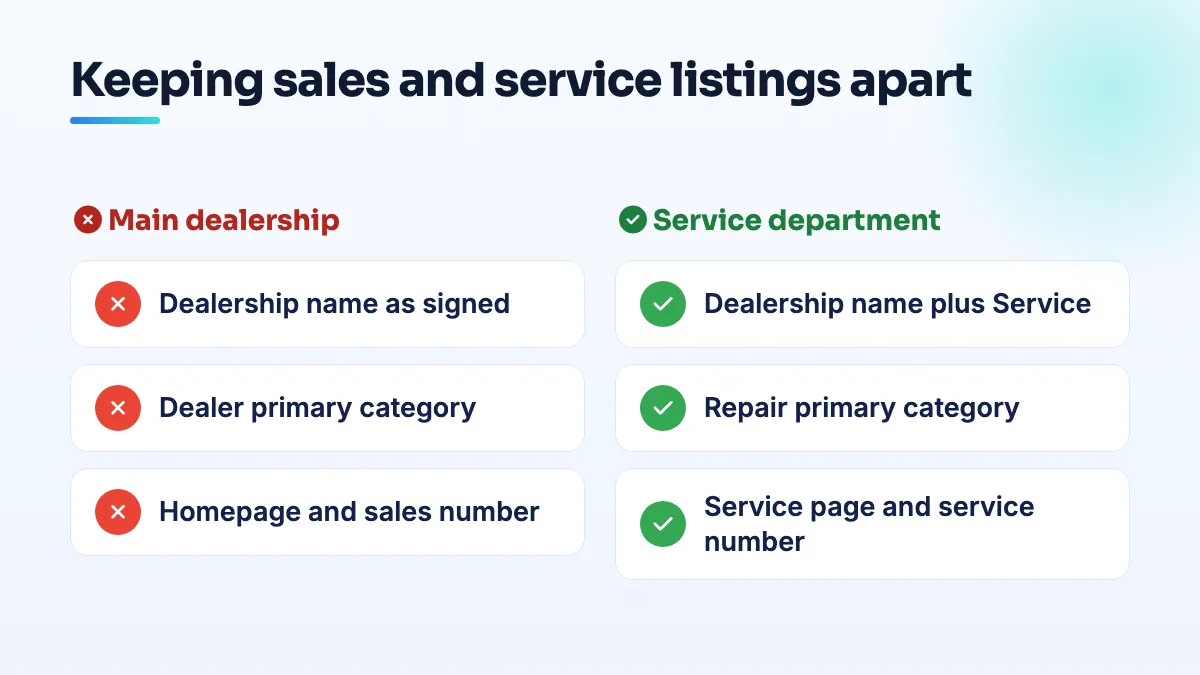
- Check the names. This is the first thing I look at. The main listing should carry the dealership's name exactly as your sign says. The service listing should be the dealership name plus "Service" or "Service Center", as it appears on the service building or lane. If the service listing is named only with the dealership name, that alone can explain it.
- Separate the categories. The main listing's primary category should be the dealer category that fits you. The service listing's should be a repair category. Neither should carry the other's primary category as a secondary.
- Separate the links and phones. The main listing links to your homepage and shows the sales number. The service listing links to your service page and shows the service number. Shared links and numbers blur the two.
- Look for duplicates of the main listing. Search the name, address and sales phone on Maps. A split main listing should be dealt with before anything else, in a quiet month.
- Build up the main listing. Showroom and inventory photos, full sales hours, posts, and a review link that your sales team sends to buyers after delivery. Service already gets reviews from every oil change; sales usually doesn't ask.
- Report it with evidence. Use the feedback option on the panel itself and post in the Help Community with your screenshots, both listing links and the dates. Say that it's the service department showing for the dealership name, so a Product Expert who has seen the pattern before can escalate it.
What not to do
- Don't delete or merge the service listing. It holds your service reviews and brings in service customers. A service department with its own entrance, phone and hours is entitled to its own listing.
- Don't rename the service listing to hide the dealership name. Customers look for "[Dealer] service". Removing the name just hurts service searches and changes nothing on Google's side.
- Don't make several edits at once. Change the name, then wait. Then categories. I work one change at a time on dealer listings, because a burst of edits on two related listings can trigger a review of both.
- Don't send every customer's review request to one listing. Buyers review the sales listing, service customers review the service listing.
If it keeps coming back
Because this is a Google-side problem that has come back before, I'll be straight with you: you may do everything right and still see it from time to time. Keep your screenshots, keep your Help Community post updated rather than starting a new one, and make sure your website works as a fallback: the homepage should make it obvious in the first screen where sales is and where service is, with both phone numbers.
The wider question of which dealer departments should have listings at all is covered in the answer on the service department Google listing rules. It's part of how we set up SEO for auto repair shops and dealer service lanes, and fixing listing structure is routine in our Google Business Profile optimization. If you'd like the website side handled as well, that sits in our local SEO services.
People also ask
Which Google Business Profile categories require a visible address?
Some Google Business Profile categories won't run as a hidden-address service area. Local Search Forum practitioners have confirmed Mechanic and Swimming Pool Contractor, and owners in other categories report being told theirs needs a location customers can visit. If your primary category is one of them, you either show a real address customers can come to during your hours, or choose a different category that fits your work and allows a service area.
Read the full answer: Which Google Business Profile categories require a visible address? →
When does a department or second entrance get its own Google Business Profile?
Only when customers deal with it as its own place. A department that has its own entrance or counter, its own phone line, its own hours and a category different from the main business can have its own listing, named as the business plus the department. A second door, a delivery gate or an internal team can't, and listing them causes duplicate flags.
Why did Google change my business category or name without asking?
Google edits profiles on its own when its systems, or suggestions from the public, decide your details are wrong. It happens most to service-area businesses with hidden addresses: Joy Hawkins confirmed one wave of forced re-categorization hit only those listings. Put your category or name back with a single edit, then make your website, signs and other listings use the same words so the change doesn't return.
Read the full answer: Why did Google change my business category or name without asking? →
Why did Google reject my website URL on my Business Profile?
Google doesn't say, but the cause is usually one of a few things: the link redirects to another address, it's a social or booking page rather than your own site, the site won't load cleanly, or the site shows a different name, address or phone from the profile. Enter the final https address of your own homepage, match the details, and resubmit once other edits have cleared.
Read the full answer: Why did Google reject my website URL on my Business Profile? →
What should you do when no Google Business Profile category fits your business?
Choose the closest category that describes the work customers hire you for, based on the categories the top three businesses use for your main search. Check it doesn't require a storefront you don't have. Then describe your exact specialism everywhere Google allows your own words: secondary categories, custom services, the description and a dedicated page on your website. Make the category change once, because category edits can send a profile back into review.