


Key points
- A missing button rarely means it can't be claimed
- Search for it in Business Profile Manager
- Check every Google account your business used
- The current owner has 3 days to respond
- Don't create a second profile as a workaround
Your business is already on Google Maps, probably created by Google itself, and there's no "Own this business?" link, no Claim button and no Request access option anywhere on it. To claim a Google listing with no claim button, you stop working from the listing and start from Business Profile Manager instead: search for the business there, and Google will either let you verify it or send you into its ownership request process.
A missing button doesn't mean the listing can't be claimed. It usually means you're looking in the wrong place, you're signed in to the wrong account, or someone already controls it. Here's how I work through it.
Why the claim button isn't there
A tattoo school described exactly this in a Help Community thread from a tattoo school with no Claim or Request access button: its own auto-generated listing showed neither option. A manufacturer had a related problem in a Help Community thread from a manufacturer whose edit option never appeared. In both cases the listing existed, and the normal path just wasn't showing.
The causes I check, in order:
- You already manage it, from another Google account. Google doesn't offer a claim link to an account when the listing is already managed. Check every Google account your business has used, including old staff and agency logins you still have.
- Someone else manages it. A former employee, an agency, a previous owner or a booking platform. The route then is a request for access, not a claim.
- You're looking in the wrong place. The claim link doesn't show in every place you might view your listing. Working from Business Profile Manager gets around that.
- The listing is in an unusual state. Marked closed, flagged as a duplicate, or in a category Google treats differently. Those usually need a Product Expert to look at them.
How to claim a Google listing with no claim button
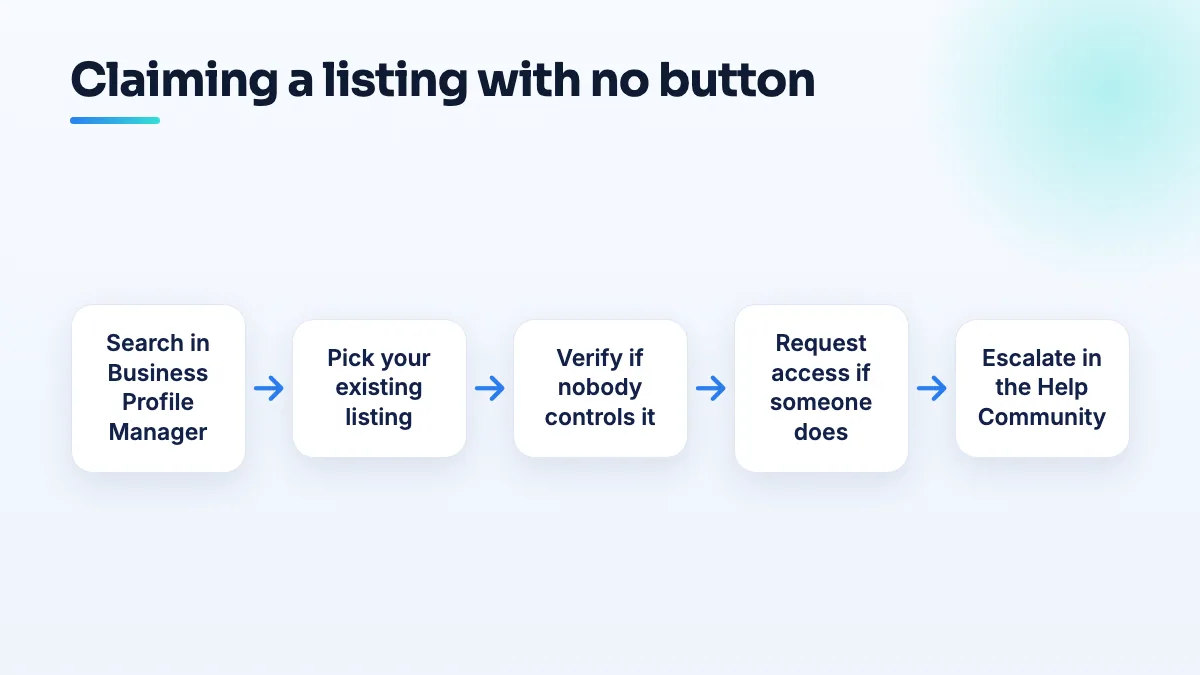
- Sign in to Business Profile Manager and add a business. Type your business name exactly as it appears on Maps, and choose your existing listing from the suggestions that appear. Don't keep typing to create a new one.
- If Google offers verification, verify. That means nobody controls the listing. Follow whichever verification method Google gives you, with your real address and details.
- If Google says someone else manages it, request access. Google's ownership request process notifies the current owner by email, and they have 3 days to respond. Fill in the form with your real name and role, and keep the request confirmation.
- Watch the request status and follow what Google offers next. Depending on how the owner responds, Google tells you what options you have. Don't file a second request while the first is open.
- If none of that works, post in the Help Community. Include the Maps link to the listing, a screenshot showing what you see, which accounts you've checked, and proof you run the business. A Product Expert can tell you whether the listing is in a state that needs escalation.
I wouldn't create a brand new profile to get around a missing button unless a Product Expert has looked at it and suggested it. A second listing for the same business splits reviews and is much harder to fix than a missing link.
When someone else controls it
If the owner is an old agency, a former manager or a web designer you've stopped working with, Google's rules are on your side. Google's policy for authorized representatives says they must transfer ownership to the business owner as soon as they're asked, and a third party has 7 business days to let you regain exclusive control. Ask them in writing first, keep the reply, and use the ownership request if they don't act. I go through the full process in the guide to get your Google Business Profile back from an agency.
What's different for studios, boutiques and manufacturers
Tattoo studios that have changed name, moved, or hosted guest artists can end up with more than one listing on Maps. Claim the one at your real address under your current name, and deal with the others as duplicates afterwards. It's where every tattoo shop SEO project with us starts.
Boutiques that took over an old shop may find the listing belongs to the previous business. That's an ownership change, not a claim, and the previous owner's cooperation makes it far easier. Settling who owns the listing comes before any boutique SEO work.
Manufacturers whose customers never visit may find the listing can't be verified at all at that address, even once claimed, because Google's rules expect a place customers visit or a business that serves customers in person. Check eligibility before spending weeks on the claim. That question is part of any manufacturing SEO plan we build.
And if you'd rather have someone do the untangling, taking back and verifying existing listings is routine in our Google Business Profile management.
People also ask
How do you ask a B2B buyer for a Google review?
Ask one named person who saw the job go well, such as the engineer whose first article passed or the manager who watched your sign go up, within a day or two of the job. Ask in person first, then send a short email with your direct review link. Tell them they don't need to mention part numbers or their company, and never offer anything in return.
Read the full answer: How do you ask a B2B buyer for a Google review? →
Can a booth renter get their own Google Business Profile?
Usually not at the salon's address. Google only lets a business in a shared space list that address if it has its own dedicated space with permanent signage, where customers deal with its own staff during business hours. An open-floor chair doesn't pass that test. A private suite with your name on the door can, and a renter who also travels to clients can list as a service-area business with the home address hidden.
Read the full answer: Can a booth renter get their own Google Business Profile? →
Why are my customers' Google reviews not showing up?
Usually because Google is holding the review back, not because it was never written. A filtered review stays visible to the person who wrote it, so their screenshot doesn't prove it's public. New or empty accounts, sudden bursts of reviews and anything rewarded are the usual triggers. If nobody at all can leave a review, check your profile for a suspension, a verification request or a ratings restriction.
Read the full answer: Why are my customers' Google reviews not showing up? →
Should you use Google Business Profile products or Merchant Center?
One shop with a small range that rarely changes can add products straight to its Google Business Profile, for free and without any feed. Use Merchant Center once you have a second store, a large catalog or an online store already, or when you want shoppers to see what's in stock today. Multi-location shops are effectively pushed to Merchant Center.
Read the full answer: Should you use Google Business Profile products or Merchant Center? →
Why did Google change my business category or name without asking?
Google edits profiles on its own when its systems, or suggestions from the public, decide your details are wrong. It happens most to service-area businesses with hidden addresses: Joy Hawkins confirmed one wave of forced re-categorization hit only those listings. Put your category or name back with a single edit, then make your website, signs and other listings use the same words so the change doesn't return.
Read the full answer: Why did Google change my business category or name without asking? →