


Key points
- Keywords in the name can work briefly, then backfire
- Google requires your real-world name, nothing added
- A stuffed description cost one 92-review cleaning profile
- Categories, services and your website carry the keywords
- Fix the description first, then the name, separately
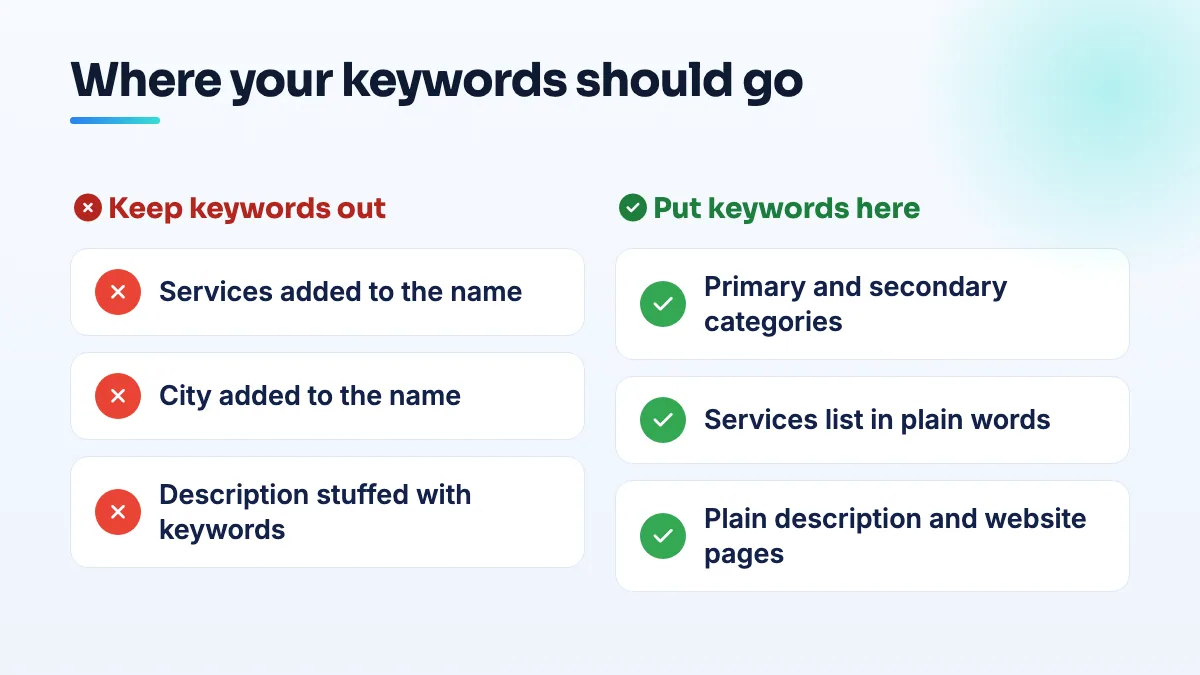
Adding services or a city to your name can lift you for a few searches, for a while. But keywords in your Google Business Profile name break Google's naming rule, and the owners who try it risk losing the whole profile, reviews included. The keywords belong in your categories, services, a plain description and your website instead.
Here's why it seems to work, what it has actually cost businesses, what the name is allowed to contain, and how to take risky keywords out without triggering the suspension you're trying to avoid.
Does adding keywords to your Google Business Profile name help?
Briefly, yes, and that's the trap. Google matches the name against the search, so a listing called "Washer Dryer Fridge Repair [City]" gets a head start on those words. In a Help Community thread about 46 keyword-named mover listings, the poster showed how names built from the search phrase fired a name match rather than a category match. That's why your competitors do it.
It's also against the rules. Google's guidelines for representing your business say the name should be your real-world name, as used consistently on your signage, website and stationery, without added keywords or location details.
And the downside is bigger than the upside. In a Help Community thread about an appliance repair profile with a keyword-stuffed name, the name was pointed to as the reason the profile wasn't getting calls, and as a suspension risk on top. Descriptions carry the same risk. A Miami maid service in a thread about a cleaning profile lost over its description had 92 five-star reviews and lost the profile, and its Local Services Ads campaign with it, over a keyword-stuffed description.
Competitors can also report you. The same edit process I describe for dealing with competitor name spam works just as well against your profile.
What your name is allowed to contain
- Your real name, exactly as you use it. The one on your registration, vans, invoices, website header and storefront.
- A service word only if it's genuinely part of that name. "Riverside Plumbing" is fine if that's what's painted on the truck and filed with the state.
- A city only if it's in the real name. Adding the city to the business name on Google because you want to rank there is exactly what the rule forbids.
- No taglines, phone numbers, "24/7", "best" or "near me".
Where the keywords belong instead
- Categories. Your primary category does more for relevance than any word in your name. Add secondary categories only for work you actually do.
- Services. List each service you offer, in plain words.
- The description. Two or three normal sentences about what you do and where. No lists of cities, no repeated service words.
- Your website. A real page for each main service, which is where most of the keyword work should live.
- Reviews. Customers naturally mention the job they hired you for. Ask for reviews; don't tell people what words to use.
How to remove risky keywords safely
Editing a live profile is when most suspensions happen, so the order matters. This is how I do it for clients:
- Line up your real name everywhere first. Registration, website, signage, invoices and major directories should all show the same name before Google sees the change. A mismatch between the new name and your paperwork is what makes an honest edit look suspicious.
- Fix the description first. Rewrite it in plain sentences and save it on its own. It's the lower-risk change, and it gets the worst stuffing off the profile quickly.
- Change the name a week or two later, and nothing else that day. No address, category, phone or hours edits alongside it. One change at a time is easier for Google to review and easier for you to diagnose if something goes wrong.
- Have your evidence ready. Keep your registration, a photo of your signage or vehicle and your website header on hand. If Google asks for verification or a video, you'll need them.
- Update your directory listings to match. Once the new name is live, change it on the other directories you're listed in so everything agrees.
Edge cases worth knowing
Even an honest name change gets reviewed. A licensed solar contractor in a thread about a rename that led to a suspension changed the profile name to match his LLC and was suspended for deceptive content. That's why I line up the paperwork first and change nothing else at the same time.
If your registered name already contains keywords, keep using it consistently. Google judges the name against what you actually trade as. What I'd never do is register a keyword name purely to justify it on Google.
Appliance repair profiles are the most tempting to stuff, because every appliance is its own search. Put each appliance in your services and on your website instead; that's the setup we build in appliance repair SEO. For cleaning companies, the description is the bigger risk, as the Miami maid service found. List neighborhoods as service areas, not as a paragraph of place names. It's the first thing I check in maid service SEO.
If you're cleaning up a profile, this sits alongside the other Google Business Profile mistakes worth fixing, and it's the kind of careful edit we handle in GBP optimization.
People also ask
Can you offer a discount or gift card for a Google review?
No. Google's review policy doesn't allow money, discounts, gift cards, free services or other incentives in exchange for reviews, even if you never ask for five stars. It often doesn't work either: one lawn care operator gave gift cards to all 21 of their clients, spent $500 and got zero reviews. A plain request at the right moment, with a direct link, does better and stays inside the rules.
Read the full answer: Can you offer a discount or gift card for a Google review? →
Can you appeal a Google review decision more than once?
No. You get one appeal on each review Google decides not to remove, and once the appeal is denied, that decision is final for that review. Wait for the first decision before appealing, and only appeal with new evidence tied to a specific policy clause. After that, your options are a calm public reply, reporting new reviews from the same accounts, and outnumbering the review with genuine ones.
Read the full answer: Can you appeal a Google review decision more than once? →
Why did Google change my business category or name without asking?
Google edits profiles on its own when its systems, or suggestions from the public, decide your details are wrong. It happens most to service-area businesses with hidden addresses: Joy Hawkins confirmed one wave of forced re-categorization hit only those listings. Put your category or name back with a single edit, then make your website, signs and other listings use the same words so the change doesn't return.
Read the full answer: Why did Google change my business category or name without asking? →
Can inconsistent business listings get a Google Business Profile suspended?
Yes, it can contribute. Google doesn't list directory mismatches as a suspension reason, but when your name, address or phone on Yellow Pages, BBB or your own website disagree with your profile, a real business looks like a fake or hijacked listing. That's how profiles end up reinstated and then suspended again. Fix your website and registration first, then correct the directories, then appeal.
Read the full answer: Can inconsistent business listings get a Google Business Profile suspended? →
Will Google remove a review meant for a different business?
Sometimes, but often not. A review meant for another business usually reads like a real customer's experience, and Google can't see which company did the job. Report it as off-topic and point to the detail that proves it isn't you, such as the same review on the other company's profile. Reply publicly and politely, and ask the reviewer to delete it, which is often the fastest fix.
Read the full answer: Will Google remove a review meant for a different business? →