


Key points
- Name the license holder, type and number
- Never imply you hold a license you work under
- Match the license lookup address to your profile
- Use the same wording on site and profile
- Check your state board's advertising rules
This looks like a small copywriting question until it takes your listing down. An electrician in a Help Community thread about a website that implied the owner held the license had his Google Business Profile suspended for "deceptive content", and it stayed down for about seven months. The problem wasn't his work. It was how his electrician license website wording described who held the license.
Why license wording can trigger a deceptive content suspension
When a Google reviewer or a Product Expert looks at a trade business, they compare what your profile and website claim with what they can confirm elsewhere, and public license records are the easiest thing to check. If your site says "licensed master electrician" next to the owner's name and the license actually belongs to someone else, a reviewer sees a claim that isn't true. Even if the arrangement behind it is perfectly legal, the words on the page are what get judged.
The address on the license record causes the other half of these problems. In a Help Community thread from an electrical contractor denied verification repeatedly, a Product Expert looked him up and found the company filing pointed to a UPS Store mailbox and the license lookup returned a hair salon's address. Nothing on the profile matched anything official, so verification kept failing with generic reasons.
I go through how these suspensions work, and how to appeal one, in the guide to deceptive content on Google Business Profile.
Electrician license website wording, step by step
When I audit an electrical company's site, this is the order I work in. It takes an afternoon, and it's the first thing I do in any electrician SEO project because everything else depends on the profile staying live.
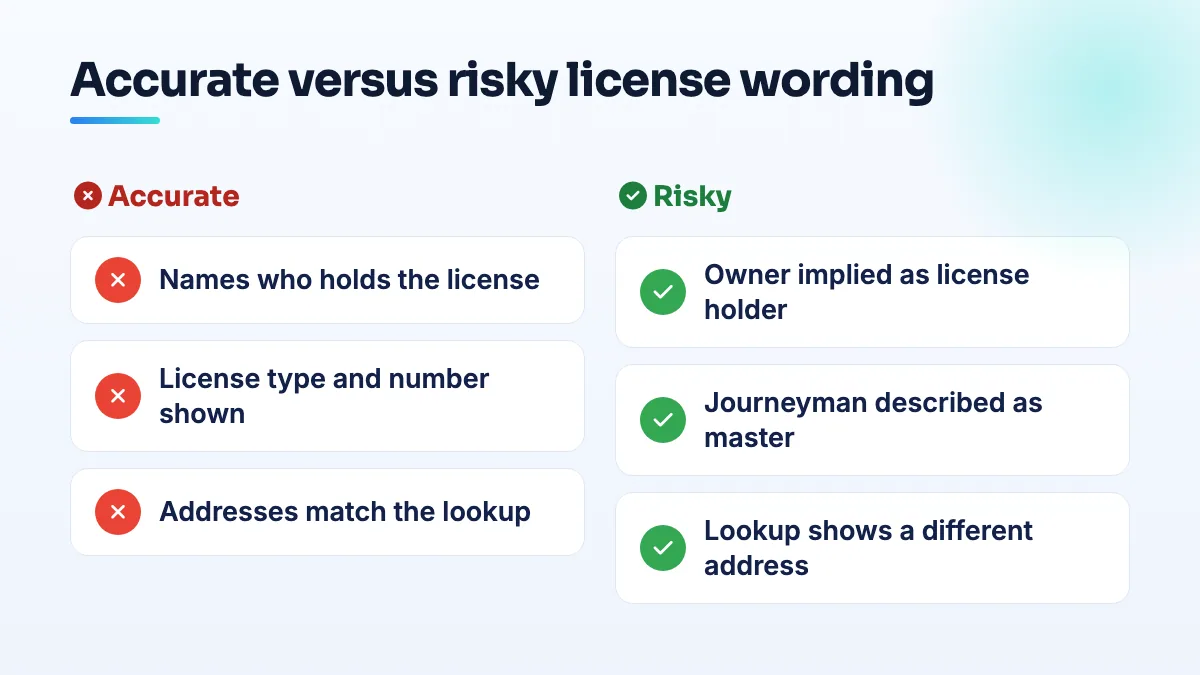
- Look yourself up on the state or provincial license search first. Write down exactly what it shows: the license holder's name, the license type, the number, the status and the address. That record is the version of the truth Google and customers can check.
- If you hold the license yourself, say it the way the record says it. "[Your name], Master Electrician, License #[number], [State]." Put it on your About page and in the site footer. Don't upgrade the type; a journeyman license described as a master license is the same problem.
- If the company holds the license through a qualifier, name the qualifier. Something like "Electrical work is performed under [Company]'s license #[number], qualified by [Name], Master Electrician." The owner can still be the owner. He just isn't described as the license holder.
- If you work under another contractor's license, say so in plain words. "We work under the license of [Contractor], #[number]." Licensing boards often have their own rules on how this arrangement can be advertised, so I always tell clients to check theirs before publishing anything.
- Remove every sentence that implies more than the record shows. Search your whole site for "licensed", "master" and "certified", including the homepage banner, service pages, image text and old blog posts. Check your Google profile description, business name and posts too.
- Make the addresses agree. The address on your license record, your state business filing and your Google profile should point to the same real place. If one still shows a mailbox or an old unit, update it with the board or registry before you appeal or verify. It's often the reason a licensed contractor cannot verify with Google.
If you're already suspended, and the edge cases
Fix the website first, then appeal. An appeal that says "I'm licensed" while the site still carries the misleading line gives the reviewer the same evidence that suspended you. In the appeal, include a screenshot of the license lookup and the page where you've corrected the wording, and explain the arrangement in one or two sentences.
- Apprentices and journeymen starting out: don't advertise as a contractor until you can legally contract. Market under the company you work for.
- Licensed in one state, working in another: list each license separately, and only claim work in states where one is active.
- A license that lapsed: take the number down until it's renewed. A lookup showing "expired" next to a website saying "licensed" is exactly the mismatch reviewers catch.
I'd rather you had a license line that sounds modest and is exactly right than one that sounds impressive and can be disproved in thirty seconds. If the site needs rebuilding around accurate wording anyway, it's a quick fix inside a website design project.
People also ask
Does a contractor license help you pass Google Business Profile verification?
Not much on its own. Google doesn't verify you because you're licensed; it checks that your records, profile and video all point to the same business at the same address. A license lookup or corporate filing showing a different address, or a mailbox, can make verification fail. Align every record first, then show the license in your video as supporting proof.
Can editing my Google Business Profile get it suspended?
Yes. Changes to your name, address, primary category, service area and even opening hours can send a profile back through Google's review, and real businesses have been suspended within minutes of making them. Photos, posts and review replies are rarely a problem. Before a risky edit, make sure your website and directories already show the change, make one planned change per session, and never edit while verification or an appeal is pending.
Read the full answer: Can editing my Google Business Profile get it suspended? →
Why do emergency dental patients leave one-star reviews after a limited exam?
Because they booked expecting the tooth to be fixed and left with a diagnosis, an X-ray, a bill and another appointment. The visit did what it was meant to do, but nobody told them what that was. Explain what a limited exam includes, what it costs and what usually needs a second visit on the phone, in the confirmation, on your website and at check-in.
Why did Google reject my website URL on my Business Profile?
Google doesn't say, but the cause is usually one of a few things: the link redirects to another address, it's a social or booking page rather than your own site, the site won't load cleanly, or the site shows a different name, address or phone from the profile. Enter the final https address of your own homepage, match the details, and resubmit once other edits have cleared.
Read the full answer: Why did Google reject my website URL on my Business Profile? →
Do I need a website if I already have a Google Business Profile?
Yes. A Business Profile can bring calls on its own, but a website is what lets you rank for more searches, explain each service, and convert visitors who want detail before calling. Google also reads your website to judge your profile's relevance. Since Google closed its free profile websites in 2024, you need your own.
Read the full answer: Do I need a website if I already have a Google Business Profile? →