


Key points
- Never click links or call numbers in the message
- Real Google requests appear inside your own profile
- Nobody legitimate asks for your verification code
- Claiming and verifying a profile is free
- Hang up on inbound callers and check yourself
Most unsolicited calls and emails about your Google listing are not from Google. A Google Business Profile scam email usually warns that your listing will be removed, your website isn't compliant or your ranking is at risk, then asks you to click, pay or call back. The test I use is simple: if Google really needs something from you, it's waiting inside your profile when you sign in yourself.
The hard part is that real Google requests exist too, and some of them look suspicious. Here's how to tell them apart in a couple of minutes.
Why these messages are so hard to judge
Scammers copy the language of real problems. Landscapers on LawnSite describe a steady stream of unsolicited "your site isn't compliant" emails aimed at lawn care companies, and the result is that many owners now distrust anything about SEO at all. Sign shops say the same. In a Signs101 thread about marketing a sign shop on no budget, owners explain that cold-call spam is why they won't talk to SEO vendors.
Then there's the opposite case. A dentist posted in a Help Community thread about a license verification message because they genuinely couldn't tell whether a request about their dental license was real or a scam. When Google's own messages can look like fraud, owners need a way to check that doesn't depend on how the message looks.
How to check any Google Business Profile scam email or call
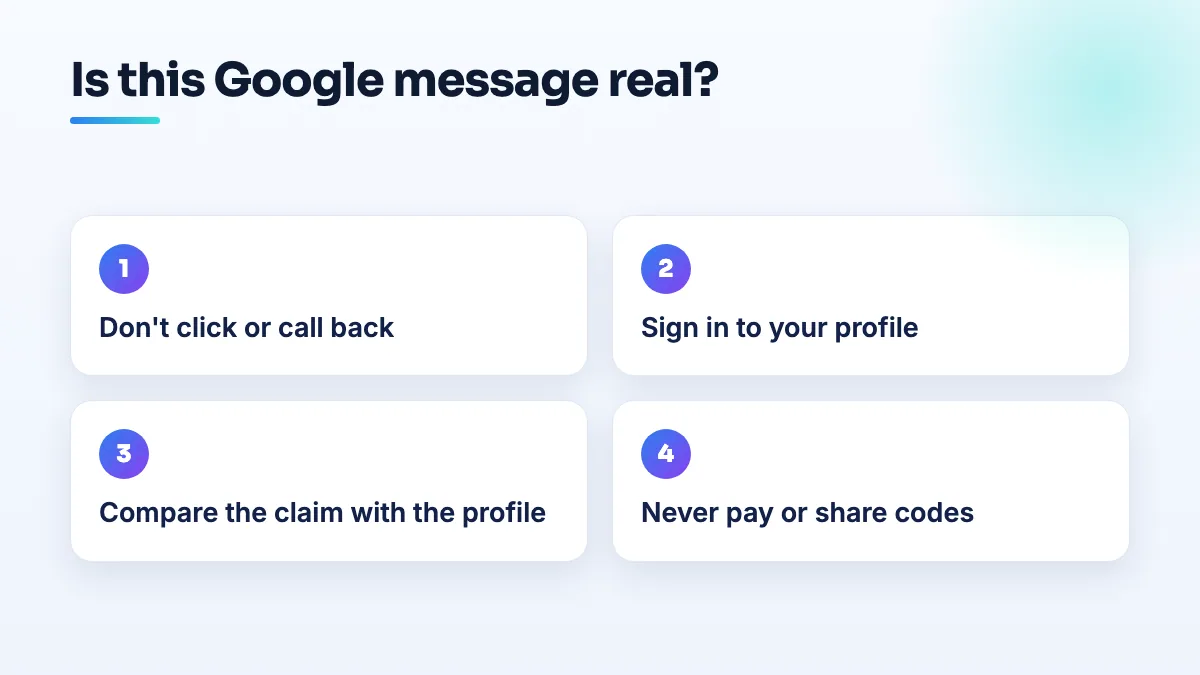
- Don't click anything in the message. Don't call a number from it either. Close it and open a new browser tab.
- Sign in to your profile yourself. Search your business name on Google while signed in to the account that owns the listing, or open Google Business Profile from a bookmark you saved earlier. Real verification requests, suspensions, ownership requests and policy notices show up there.
- Match the request to what you see. If the message says your listing is suspended but your profile looks normal, it's not real. If it asks for a license or documents and your profile shows the same request, go through it inside the profile only.
- Check the sender, then ignore it anyway. A sender address that isn't from Google is a clear sign of a scam. A Google-looking address proves nothing, because it can be faked, so step 2 is still the real test.
- Hang up on anyone who calls first. If a caller claims to be from Google, end the call and check your profile yourself. Nobody legitimate needs you to act while they wait on the line.
- Tell your staff the rule. Front desks take most of these calls. The rule for everyone: we never pay, share a code or give account access on a call we didn't make.
The red flags I see most often
- A deadline. "Your listing will be removed in 24 hours" is written to stop you checking.
- A guaranteed ranking. Nobody can promise first place on Google Maps, and Google doesn't sell it.
- A request for your verification code. Codes are for you to enter into your own profile. Anyone asking you to read one out is trying to take the listing.
- A request to add them as an owner or manager. Once they're an owner, getting the listing back can take weeks.
- Payment for something that's free. Creating, claiming and verifying a Business Profile costs nothing.
- A vague compliance claim. "Your website isn't compliant" with no specific rule, page or law named is a sales pitch, not a notice.
If you've already clicked, paid or shared a code
- Change your Google account password and turn on two-step verification.
- Check who manages the profile. Remove any user or owner you don't recognize.
- Look for edits you didn't make to the name, phone, website or hours, and put them back.
- Call your bank about any card payment and ask about reversing it.
What's different for dentists, landscapers and sign shops
For dental practices the hardest ones to judge are about licenses, because license and credential checks sound plausible for a regulated profession. Run every one through step 2, and keep one person at the practice who owns the Google account so requests don't get lost between the front desk and the dentist. It's part of how I set up dental practice SEO from day one.
Lawn care companies get the "compliance" emails in bulk, which is exactly what the LawnSite owners were complaining about. I tell lawn care SEO clients to forward anything like that to me before replying. Sign shop owners describe the phone calls more than the emails, and the answer is the same: hang up and check. The sign shop owners in that thread are right to be wary, and it's why I'd point anyone doing SEO for sign shops to plain, checkable results instead of promises.
If a legitimate agency approached you and you want to know whether they're doing anything, read how to check your SEO agency before you pay a second invoice. And if the scare message was about something real, like a suspension, our Google Business Profile management starts with exactly that fix.
People also ask
How do you ask a B2B buyer for a Google review?
Ask one named person who saw the job go well, such as the engineer whose first article passed or the manager who watched your sign go up, within a day or two of the job. Ask in person first, then send a short email with your direct review link. Tell them they don't need to mention part numbers or their company, and never offer anything in return.
Read the full answer: How do you ask a B2B buyer for a Google review? →
Why are my customers' Google reviews not showing up?
Usually because Google is holding the review back, not because it was never written. A filtered review stays visible to the person who wrote it, so their screenshot doesn't prove it's public. New or empty accounts, sudden bursts of reviews and anything rewarded are the usual triggers. If nobody at all can leave a review, check your profile for a suspension, a verification request or a ratings restriction.
Read the full answer: Why are my customers' Google reviews not showing up? →
Can you offer a discount or gift card for a Google review?
No. Google's review policy doesn't allow money, discounts, gift cards, free services or other incentives in exchange for reviews, even if you never ask for five stars. It often doesn't work either: one lawn care operator gave gift cards to all 21 of their clients, spent $500 and got zero reviews. A plain request at the right moment, with a direct link, does better and stays inside the rules.
Read the full answer: Can you offer a discount or gift card for a Google review? →
Why do emergency dental patients leave one-star reviews after a limited exam?
Because they booked expecting the tooth to be fixed and left with a diagnosis, an X-ray, a bill and another appointment. The visit did what it was meant to do, but nobody told them what that was. Explain what a limited exam includes, what it costs and what usually needs a second visit on the phone, in the confirmation, on your website and at check-in.
Is a perfect 5.0 Google rating bad for a business?
Not in itself, but a perfect 5.0 made of short, identical reviews is something patients openly say they distrust. People choosing a chiropractor or dentist read the reviews, not just the score. A profile with detailed reviews, a few honest four-stars and calm replies to criticism usually looks more believable than a flawless rating. Ask every patient, spread requests out and let the content build trust.
Read the full answer: Is a perfect 5.0 Google rating bad for a business? →