

You can hand your Google profile to the front desk, but only if the job is written down and the risky edits are kept out of it. This Google Business Profile weekly checklist takes about 20 minutes, covers everything a clinic or pharmacy needs done each week, and deliberately leaves out the changes that get profiles suspended.
Chiropractors ask me for this more than anyone. Owners in a Reddit thread from chiropractors who want staff to handle Google upkeep want their team to run it, and new chiropractors in a Reddit thread where new chiropractors are told the listing is everything are told early on that the verified listing is most of the game. Dental offices and independent pharmacies are in the same position: the front desk is closest to patients and has the time, and the owner is with patients all day.
Here's the routine, the list of things staff should never touch, and what changes for chiropractic, dental and pharmacy.
Why the routine leaves out certain edits
Most of what keeps a profile healthy is low-risk: reading it, replying, posting and adding photos. The dangerous part is editing the core facts. Across every health vertical I researched, the most common cause of a suspension was an edit to the name, address, phone, hours or category.
Two examples from the Google Business Profile Help Community show how small the edit can be. In a Help Community thread about a pharmacy suspended after a name edit, a fully licensed pharmacy changed only the format of its name and was suspended for "deceptive content," with the appeal under review for two weeks. In a Help Community thread from a business suspended after editing its hours, the trigger was an opening hours change.
So the rule for staff is simple: look, reply, post and add photos every week. Anything that changes who you are or where you are goes to the owner.
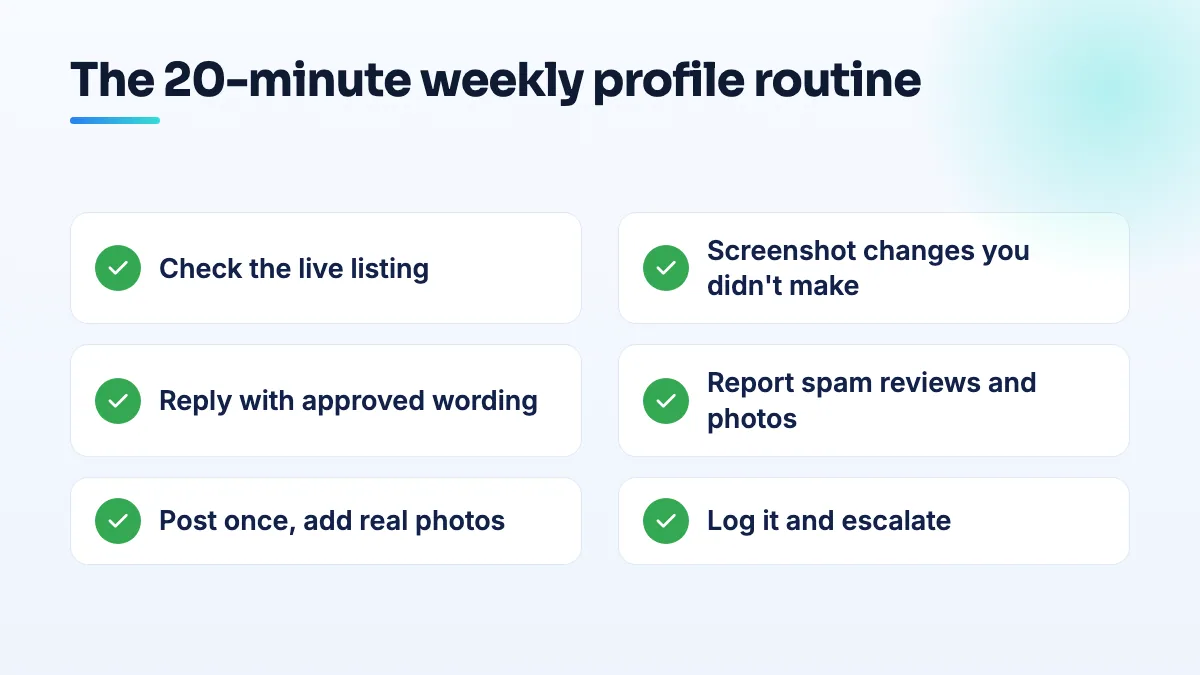
The Google Business Profile weekly checklist
Put this in the front-desk calendar for the same quiet slot every week. It works in the order below.
- Search the practice name on Google and Maps (3 minutes). Check the profile shows, the hours are right, the phone number is yours and the website link works. Look for a second listing with your name or a doctor's name at your address. If anything looks wrong, don't fix it. Screenshot it and put it on the escalation list.
- Check for changes you didn't make (2 minutes). Google and the public can suggest edits, and the profile may show an update waiting for review. Don't accept or reject anything to the name, address, phone, category or hours. Screenshot and escalate.
- Reply to every new review (5 to 8 minutes). Use the practice's approved replies, adjusted to the review. Thank the person, never confirm they're a patient, never mention a treatment, a visit, an appointment time or a medication. If the review is angry, about billing or mentions a staff member by name, don't reply. Escalate it.
- Report reviews and photos that break Google's rules (2 minutes). Spam, offensive content or a review clearly meant for another business can be flagged from Maps. Write down what you flagged and the date, so you don't flag the same thing twice.
- Publish one post (3 minutes). A seasonal reminder, a new service, a holiday closure, a staff welcome. Use a photo you took, with no patient in it and nothing on screen.
- Add two or three real photos (2 minutes). The front of the building, the waiting room, the team at the start of the day. No patients, no screens, no paperwork in view.
- Log it and send the escalation list (1 minute). A shared sheet with the date, reviews answered, post published, photos added and anything escalated. The owner reads the escalation column and nothing else.
On posting, I'd rather see one real post a week than five pieces of filler. There's a fuller answer on how often to post on Google Business Profile if the team asks.
What front-desk staff should never change
Print this and stick it next to the checklist. Each of these goes to the owner or whoever manages your profile:
- The business name, including punctuation, a doctor's name or a service word.
- The address, the service area or the map pin.
- The primary category or additional categories.
- The main phone number or the website link.
- Regular opening hours. Holiday hours should be set by the owner ahead of time, not on the day.
- The business description.
- Who has access to the profile.
If one of these genuinely needs to change, the owner should make one change at a time and then leave the profile alone while Google reviews it. I explain the safe way to edit a Google Business Profile in a separate answer. Plenty of other slips are covered in the list of common Google Business Profile mistakes.
How to set up access so staff can do this safely
- Keep ownership on the owner's own Google account. Not a staff member's, not an agency's and not a shared inbox that nobody controls. If the one account that owns the profile disappears, the profile can go with it.
- Add the front-desk person as a manager, not an owner. Managers can reply, post and add photos. Use their work email so access leaves with the job.
- Write the approved replies before handing over. A handful of short replies: thanks for a good review, a general complaint and a wait-time complaint. Everything else is escalated. The owner approves them once.
- Remove access the day someone leaves. Add it to your leaving checklist next to keys and passwords.
What changes for chiropractic, dental and pharmacy
Chiropractic offices
The front-desk risk here is replying too personally. In a Reddit thread about a chiropractic receptionist's review reply, chiropractors discussed a receptionist who publicly answered an anonymous review in a way that confirmed the reviewer was a patient. That's the reply your approved templates exist to prevent. For a brand-new office, the weekly routine matters even more because the listing carries most of the load in the first months; it's usually the first piece of our chiropractic SEO work.
Don't coach staff to push every patient for five stars. People who search for a chiropractor often read a wall of perfect ratings as suspicious, as a Reddit thread where Houston locals discuss chiropractor ratings shows. A steady, honest flow of reviews reads better.
Dental practices
Review replies are where dental front desks carry real legal risk. The federal health regulator settled with a dental practice over review replies that disclosed patient information, in the HHS resolution agreement with New Vision Dental. So step 3 is strict for dentists: approved replies only, and anything about treatment, pain or a bill is escalated, not answered. I go through safe wording in the guide to a HIPAA review response. Dental offices should also watch step 1 closely for a duplicate listing under an individual dentist's name.
Independent pharmacies
For a pharmacy, the hours check in step 1 is the one that pays. People choose a pharmacy on location and hours, so wrong holiday hours cost real prescriptions. Staff should check them every week and escalate any mistake instead of fixing it themselves, because of the name-edit suspension above. Posts that work well for pharmacies are practical: flu shot days, delivery days and holiday closures.
When to escalate straight away
- The profile doesn't show, or shows as closed or suspended.
- A review mentions a staff member, a lawsuit, a regulator or a health outcome.
- A sudden burst of reviews, good or bad.
- Reviews disappearing.
- An email or call claiming to be from Google asking for payment or access.
Those need the owner or someone who handles profiles for a living, not a front-desk reply.
Handing it over this week
Write the approved replies, add your front-desk lead as a manager, print the checklist and the never-change list, and block the 20 minutes in the calendar. If you'd rather have the escalations and the risky edits handled by us while your team does the weekly routine, that split is how our Google Business Profile management works for most practices.
Written by Saifur Rifat, Founder & SEO Lead at SERP Squad.