

Your tours all land in one busy month, and the rest of the year the waitlist sits in a spreadsheet nobody updates, so families drift off to whoever called them back first. A school enrollment marketing calendar fixes both: you plan your pages and Google profile updates backwards from tour season, and you turn the waitlist into a page that captures families properly and keeps them warm until a spot opens.
This hits private schools, preschools and daycares alike. Parents in a Richmond parents' Reddit thread about February school tours describe tours in their area clustering in February. Childcare providers in a Reddit thread from providers with long waitlists describe lists running 12 to 16 months that aren't handled well. One problem is too much demand at once, the other is demand you're quietly losing.
Below is how I'd build the waitlist page, the calendar I'd work to, and what to avoid.
Why enrollment demand comes all at once
Parents don't shop for schools when it suits you. They shop when the school year, a new baby's arrival or a return to work forces the decision. In many areas that pushes every tour into a few weeks. If your pages, photos and tour booking aren't ready before that window opens, you spend it answering the same questions by phone while families book tours elsewhere.
The fix is simple to describe and easy to put off: know your tour month, then do the work two to four months before it.
Why long waitlists lose families
A waitlist looks like a good problem. In practice it's where a lot of future enrollments go missing. The patterns providers describe are the same ones I see when I look at how a school handles enquiries:
- Families join several lists at once. Your list is one of five, and the school that gets in touch first wins.
- Nobody hears anything for months. Parents assume silence means no and stop waiting.
- The list is out of date when a spot opens. By the time you call, the child has started elsewhere, and you work down a list of dead numbers.
- The rules are unclear. Parents don't know whether a fee holds a spot, how offers are made or how long they have to answer. That's how disputes start. Parents in a Reddit thread about losing a daycare spot over a deposit dispute show how quickly that becomes a public complaint.
How to build a daycare waitlist page that converts
A waitlist page is not an apology for being full. It's the page that turns interest you can't serve today into the families you enroll next year. This is how I'd set it up.
- Give it its own page on your website. Call it what parents search for, such as "Join our waitlist", and link to it from your home page, your enrollment page and your Google profile. Don't hide it inside a PDF.
- Say honestly how long the wait is, by age group. Infant, toddler and preschool rooms usually differ. A rough, honest range helps a parent plan. "Full" with nothing else sends them away.
- Explain the rules in plain words. Whether there's a fee, whether it's refundable, how you decide who gets offered a spot, how you contact families and how long they have to reply. Put the same rules in the confirmation email.
- Ask only for what you need. Child's date of birth or due date, the start date they want, the days they need, and a phone and email. A short form gets finished. A long one gets abandoned on a phone.
- Send a confirmation straight away. An automatic email that says they're on the list, what happens next and when they'll hear from you.
- Update every family on a schedule. Every three months, a short email asking whether they still want a place and confirming their details. It keeps the list clean and reminds them you exist while the other schools stay silent.
- Offer a tour to families on the list. A family that has seen the rooms and met the staff is far more likely to say yes when the call comes.
A school enrollment marketing calendar built around tour season
Your tour month may not be February. Work out when most of your tours and applications actually happen, from last year's enquiry dates or your booking system, then plan backwards from that month.
| When | Website | Google profile |
|---|---|---|
| Three to four months before tours | Update tuition, programs, staff and admissions pages. Check the waitlist page and form work on a phone. | New photos of rooms, grounds and recent events. Check hours, phone and website link. |
| Six to eight weeks before | Publish tour dates and a booking link. Add a page answering the questions parents asked most last year. | Post the tour dates with a link to the booking page. |
| Tour month | Keep tour slots current. Remove full dates quickly. | Reply to messages and reviews within a day. Post reminders about remaining slots. |
| After tours and decisions | Invite families who didn't get a place onto the waitlist page. | Ask enrolled families for honest reviews after their first weeks. |
| Quiet months | Write one useful page a month: what a day looks like, how to prepare a child to start, how your programs compare. | Keep posting photos and news so the profile isn't stale when tour season returns. |
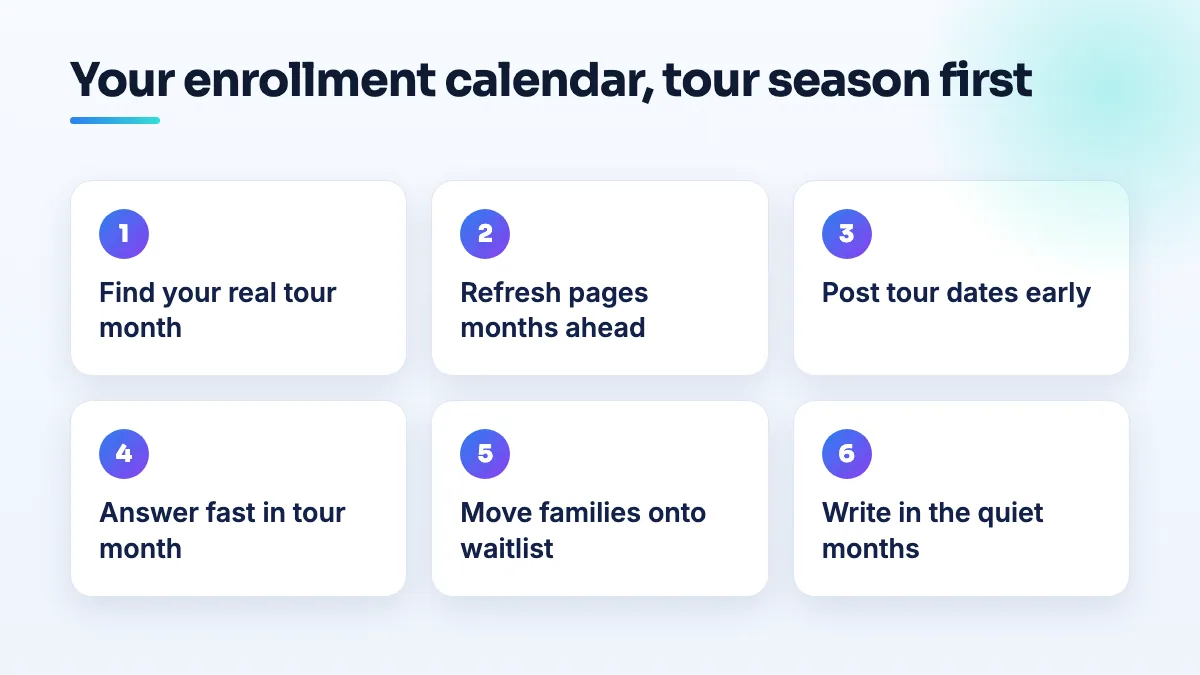
The quiet months are where most schools lose ground. The pages you write then are the ones Google has had time to find by the time parents start searching. If writing isn't something your staff have time for, this is the kind of SEO content writing we plan around a school's calendar.
Keep your Google profile in step with the calendar
A parent's first look at your school is usually the Google profile, not your website. In tour season it should show that you're active and organized.
- Post tour dates as updates with a link to the booking page, and remove or replace them when they pass.
- Change your hours when the office hours change. If the office closes in summer, set the hours so parents don't call an empty building.
- Add photos after every event (with consent for any children who can be identified). A profile whose newest photo is two years old looks like a school that isn't paying attention.
- Answer reviews and messages quickly, especially in the weeks when parents are comparing you with other schools.
What's different for daycares, preschools and private schools
- Daycares enroll year-round as children age up and families move, so the waitlist matters more than a tour season. If one room has a much longer wait than the others, make that range especially clear.
- Preschools tend to follow the school year, so tour season and the waitlist both matter. Put the application window on the waitlist page so families know when to act.
- Private schools usually have fixed application deadlines. Put the deadline everywhere: website, Google profile posts, tour confirmation emails.
What not to do
- Don't take a waitlist fee without clear written terms. Unclear fees are how a waitlist turns into a dispute and a public review.
- Don't delete families from the list without contacting them. Ask first. Some are still waiting and will be upset to find they were dropped.
- Don't post tour dates only on social media. Parents searching on Google won't see them. Put them on your website and your profile.
- Don't leave last year's tour dates up. Old dates tell parents the school isn't keeping its information current.
- Don't say "no spots" and stop there. Give the waitlist link every time, on the phone, by email and on the website.
Where this fits
A calendar and a waitlist page matter once you have demand. If you're still filling your first rooms, start with where parents find daycare instead, and if rating sites dominate your name search, read about school name search results. If you'd like the whole calendar planned and run, it's part of our childcare SEO work.
Written by Saifur Rifat, Founder & SEO Lead at SERP Squad.