

If most of your clients came through Rover or Wag, you've built a business on someone else's list. The platforms' terms don't let you take those clients off the app, so the day you want to leave, the client base stays behind. The way to leave Rover and Wag with your own clients is to build a second channel alongside the app, a Google Business Profile, a simple website and a referral habit, filled only with people who found you outside the platform.
Groomers have a version of the same problem. When everything comes by word of mouth, income rises and falls with no warning. The fix for both is a way of being found that you own.
Why you can't just leave Rover or Wag with your own clients
Walkers run into this all the time. In a Reddit thread from a Wag walker about the client list they couldn't keep, the frustration is simple: a list of regular clients who know and trust you, and no way to take them with you. Another walker asked in a Reddit thread on networking without breaking Wag or Rover's terms how to meet owners while out walking without soliciting current app customers.
That second question is the right one to ask. The platforms found those clients and take a cut in return, and their terms protect that. I'm not a lawyer and the terms change, so read the current version for any app you use. My rule for clients is simple: if someone booked you through the app, treat them as the app's client. Don't message them offering cheaper bookings off the platform. It risks your account, and it's the kind of thing that ends a reputation in a small neighborhood.
What counts as your own client
You don't need the app's clients. You need new ones who never came through it. These are the sources I'd count as yours:
- People who found you on Google through your profile or your website.
- Referrals from vets, trainers, groomers and pet shops who hand out your card.
- Neighbors and people in your building who ask about you, not people you approached because they're app clients.
- Friends of your direct clients who were told about you.
- People who saw your van, your branded leash bag or your flyer at the dog park.
Tag every new client with where they came from. After a few months, that list tells you which channel is really growing and whether you're close to not needing the app.
How to build a dog walker own business channel, step by step
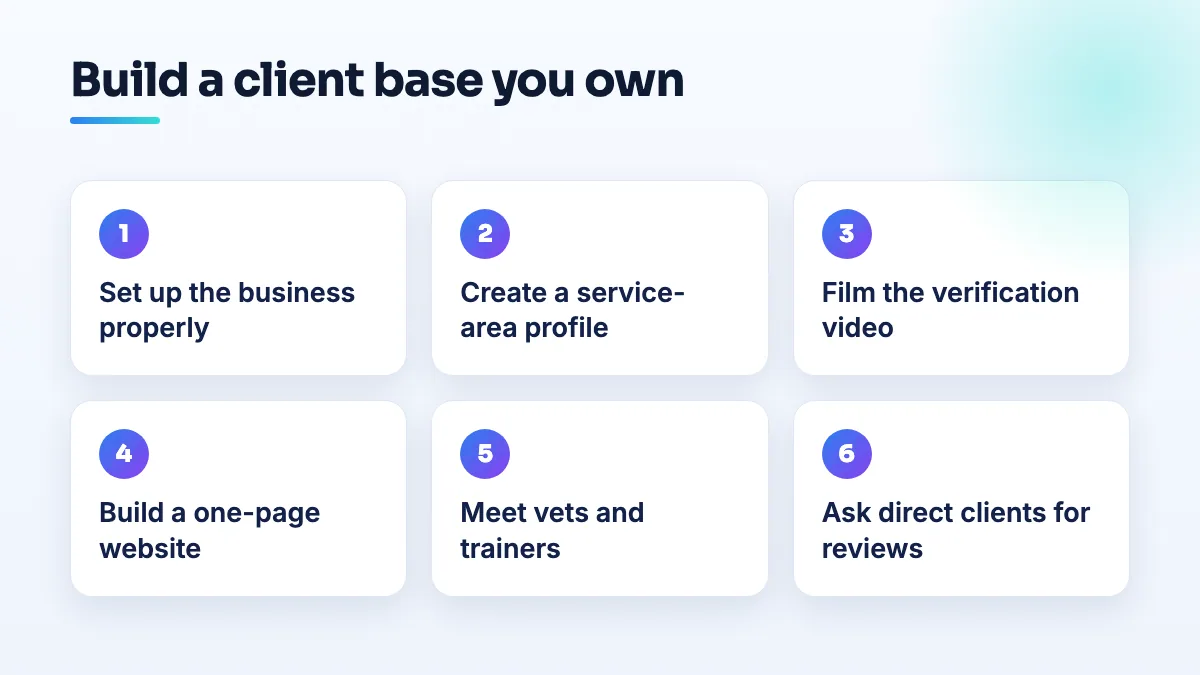
- Set the business up properly first. A registered business name, insurance, and a clear list of services and prices. You'll need all three before a Google profile or a vet referral makes sense.
- Create a Google Business Profile as a service-area business. You go to the client, so hide your home address and list only the neighborhoods or towns you really cover. I explain how a service area business can hide its address, and why that can affect visibility.
- Prepare for the verification video. Google's automated feedback expects a storefront. A dog walker in a Help Community thread about a dog walker asked for a storefront was told to show a store front, cash register or signage, none of which she had. Film the street near your base, your car with crates and leads, and your booking app or insurance instead. I set out the full shot list for how to verify a home based business with Google.
- Build a one-page website. Your services and prices, the neighborhoods you cover, your insurance, a photo of you with dogs, and a booking or meet-and-greet form. Link it from the Google profile.
- Get in front of the people who refer pet owners. Drop cards and a short note at local vets, trainers, groomers and pet shops. Offer the same in return for their clients.
- Ask every direct client for a Google review. Send the link after the first few weeks, when they're happy and the routine has settled. Reviews are what make a stranger pick you over the app.
- Keep the app running until direct clients cover what you'd lose. Leaving too early just swaps one kind of instability for another. Watch your source tags and decide with numbers.
Groomers: turning word of mouth income into something steadier
Groomers describe the same instability from a different angle. A groomer in a Reddit thread from a groomer with unpredictable income called their income "volatile to the last bit", and another groomer on the same forum said they get one or two new client enquiries a week. Word of mouth is a great source of trust, but you can't turn it up when the diary is empty.
What's different for groomers:
- Rebooking beats new clients. Book the next appointment at checkout, every time. A groomer with a full rebooking habit needs far fewer new enquiries.
- Your Google profile needs photos. Before and after shots of real dogs, with the breed noted, do more than any description. Add a booking link you control.
- Home-based groomers have an address problem. A home-based groomer in a Help Community thread about a home groomer invisible in search hid the door number for safety and then couldn't be found. If clients come to your home, the address is part of how Google places you. Decide which matters more to you before you set it up, and keep the setup consistent.
- Mobile groomers should check the business name on the profile. One mobile grooming business found that Google had renamed it without permission. Check your profile regularly and fix edits fast.
Groomers in corporate salons
If you work at a chain salon, your contract may limit how you advertise yourself. A groomer in a Reddit thread about groomers restricted by corporate salons ran into exactly that. Read your employment agreement before you build anything. What you can usually do is keep a photo portfolio of your own grooms, with the salon's permission, ready for when you go independent. When you do leave, start with the Google profile and website steps above rather than approaching the salon's clients.
What to expect from a pet sitter Google Business Profile
Pet businesses hit some of the same walls on Google as any home-based trade, and a few of their own. Plan for these:
- Verification rejections asking for a storefront. They're the norm for walkers and sitters. Film what you have, as above.
- Posting features switched off. A dog training and walking profile had posting disabled and didn't appear in search. If it happens, check the business name, category and address settings before contacting support.
- One-star reviews from people you turned away. Pet businesses get retaliatory reviews from people refused a booking. Reply calmly and factually, and flag reviews from people who were never customers.
What not to do
- Don't solicit app clients off the platform. It's the fastest way to lose the account you still rely on.
- Don't copy your app reviews onto your website as if they were Google reviews. Start collecting your own.
- Don't set a service area far wider than you drive. It looks like a lead generator and invites trouble on Google.
- Don't quit the app on a good month. Quit when your own clients carry you through a bad one.
Where to start
This week, create the Google profile, hide your address, and ask three direct clients for a review. That's the start of a list nobody can take from you. If you want help with the setup, it's part of our Google Business Profile management, and the wider plan is what our pet business SEO work covers.
Written by Saifur Rifat, Founder & SEO Lead at SERP Squad.