

When the owner account behind your Google Business Profile is deleted or restricted, the profile usually goes down with it, and the same account problem blocks the edits and appeals that would bring it back. The way out is to fix the Google account first and the profile second, and the moment you're back in, add a second owner so one account can never take your listing down again.
I see this in every trade. In the Google Business Profile Help Community it shows up as HVAC companies, cleaners and decades-old storefronts all describing the same loop: the profile is suspended, the appeal button leads nowhere, and somewhere in the small print it says "Google Account restricted".
Below is how to tell which situation you're in, the order I'd work in to get control back, and the setup that stops it happening twice.
What happens when a Google Business Profile owner account is deleted
A Business Profile doesn't belong to your business in Google's systems. It belongs to the Google accounts listed as its owners. When the primary owner's account disappears, the profile can lose the only person able to manage it, and it often gets suspended at the same time.
In a Help Community thread from an HVAC company whose primary owner account was deleted, the profile was suspended and the owner posted four escalation requests in a single week trying to get anyone to look at it. In a thread from a 20-year-old HVAC company suspended after verification, it wasn't only the profile: the owner's whole Google account was restricted too.
Storefronts aren't immune. A clothing store that had traded for decades was suspended for "deceptive content", had its appeal denied and was promised a video verification email that never came. Four months later, in a Help Community thread from a boutique stuck in a verification loop, every link in the dashboard looped back on itself, the Continue button was disabled and the only explanation was a line reading "Google Account restricted".
Why a restricted account blocks the fix
This is the part that makes owners want to throw the laptop. The restriction doesn't just hide your profile. It stops you from making the changes that would lift the suspension.
An exterior cleaning company in Idaho put it exactly in a thread about a restriction that blocks compliance edits: "the system blocks me from making any compliance edits (such as completely hiding my home address)". Hiding the address was the fix. The account restriction made it impossible, and appeals came back rejected within minutes.
The biggest version of this I found was a urology group that lost 38 listings at once because the account of an agency it had fired was restricted. The advice in the thread about 38 listings suspended by one restricted account was that the profile appeals couldn't go anywhere until the account restriction was lifted, and that once the account appeal form is open you have 60 minutes to upload your evidence. So the order matters: account first, profile second, and your documents ready before you open anything.
Work out which situation you're in
Before you touch any form, spend ten minutes finding out what actually happened. Each case has a different first move.
| What you see | What it usually means | What to fix first |
|---|---|---|
| You can't sign in, or Google says the account doesn't exist | The owner account was deleted | Try account recovery, then look for any other owner |
| You can sign in but see "Google Account restricted" or can't open the profile | The account itself is under a restriction | Appeal the account, not the profile |
| The profile is suspended and edits are grayed out | Profile suspension on top of an account problem | Clear the account, then make the compliance fix, then appeal |
| Your agency or a former employee held the owner role | Their account problem is now your problem | Ask them to transfer ownership today |
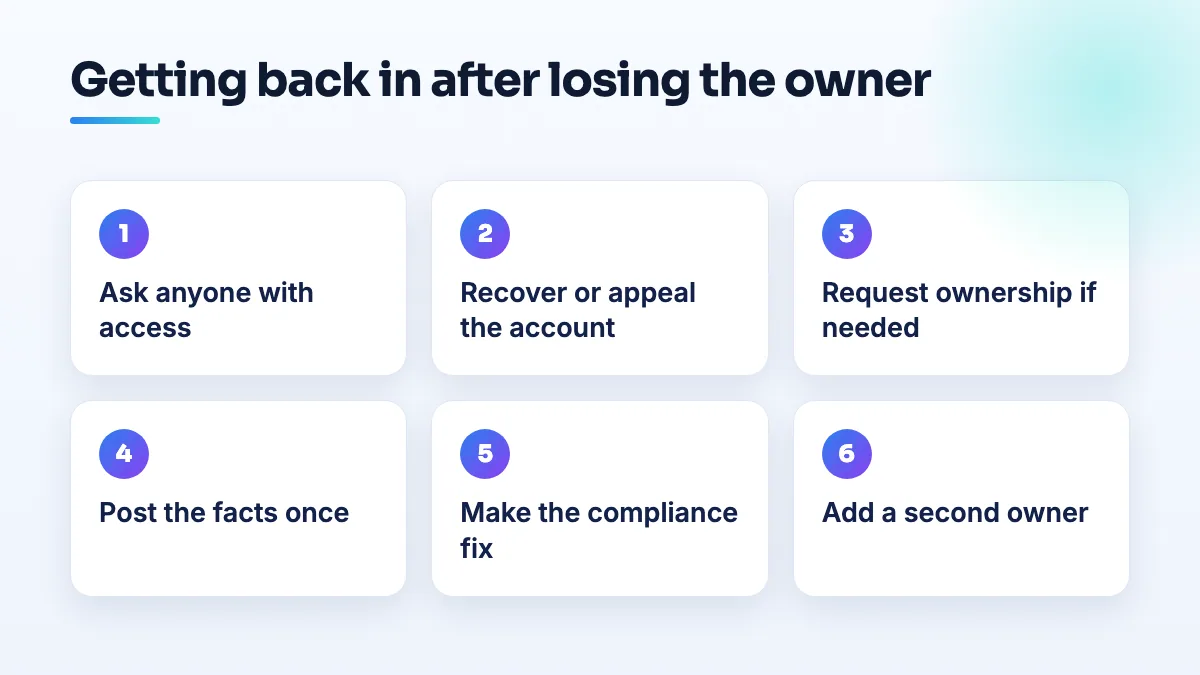
How to get your profile back, step by step
- Ask everyone who might still have access. Co-owners, a business partner, your office manager, your current or old marketing agency. If any active owner is still on the profile, they can add a new owner account for you. That's by far the fastest route, so rule it out before you file anything.
- If the account was deleted, try to recover it first. Use Google's account recovery from a phone or computer you've signed in on before. Google can restore some recently deleted accounts, and a restored owner account is cleaner than any workaround. If recovery fails, write down the date and the message you got.
- If the account is restricted, gather your evidence before you open the appeal. Business registration, trade license, a utility bill or lease in the business name at the address on the profile, photos of your signage or your vehicle and equipment. Put it all in one folder. With a 60-minute upload window, you don't want to be searching your email for a license while the clock runs.
- Appeal the account restriction on its own. Don't send a profile reinstatement request at the same time. A profile appeal filed while the account is restricted gets rejected, and each rejection makes the next attempt harder. I explain what Google looks for once the account is clear in the post on why a Google Business Profile gets suspended.
- If the account can't come back, request ownership from a new one. Create a Google account on your business email domain and use Google's ownership request process. Google's help page says the current owner is emailed and has 3 days to respond. When the owner account no longer exists there's nobody to approve it, so keep a screenshot of the request and its status for the next step.
- Post once in the Help Community with the facts. Your business name and address, whether the owner account was deleted or restricted and when, every case ID, and what you've already tried. Product Experts can't restore accounts, but they can escalate a case that's clearly stuck. Keep it to one thread and update it, so whoever picks it up sees the whole history in one place.
- The moment you're back in, make the compliance fix. Hide your home address if customers don't come to it, cut the service area to where you really drive, and put your real registered name on the profile. Then appeal the profile, not before.
Stop it happening again: add a second owner
Every case above had one thing in common: one Google account stood between the business and its listing. This is the setup I put on every profile we manage.
- A business-owned account as primary owner. Create it on your company domain (something like admin@ your domain), keep the password in the company's password manager, and make it the primary owner. It shouldn't be anyone's personal Gmail.
- At least one more owner. You personally, or a partner. If one account is ever restricted or deleted, the other can still get in and act.
- Agencies and staff as managers, not owners. A manager can do the day-to-day work but can't remove owners. If your agency's own account gets restricted, your ownership isn't tied to it.
- 2-step verification and current recovery details on every owner account. A lost phone or an old recovery email is how a lot of owners get locked out of accounts they still legitimately own.
- Check before anyone deletes a Google account. When staff leave or you tidy up old logins, look at what that account owns first.
Then put a date in your calendar to look at the owners list every few months. I walk through that in the Google Business Profile ownership audit. If someone outside the business holds your profile and won't hand it back, Google's policy for authorized representatives says they must transfer ownership to the business owner immediately on request, and failing to can get the profile or their Google account suspended.
What's different for HVAC companies, cleaners and storefronts
HVAC and other trades tend to hit this during or right after verification, which is when Google looks hardest at the account as well as the profile. If you're verifying or re-verifying, sort out ownership first. It's one of the first checks in any HVAC SEO project I take on.
Home-based cleaners get the cruelest version: the most common cause of their suspension is a visible home address, and the restriction blocks the one edit that hides it. If you run a cleaning business from home, hide the address before anything else goes wrong, not after. I cover the rest of the setup in cleaning business SEO.
Boutiques and other storefronts assume a real shop with a real sign is safe. The boutique case shows it isn't when the account is the problem. The fix is the same: two owners, one of them a business account, and your documents kept where you can find them. I apply the same rule in boutique SEO work.
What not to do
- Don't create a new profile to replace the old one. It starts with no reviews, and if the old one comes back you have two listings at one address to untangle.
- Don't keep refiling the same appeal. Appeals rejected within minutes are the system telling you the account problem is still there.
- Don't open a string of new Google accounts to appeal from. One new business account for an ownership request is fine. Five looks like the behavior the restriction exists to stop.
- Don't pay anyone who claims a contact inside Google. Product Experts in the Help Community are volunteers and help for free; nobody can buy a restriction off your account.
Where to start
If you're locked out right now, work the steps in order and keep every case ID. If you're not locked out, the second owner takes five minutes and is the cheapest insurance you'll ever buy. Setting up ownership properly is the first job in our Google Business Profile management, before any ranking work starts.
Written by Saifur Rifat, Founder & SEO Lead at SERP Squad.